.png)
Welcome to this technology overview of block storage in Windows. This will be a multi-part deep dive blog, going into detail about relevant concepts and technologies underlying block storage in Windows.
Part 1: some basic concepts…
There are some basic concepts regarding disk storage for any operating system including Windows and Linux. In this blog, we’ll define and detail the different relevant concepts necessary to understand and explain it.
Disk
A disk is a physical storage device—such as an HDD or SSD—used by the operating system to store data persistently. It provides block-level access, allowing the OS to read and write fixed-size units of data. Disks serve as the primary medium for system files, applications, and user data.
A sector is the smallest addressable storage unit on a disk that the operating system can read or write at once. Disks are divided into sequential sectors, each identified by a numeric address.
Historically, a sector typically stores 512 bytes, but some modern disks increasingly use 4,096-byte (4 KB) sectors for improved efficiency.
Partition
A partition is a logical division of a physical disk. It separates the disk into independent sections, each with its own structure and management. Partitions allow multiple operating systems, data isolation, or different storage configurations to coexist on the same physical device.
A partition is a contiguous block of sectors on a single physical disk. It reserves one continuous range of disk addresses, which is why partition tables (like MBR or GPT) record a start sector and an end sector.
Partition Table
A disk partition table is a data structure stored on a disk that tells the operating system how the disk is divided into partitions. It records details such as:
- The number of partitions
- Each partition’s start and end sector (or size)
- The partition type (e.g., Linux, Windows, EFI system partition)
- Whether a partition is bootable
The partition table is stored in the first few sectors of any partitioned disk. The partition table is read from disk during startup to understand where filesystems and boot loaders are located.
Common partition table formats include:
- MBR (Master Boot Record) — older, supports up to 4 primary partitions and disks up to 2 TB
- GPT (GUID Partition Table) — modern, supports many partitions and very large disks
Volume
A volume is a storage entity created from one or more partitions or disks. The operating system treats a volume as a single logical storage unit to host a filesystem.
The simplest and most common is to use one single partition for a volume. In Windows, this kind of volume is called “basic” or “simple”. But volumes can also span multiple disks, depending on the storage architecture (e.g., RAID, LVM).
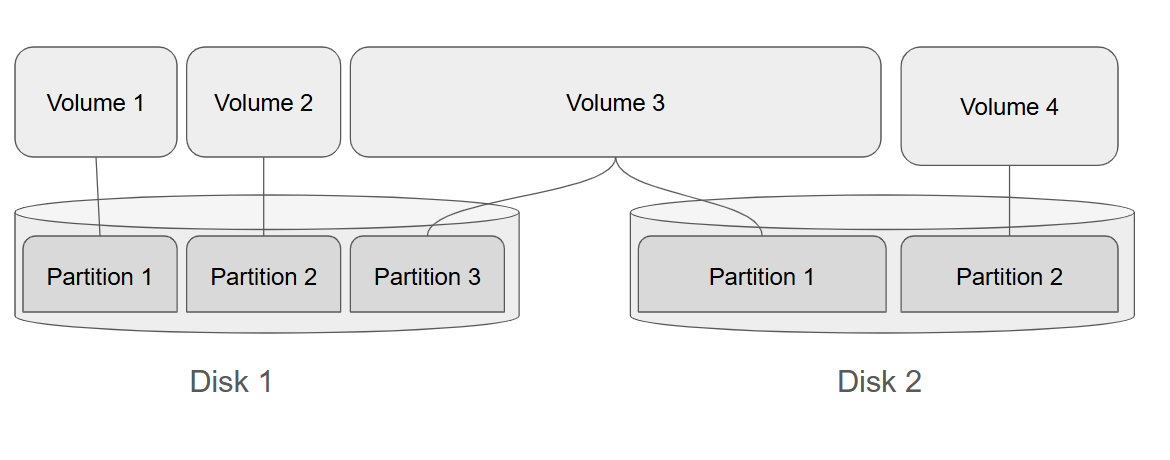
Figure 1. A sample scheme featuring 2 disks, with 3 and 2 partitions respectively. Some of the volumes are simple and map 1-to-1 to partitions while one of the volumes spans over 2 partitions on both of the drives.
Filesystem
A filesystem is stored within a volume. A filesystem defines how data is organized, stored, retrieved, and managed on a volume. It provides structures like directories, filenames, metadata, and access permissions. Common examples include NTFS, ext4, APFS, and FAT32.
Operating systems usually provide an interface to access a filesystem on a volume by a mount point, or in Windows, assigned drive letter. The process which is performed by the operating system to recognize and read filesystems from a volume is called “mounting”. Only a single filesystem can be mounted to a volume at a time.
Different filesystems exist because different operating systems have different priorities, performance needs, and hardware considerations, so no single filesystem fits all use cases.
Some operating systems or companies own and control the filesystem technology, restricting its use or development outside their ecosystem. That is why some filesystems are native to some operating systems, and available out-of-box, while others are unavailable, or available only as 3rd party modules, often featuring limited functionality compared to their native counterparts.
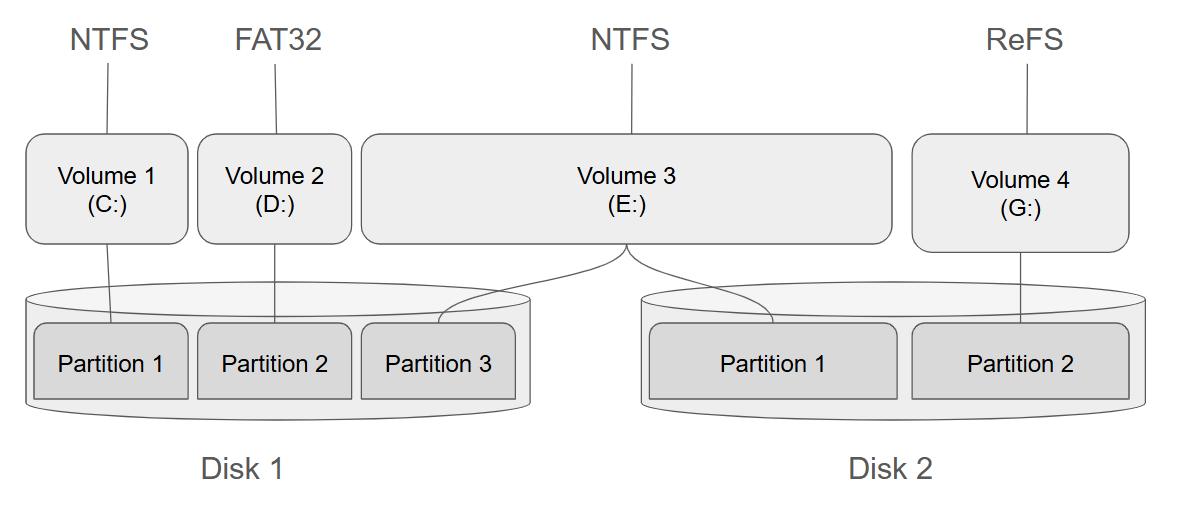
Figure 2. A sample scheme from Figure 1 featuring Windows drive letters assigned to volumes, and filesystems mounted.
RAID
RAID is a technique that combines multiple physical disks into a single logical disk unit to improve performance, reliability, or both. Instead of using a single disk, the OS or RAID controller manages several disks as a unified system. RAID is implemented by a storage hardware controller, or software driver specific to an OS.
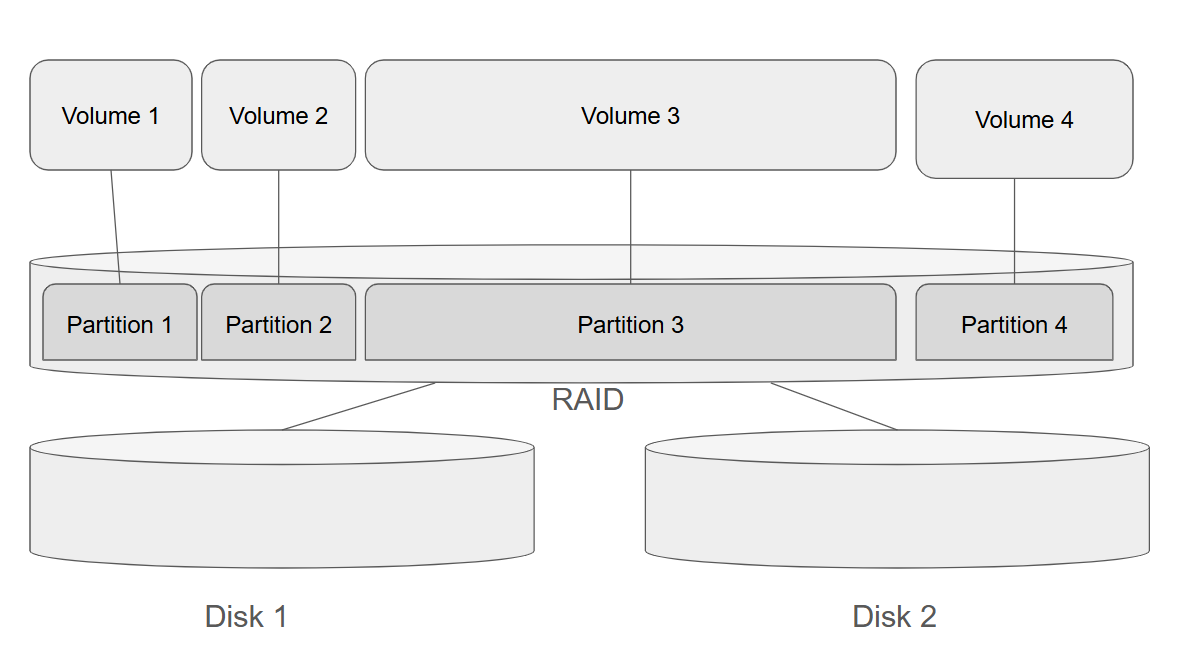
Figure 3. A sample scheme from Figure 1 but using RAID technology to pool 2 disks in a single RAID disk.
Coming up next in part two
That covers the key basic concepts necessary to understand block storage in Windows. In the next entry of this blog, we’ll cover Windows technologies that enable and support block storage, taking a look at their history, design, and key features and functionality.
Table of Contents
Sign Up