Last updated: May, 2026
Azure Disk pricing outlines the costs associated with using managed disk storage services in Microsoft Azure. Pricing varies by disk type (Standard HDD, Standard SSD, Premium SSD), size, and the Azure region.
Customers are billed for the provisioned size of the disk, and additional charges apply for operations like reads and writes. Understanding these costs is essential for planning and optimizing storage configurations in Azure.
What is Azure Disk Storage?
Azure Disk Storage is like having a supercharged hard drive for your cloud-based VMs. It's designed by Microsoft Azure to give you high-performance, durable storage that sticks around even if your VM doesn't. With Azure Disk Storage, you can choose from different types of disks based on your needs – whether you need something fast for high-speed data processing or something robust for large, important applications.
One of the best parts? Azure Managed Disks take the hassle out of storage management. They handle the behind-the-scenes work, like provisioning and managing disks, so you can focus on what matters most – your applications and data.
Plus, with features like easy snapshots and backups, you can protect your data and recover it quickly if needed. Whether you're working on a small project or running a huge enterprise application, Azure Disk Storage scales with you, providing a flexible, secure, and high-performing storage solution.
Which Factors Affect Azure Disk Pricing?
Various factors can influence Azure disk pricing. Let's explore these factors in a way that's easy to understand and apply to your specific needs.
1. Disk Type: Azure offers different types of disks, each with its own pricing and performance characteristics:
- Standard HDD: Lowest cost, suitable for non-critical workloads.
- Standard SSD: Balanced cost and performance, good for general use.
- Premium SSD: High performance for IO-intensive applications.
- Ultra Disk: Top-tier performance with the highest cost, ideal for data-intensive workloads.
Tip: Choose the disk type that matches your performance needs to avoid overpaying for unnecessary speed. Moreover, you can use the Azure Pricing Calculator to compare Azure Disk cost for different types based on your workload requirements.
2. Disk Size: Azure offers a range of disk sizes. Here's a quick reference for different Azure Disk Storage sizes:
- Small: 32 GB
- Medium: 512 GB
- Large: 32 TB
Tip: Right-size your disk to avoid paying for unused space. Estimate your storage needs and start small, scaling up as needed.
3. Performance Tier: You can choose different performance tiers within each disk type. For example, Premium SSDs have tiers based on IOPS and throughput.
Higher tiers = Higher cost
Tip: Match the performance tier to your application needs. High IOPS for databases, standard tiers for less demanding tasks.
4. Provisioned Capacity: You pay for the disk size you provision, not just what you use.
Tip: Provision only what you need. Use Azure's monitoring tools to track usage and adjust your capacity accordingly.
5. Redundancy Options: Redundancy increases data availability but also impacts Azure Disk Storage pricing:
- LRS (Locally Redundant Storage): Cheapest, replicates data within a single data center.
- ZRS (Zone Redundant Storage): Higher availability, replicates across multiple zones.
- GRS (Geo-Redundant Storage): Highest durability, replicates to a secondary region.
- RA-GRS (Read-Access GRS): Same as GRS but with read access in the secondary region.
Question to consider: How critical is data availability for your application?
Tip: Choose redundancy based on your availability and durability needs. LRS for cost savings, GRS for critical data.
6. Snapshots and Backup: Creating snapshots can help with data recovery and backup.
Tip: Regularly take snapshots of your important data. Use incremental snapshots to save on storage costs.
7. Transactions and Data Transfers: Azure Disk Costs can increase with the number of transactions (reads/writes) and data transfers, especially between regions.
Tip: Minimize data transfer between regions and optimize read/write operations to control costs.
8. Managed vs. Unmanaged Disks
- Managed Disks: Simplified management, high availability, slightly higher cost.
- Unmanaged Disks: Lower cost but require you to manage storage accounts.
Decision point: Weigh the convenience of managed disks against the potential cost savings of unmanaged disks.
Tip: Use Managed Disks for mission-critical applications to leverage Azure's built-in features.
9. Region: Azure Disk Pricing varies by region due to differences in infrastructure costs.
Tip: Compare Azure Disk Storage pricing across regions. Sometimes, deploying in a nearby region can save costs without compromising performance.
10. Reserved Capacity: Commit to a one- or three-year term to get discounted rates.
Tip: If you have predictable workloads, use reserved capacity to save significantly.
Focusing on these factors can help you make smarter choices about your Azure disk usage and keep Azure disk costs under control. Azure also provides cost management tools and calculators to help you estimate and monitor your expenses based on your specific requirements.

Azure Disk Pricing Plans
Azure Disk Storage provides various disk options for different performance and cost needs. Below, we detail the Azure Disk pricing plans for each type of disk, including tables and comprehensive explanations.
Premium SSD Managed Disks Pricing
Azure Premium SSD Managed Disks are high-performance storage options that support I/O-intensive workloads with low latency and high throughput. They are ideal for critical applications like databases and large-scale enterprise solutions. Below is a detailed breakdown of these disks' pricing, features, and additional considerations.
1. Premium SSD Overview
Azure Premium SSDs offer the following key benefits:
- High Performance: Supports intensive workloads with high input/output operations per second (IOPS) and throughput.
- Low Latency: Ensures quick data access for critical applications.
- Scalability: Suitable for various applications from small to large-scale enterprise solutions.
2. Snapshots
Snapshots provide a backup mechanism for your Premium SSDs, which is useful for data protection and disaster recovery.
Types of Snapshots
- Locally Redundant Storage (LRS): Stores three copies of your data within a single region.
- Zone-Redundant Storage (ZRS): Stores three copies of your data across multiple availability zones within a region.
Cost Considerations
- Snapshots are billed based on the amount of data used, not the provisioned size of the disk.
- They help quickly restore data in case of failures or create new disks based on the snapshot.
3. Bursting
Bursting capabilities allow disks to handle temporary spikes in workload by providing higher IOPS and throughput for short durations.
Key Points
- Automatic: Enabled by default for all Premium SSDs at no extra cost.
- Temporary Boost: Provides a performance increase during peak times without permanent upgrades.
4. Reservation
Azure offers discounted pricing for Premium SSDs through one-year or three-year reserved capacity.
Benefits
- Cost Savings: Significant discounts compared to pay-as-you-go pricing.
- Flexible Terms: Available in increments of one GiB.
5. Pricing Table
Pricing depends on your needed redundancy and region. The following table outlines the pricing and performance characteristics of various sizes of Premium SSD Managed Disks for LRS redundancy in East US:

Example: P1 Azure Disk Pricing Calculation
P1 Disk (4 GiB)
Monthly Price: $0.60
Performance
- Max IOPS: 120, up to 3,500 with bursting.
- Max Throughput: 25 MB/s, up to 170 MB/s with bursting.
Shared Disk Cost: An additional $0.03 per month if used as a shared disk.
Additional Considerations
- Performance Tiers: Higher disk sizes offer more IOPS and throughput.
- Bursting Capability: Allows for handling unexpected spikes in workload without a permanent upgrade.
- Snapshot Billing: Only charged for the data used, not the allocated size.
- Shared Disk Use: Additional costs apply if the disk is used in a shared environment.
- Reserved Pricing: Substantial savings if you commit to a one-year or three-year plan.
Azure Premium SSD Managed Disks provide flexible, high-performance storage options ideal for critical applications. Understanding the pricing and features, including snapshot options, bursting capabilities, and reservation discounts, can help optimize your Azure storage costs and performance.
Pricing Plan for Premium SSD v2
Azure Disk Storage pricing for Premium SSD v2 is calculated based on three main components: Disk Capacity, Provisioned IOPS, and Provisioned Throughput. Each component has its own cost structure and is billed separately. Here's a detailed breakdown of the pricing plan:
1. Disk Capacity
Disk capacity is billed based on the size of the disk you provision. This cost is straightforward and is calculated on a per GiB basis.

2. Provisioned IOPS
IOPS (Input/Output Operations Per Second) is a measure of how many input/output operations a storage system can handle per second. With Premium SSD v2, you can provision IOPS independently of disk capacity. The cost structure for IOPS is divided into two tiers:
- Up to 3,000 IOPS: Included at no additional cost.
- Over 3,000 IOPS: Charged per provisioned IOPS.

3. Provisioned Throughput
Throughput refers to the amount of data that can be read from or written to storage per second. Similar to IOPS, throughput can also be provisioned independently, and the pricing is tiered:
- Up to 125 MB/s: Included at no additional cost.
- Over 125 MB/s: Charged per provisioned MB/s.

Snapshot Pricing
Snapshots capture the state of a disk at a specific point in time and are stored in standard storage. They are billed based on the amount of data that has changed since the last snapshot (delta changes).
Snapshot Price: $0.05 per GB per month.
Billing Example:
For a managed disk of 128 GB with 10 GB used:
- First Snapshot: Billed for 10 GB.
- Second Snapshot: If an additional 20 GB is added, the second snapshot is billed for that amount only.
Azure Disk pricing plan for Premium SSD v2 includes separate charges for disk capacity, provisioned IOPS, and provisioned throughput. Additionally, snapshots are billed based on the changes since the last snapshot. This allows for a highly customizable and scalable storage solution suited to various performance requirements.
For more details, refer to:
- Premium SSD v2 Documentation: Azure Premium SSD v2 Documentation
- Azure Storage Replication: Azure Storage Replication Documentation
Pricing Plan for Standard SSD
Azure Disk pricing for Standard SSD is structured based on disk capacity, with additional costs related to snapshots. This plan is designed for less performance-critical applications compared to Premium SSD. The following sections detail the pricing structure, including per-month and per-hour costs, maximum allowed IOPS and throughput, and additional snapshot pricing.
1. Disk Capacity Pricing
Standard SSDs are priced based on the size of the disk you provision. The cost structure for each disk size is detailed below:

Explanation of the parameters
- Disk Size: The disk size measures in GiB (Gibibytes) or TiB (Tebibytes). This represents the provisioned storage capacity.
- Price per Month: The cost of the disk per month. This is a fixed monthly charge based on the provisioned disk size.
- Price per Hour: The cost of the disk per hour. This is a pro-rated hourly charge based on the provisioned disk size.
- Max Paid Transactions per Hour: The maximum number of paid transactions allowed per hour. Transactions include input/output operations.
- Max Transaction Price per Month: The maximum cost associated with monthly paid transactions. This ensures you won't be charged beyond this limit for transactions.
- Max Transaction Price per Hour: The maximum cost associated with paid transactions per hour. This ensures you won't be charged beyond this limit for transactions.
- Max Throughput (Burst): The maximum data transfer rate (in MiB/s) during burst conditions, allowing for short-term performance boosts.
- Price per Provisioned GiB: The cost per GiB of provisioned disk size. This helps understand the unit cost of the disk capacity.
2. Snapshot Pricing
Snapshots are used to capture the state of your Standard SSD disks. The pricing for snapshots is based on the storage occupied by the delta changes since the last snapshot. You can choose between Locally Redundant Storage (LRS) and Zone-redundant Storage (ZRS).
- Snapshot Price: $0.05 per GB per month.
- Snapshot Type: Available for both Standard LRS and ZRS.
Snapshot Billing Example:
- Scenario: Using a managed disk with a provisioned size of 128 GB and a used size of 10 GB.
- First Snapshot: Billed for 10 GB.
- Second Snapshot: If an additional 20 GB is added, the second snapshot is billed for the additional 20 GB.
3. Bursting
Bursting capability is enabled by default for Standard SSDs, providing additional performance when required without extra cost. This feature allows you to exceed the maximum throughput and IOPS for short periods to handle sudden increases in load.
- Burst IOPS and Throughput: Up to 3,500 IOPS and 170 MB/s for up to 30 minutes.
- Unburst Performance: Defined per disk size in the table above.
The pricing for Azure Standard SSD includes costs based on disk size, snapshot storage, and burst capabilities. Each disk size has a fixed price per GiB, and additional charges apply for snapshots based on the data changes since the last snapshot. Bursting allows temporary performance increases without extra costs, ensuring flexibility for varying workloads.
For more details, visit the Azure Standard SSD Documentation.
Pricing Plan for Standard HDDs
Standard HDDs (Hard Disk Drives) are designed for applications and workloads that are not sensitive to performance variability. These disks are optimal for dev/test scenarios and infrequent access workloads where lower cost and higher capacity are the primary concerns.
- Technology: HDD (Hard Disk Drive)
- Use Case: Dev/test environments, infrequent access workloads
- Redundancy Options: Only Locally Redundant Storage (LRS) is supported.
1. Pricing Details
The Azure Disk Storage pricing for Standard HDDs depends on several factors, including disk size, number of disks, number of transactions, and outbound data transfers.
Note: All costs are measured per month and per hour to facilitate easy calculation and planning.
2. Snapshot Costs
Snapshots of Standard HDDs are charged based on the portion of disk used.
- Full Snapshots: $0.05 per GB per month for both LRS and ZRS snapshot options.
- Incremental Snapshots: $0.05 per GB per month for both LRS and ZRS, based on the data changes since the last snapshot.
Example for Full Snapshots
If you create a snapshot of a managed disk with 64 GB provisioned and 10 GB used, you will be charged for 10 GB.
Example for Incremental Snapshots
For a 128 GB provisioned disk with 100 GB used, adding 20 GB of new data before the next snapshot will result in billing for 20 GB of incremental data.
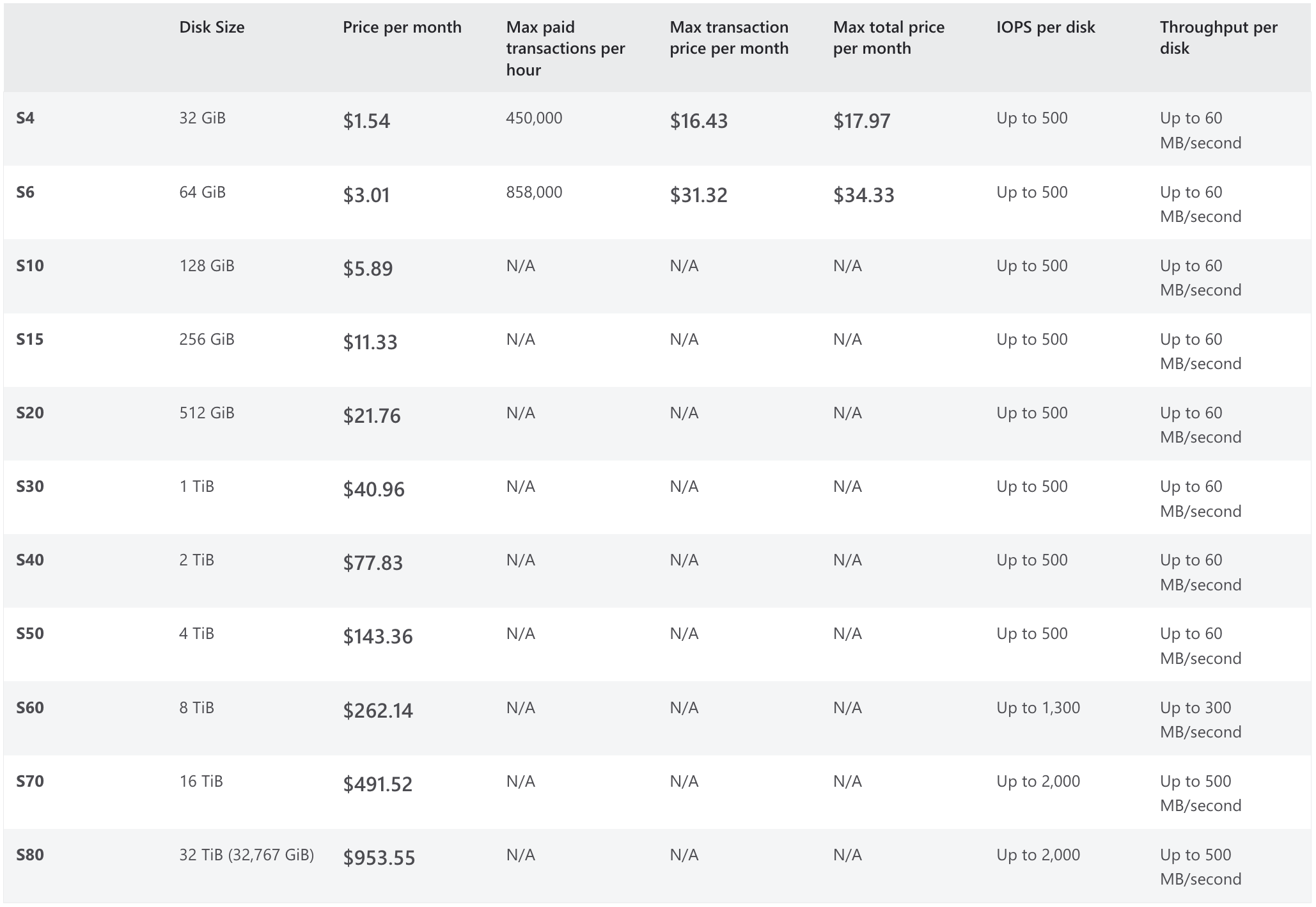
3. Standard HDD Pricing Table
The table below outlines the pricing structure based on disk size, monthly and hourly cost, IOPS (Input/Output Operations Per Second), and throughput.
Explanation of Table Columns
- Disk Size: Indicates the available storage capacity options.
- Price per Month: Monthly cost associated with each disk size.
- IOPS per Disk: Maximum number of IOPS the disk can handle.
- Throughput per Disk: The disk can sustain the maximum data transfer rate (in MB/second).
3. Additional Costs
In addition to the storage and snapshot costs, there are transaction costs for Standard HDDs:
- Transactions: $0.0005 per 10,000 transactions. This includes operations such as reads, writes, and deletes.
Standard HDDs offer a cost-effective storage solution for less performance-sensitive workloads. The pricing model is straightforward with predictable costs based on disk size and incremental snapshot charges. Users can efficiently manage their storage expenditures by understanding the snapshot and transaction costs.
This detailed breakdown ensures clarity in selecting and budgeting for Standard HDD storage, aligning costs with specific workload requirements.
Pricing Plan for Ultra Disks
Ultra Disks are Azure's high-performance Solid-State Drives (SSDs) optimized for applications demanding the lowest latency and high IOPS/throughput. Ultra Disks support highly scalable performance with sub-millisecond latency, making them ideal for intensive workloads.
- Technology: High-performance SSD
- Use Case: Intensive workloads requiring high IOPS/throughput with low latency.
- Redundancy Options: Only Locally Redundant Storage (LRS) is supported.
1. Pricing Structure
The pricing for Ultra Disks is based on four key components: Disk Capacity, Provisioned IOPS, Provisioned Throughput, and Provisioned vCPU Reservation. Each is billed hourly and monthly to provide cost flexibility.
Pricing Table

- Disk Capacity: Cost per GiB of storage.
- Provisioned IOPS: Cost per IOPS provisioned.
- Provisioned Throughput: Cost per MB/s of throughput.
- Provisioned vCPU Reservation Charge: This is a cost per vCPU, and it is only charged if Ultra Disk compatibility is enabled on a VM without attaching an Ultra Disk.
Note: The monthly price is derived from the hourly price, assuming a 730-hour month
2. Billing Details
Ultra Disks are billed based on the provisioned size, provisioned IOPS, and provisioned throughput. Azure maps the provisioned size (rounded up) to the nearest disk size offered.
- Provisioned Size: If a 200 GiB Ultra Disk with 20,000 IOPS and 1,000 MB/s throughput is provisioned and deleted after 20 hours, billing is based on the nearest size offer. In this case, it would map to a 256 GiB disk size, with 20,000 IOPS and 1,000 MB/s for 20 hours.
Usage Example: The billing will reflect the provisioned values regardless of the actual data amount or number of I/Os written.
Shared Disk Costs: There is no additional charge for shared Ultra Disks. Charges apply for the capacity, total IOPS, and throughput provisioned.
3. Snapshot Costs
Snapshots for Ultra Disks are charged as follows:
- Full Snapshots: $0.05 per GB per month for both LRS and ZRS options, based on the used portion of the disk.
- Incremental Snapshots: $0.05 per GB per month for both LRS and ZRS, based on the data changes since the last snapshot.
Snapshot Example:
- For a 128 GB provisioned disk with 10 GB used, the first snapshot charge is based on 10 GB.
- For incremental snapshots, if 20 GB is added before the second snapshot, the billing reflects 20 GB.
Ultra Disks provide a scalable, high-performance storage solution with predictable costs. The pricing model includes hourly and monthly rates for disk capacity, IOPS, throughput, and vCPU reservations. With comprehensive snapshot options and no additional charges for shared disks, Ultra Disks are designed for applications that demand the highest performance and flexibility in cost management.
Note: Pricing varies by region; therefore, if you want access to a region—and redundancy-specific pricing plan, you can visit Microsoft's official pricing page.
How Lucidity Helps In Optimizing Azure Disk Spend
Storage is critical to every cloud infrastructure, including your Azure environment. However, despite its importance in cloud cost optimization, storage is often overlooked.
As seen in the State of Cloud Storage and AI Workloads, 2026, storage is woefully underutilized and full of waste, with average disk utilization sitting at only 30%. With block storage making up 5-45% of cloud bills, this is a major source of waste.
Understanding these trends, it's clear that optimizing your storage resources is crucial to reducing inflated cloud bills.
One tool that can help with Azure autoscaling is Lucidity, designed to address the following pain points of cloud infrastructure management.
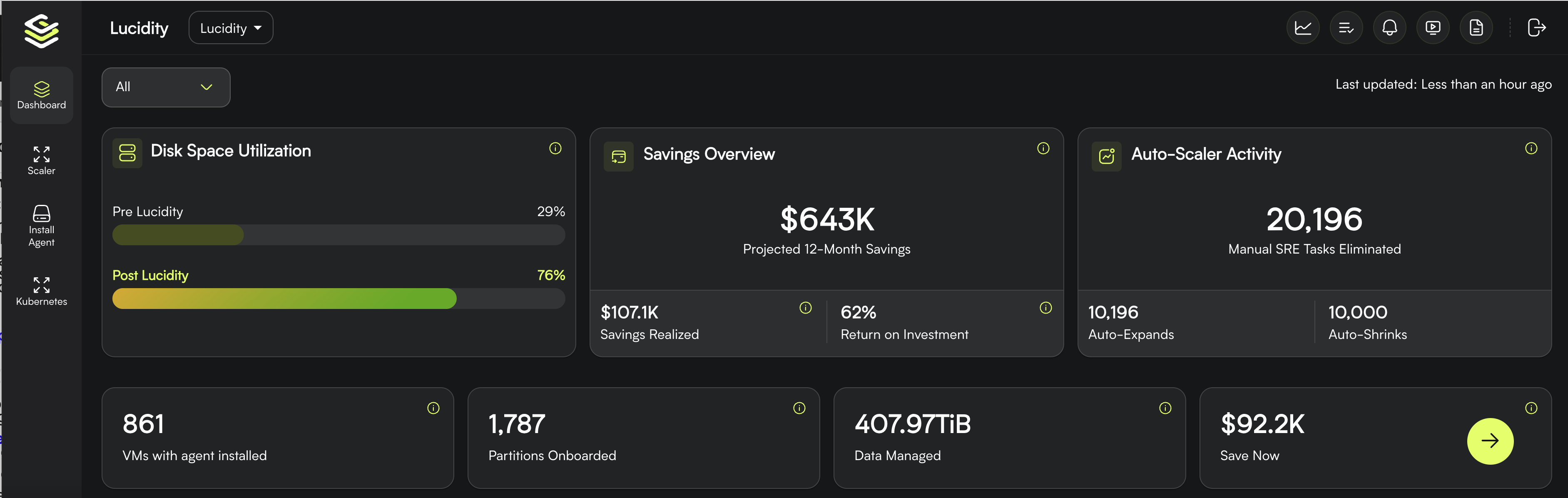
- Overprovisioning and wasted costs: Overprovisioning and inefficient cloud storage management can lead to significant wasted costs for companies. Many organizations overprovision storage out of fear of performance issues, downtime, and uncertain capacity preditctability. resulting in unused capacities and inflated cloud bills. Conversely, underprovisioning can lead to downtime and operational disruptions, adding unnecessary expenses.
- Inefficient Management: Did you know that manually scaling up or down storage resources in a multi-cloud environment can be time-consuming and complex? This impacts user experience and workload deliveries and demands additional efforts from DevOps teams.
Lucidity offers three solutions tailored for block storage optimization: Lucidity Assessment, AutoScaler, and Lumen.
Lucidity Assessment
Effective storage optimization starts with visibility. Lucidity offers a free, self-serve Assessment that scans your cloud environment metadata and quantifies exactly how much you are spending on block storage versus how much you actually need.
Assessment surfaces three critical insights:
- Overall disk spend optimization: A clear view of your current block storage costs and the specific savings available, typically 40 to 70% of current spend.
- Disk wastage analysis: Identification of over-provisioned volumes, idle disks, and orphaned storage that is generating cost with zero utilization.
- Downtime risk assessment: Visibility into volumes at risk of filling up, so you can address potential incidents proactively rather than reactively.
Because the Assessment is agentless and read-only, there is no risk to your environment and you can get started self-serve. The output gives you a quantified savings opportunity you can take directly to your CFO or FinOps lead.
If you know some facts about your environment up front, you can check out the Lucidity ROI Calculator to get a high-level estimate of potential savings before taking any other action.
Lucidity AutoScaler
Once you have visibility into the waste, AutoScaler handles the fix. Lucidity AutoScaler is the first platform to deliver autonomous block storage right-sizing, continuously shrinking and expanding disk volumes based on actual utilization, with zero downtime.
No major cloud provider offers native live disk shrinking, and no general FinOps platform automates it. Lucidity fills that gap.
What AutoScaler delivers:
- Auto-shrink and auto-expand without downtime or infrastructure changes: Disks scale dynamically based on real utilization patterns. No manual intervention, no instance termination, no snapshot-and-remount workarounds.
- 40 to 70% reduction in block storage costs: By eliminating over-provisioning continuously (not as a one-time project), savings compound as your environment grows.
- Zero unplanned downtime: Across Lucidity's entire customer base, including a global airline managing 8,000+ automated tasks and a large national retailer, there have been zero P1 or P2 disk-related incidents post-deployment.
- Zero Downtime Assurance: Manual provisioning processes often involve downtime risks. Lucidity Block Storage Auto-Scaler eliminates this concern by automatically adjusting resources based on changing requirements, ensuring a seamless experience without room for downtime.
- Customizable policies: Define target utilization, maximum disk sizes, and buffer thresholds. AutoScaler executes within those guardrails automatically.
Lucidity Lumen
For Azure environments, Lumen adds a second layer of savings and storage optimization potential through one-click disk tiering and idle disk cleanup. Lumen is the visibility, recommendations, and actions engine for cloud storage. For any set of optimization efforts where fully autonomous work is not the right approach, Lumen steps in to bring new visibility, evidence-based recommendations, and one-click actions to cloud teams.
One Lucidity customer in the recruiting and staffing space saw 97% of their disks moved to the optimal tier through Lumen, unlocking additional cost reductions on top of the right-sizing savings from AutoScaler.
If deciphering the reasons behind a soaring cloud bill proves challenging, your cloud storage might be the culprit. Schedule a personalized Lucidity demo to see how you could uncover a new vector of cloud savings.
Choose The Right Azure Disk & Take Control Of Your Cloud Costs
In conclusion, understanding Azure Disk pricing models and implementing effective cost optimization strategies are crucial steps in managing your cloud costs. With a variety of disk options available, each tailored to different performance and budgetary needs, Azure allows you to make choices that best suit your specific requirements.
By gaining insight into pricing details and utilizing strategies like choosing the right disk size and type, you can maximize cost savings while ensuring efficient resource utilization in your Azure environment.
Continuous monitoring and adjustment of your disk configurations will help maintain cost-effectiveness over time. Feel free to ask if you have any questions or need further assistance on Azure Disk pricing or optimizing your cloud costs.
Frequently Asked Questions
Q1. How is Azure Disk pricing calculated in 2026?
Azure Managed Disk pricing is calculated per disk on three components: provisioned capacity ($/GB-month), provisioned performance (IOPS and throughput for Premium SSD v2 and Ultra Disks), and transaction charges on Standard SSD and Standard HDD. You pay for what you provision, not what you use, which is where most overprovisioning waste hides.
Q2. Which Azure Disk tier is the most cost-effective?
For most steady-state workloads, Standard SSD offers the best balance of cost and performance. Premium SSD v2 is the most cost-effective choice when you need high IOPS because you pay for performance independently of capacity. Ultra Disk is worth the premium only for mission-critical, latency-sensitive databases.
Q3. What is the difference between Premium SSD and Premium SSD v2 pricing?
Premium SSD prices by disk size tier (P1 through P80), bundling capacity and performance. Premium SSD v2 decouples them: you pay per GB-month for capacity and separately for IOPS and throughput above the free baseline. Premium SSD v2 is cheaper for workloads that need high performance but moderate capacity.
Q4. How can I reduce Azure Disk costs without sacrificing performance?
Four strategies cut Azure Disk costs reliably: rightsize overprovisioned volumes, use Premium SSD v2 for performance-heavy workloads, delete orphaned and unattached disks, and apply Reserved Instances to steady-state usage. Lucidity AutoScaler autonomously rightsizes overprovisioned Azure Managed Disks and typically delivers 40 to 70 percent savings without downtime.
Q5. Does Azure charge for snapshots separately from disk costs?
Yes. Azure charges for snapshots based on provisioned capacity and storage redundancy (LRS vs ZRS). Incremental snapshots charge only for changed data, which can reduce costs by 80 percent or more versus full snapshots. Audit your snapshot retention policy; stale snapshots are a common source of silent spend.
Q6. What is the average Azure Disk utilization rate?
Enterprise teams typically use only 30 percent of the block storage they provision. The gap exists because running out of disk causes downtime, so teams overprovision as insurance. That insurance costs 40 to 70 percent more than it needs to.
Q7. Are Azure Reserved Instances available for Managed Disks?
Reserved capacity is available for Premium SSD, offering up to 33 percent savings on one-year and three-year commitments. Reservations apply to specific disk sizes in specific regions, so verify your workload shape is stable before committing.
Q8. How does Azure Disk pricing compare to AWS EBS?
Azure Premium SSD and AWS EBS gp3 land within 10 percent of each other on list price for equivalent capacity and performance. The larger cost driver is almost always utilization, not list price. Teams save more by rightsizing overprovisioned volumes than by switching cloud providers.
Originally published August, 2024
Table of Contents
Sign Up

Ankur Mandal