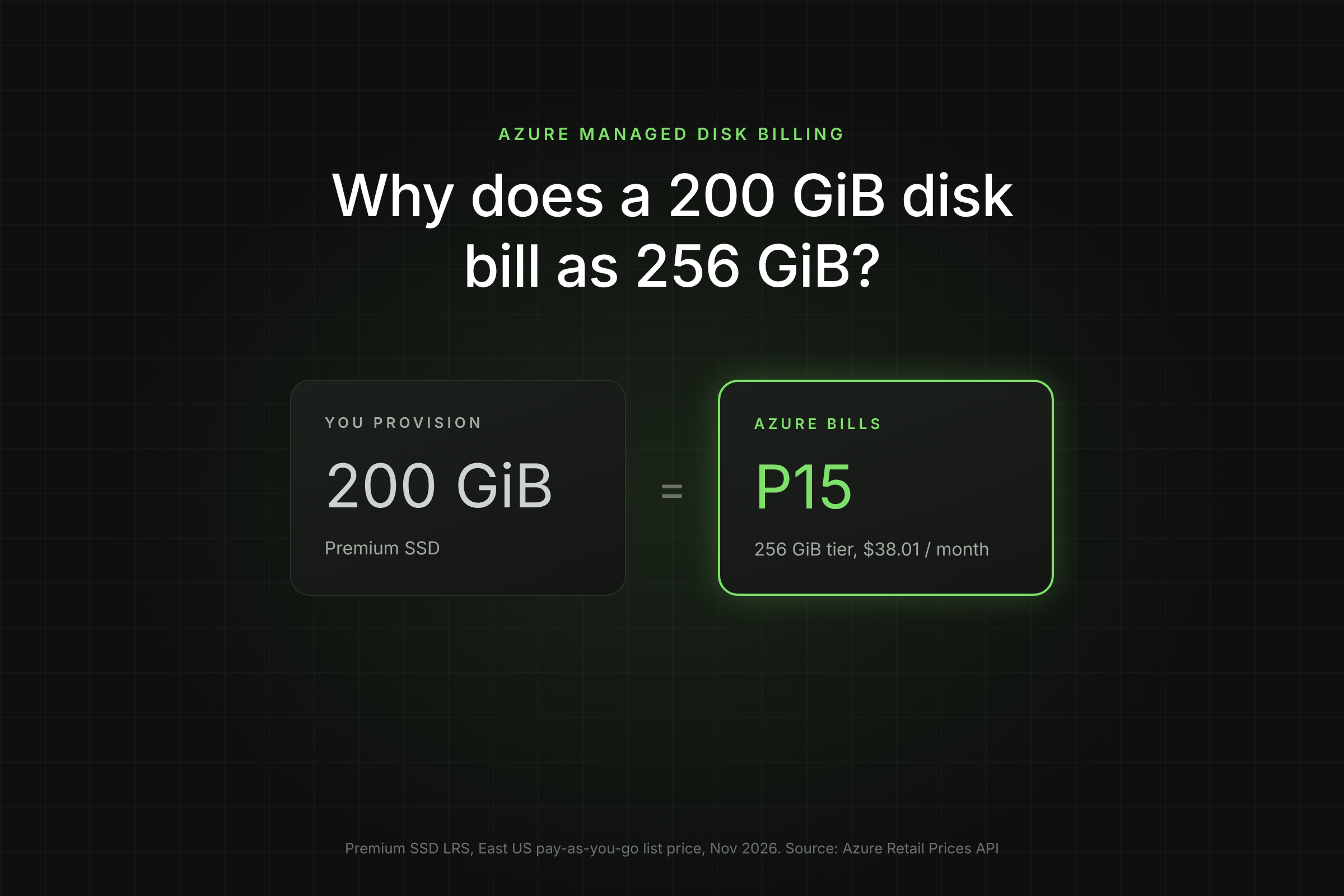
You created a 200 GiB Premium SSD, but the invoice says P15, which is a 256 GiB disk. That is not a billing error. Azure managed disk billing charges Premium SSD, Standard SSD and Standard HDD disks at the fixed size tier their capacity falls into, not per GiB.
Key Takeaways
- A 200 GiB Premium SSD bills as a P15 (256 GiB) at $38.01 a month in East US. You can grow it to 256 GiB for no extra cost.
- Premium SSD v2 bills per GiB: the same 200 GiB costs $16.06 a month with 3,000 IOPS and 125 MB/s included.
- Crossing a tier boundary by 1 GiB can nearly double the bill: 128 GiB is a P10 at $19.71, 129 GiB is a P15 at $38.01.
- Run one Azure Resource Graph query to list every disk whose size sits just above a tier boundary, then fix the worst offenders first.
How does Azure managed disk billing work?
Azure managed disk billing for Premium SSD, Standard SSD and Standard HDD is tier based. Each disk maps to a fixed size tier (P15, E15, S15 and so on), and you pay the flat monthly price of that tier whatever the exact GiB you provisioned.
Microsoft's billing guide gives the rule with examples: a 1 TiB Premium SSD has the P30 tier by default, and a Standard SSD grown from 1 TiB to 3 TiB starts billing at E50 (Microsoft Learn, Understand Azure Disk Storage billing). The tier sets both the price and the performance: a P15 gives 1,100 IOPS and 125 MB/s regardless of whether the disk is 129 GiB or 256 GiB.
Two things follow from this:
- Any GiB between your provisioned size and the top of the tier is already paid for.
- Growing a disk by a few GiB past a boundary moves the whole disk to the next tier price.
Ultra Disk and Premium SSD v2 are the exceptions. They bill per GiB in 1 GiB steps, plus provisioned IOPS and throughput. More on that below.
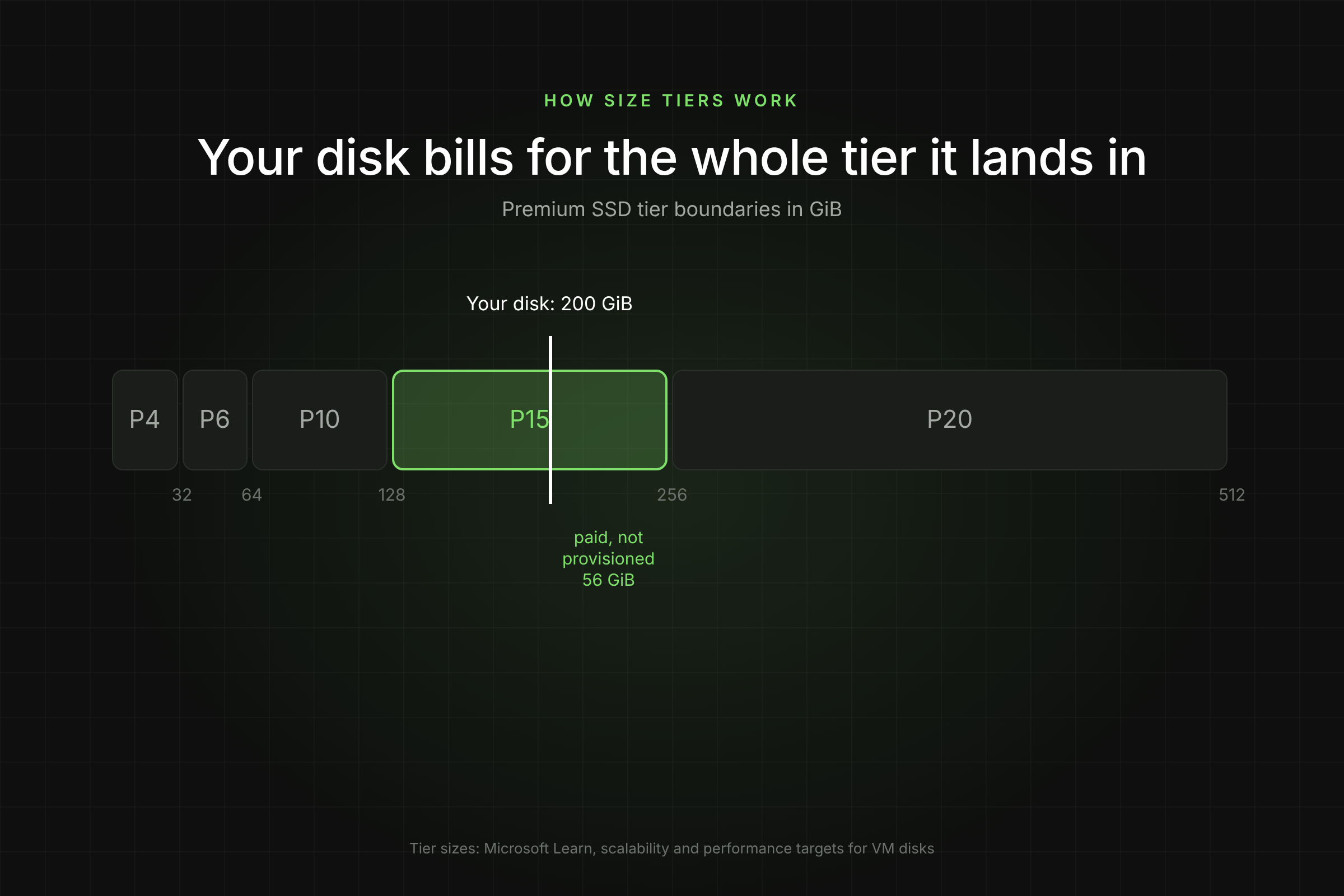
[Visual 1: Diagram of a disk size bar from 0 to 512 GiB with tier boundaries at 32, 64, 128, 256 and 512 GiB, a marker at 200 GiB and the shaded P15 band. Caption: "A 200 GiB disk sits inside the P15 band and bills for the full tier." Alt text: Azure managed disk size tiers showing a 200 GiB disk billed as P15 256 GiB.]
Which size tier does your disk bill at?
Your disk bills at the smallest tier whose size is equal to or larger than the provisioned capacity. The table lists the common Premium SSD and Standard SSD tiers with East US list prices from the Azure Retail Prices API and performance from Microsoft Learn scalability targets.
Standard SSD tiers up to E30 all give 500 IOPS and 100 MB/s, so on Standard SSD the tier only changes capacity and price. On Premium SSD, the tier also sets performance, which is why some teams oversize Premium disks on purpose to get more IOPS.
That workaround is no longer needed. Premium SSD lets you raise the performance tier without resizing and without downtime, for example running a 128 GiB disk at P50 performance (Microsoft Learn, change performance tier). You pay the P50 price while the higher tier is active, then drop back. Downgrades are limited to once every 12 hours.
What does a tier boundary cost you?
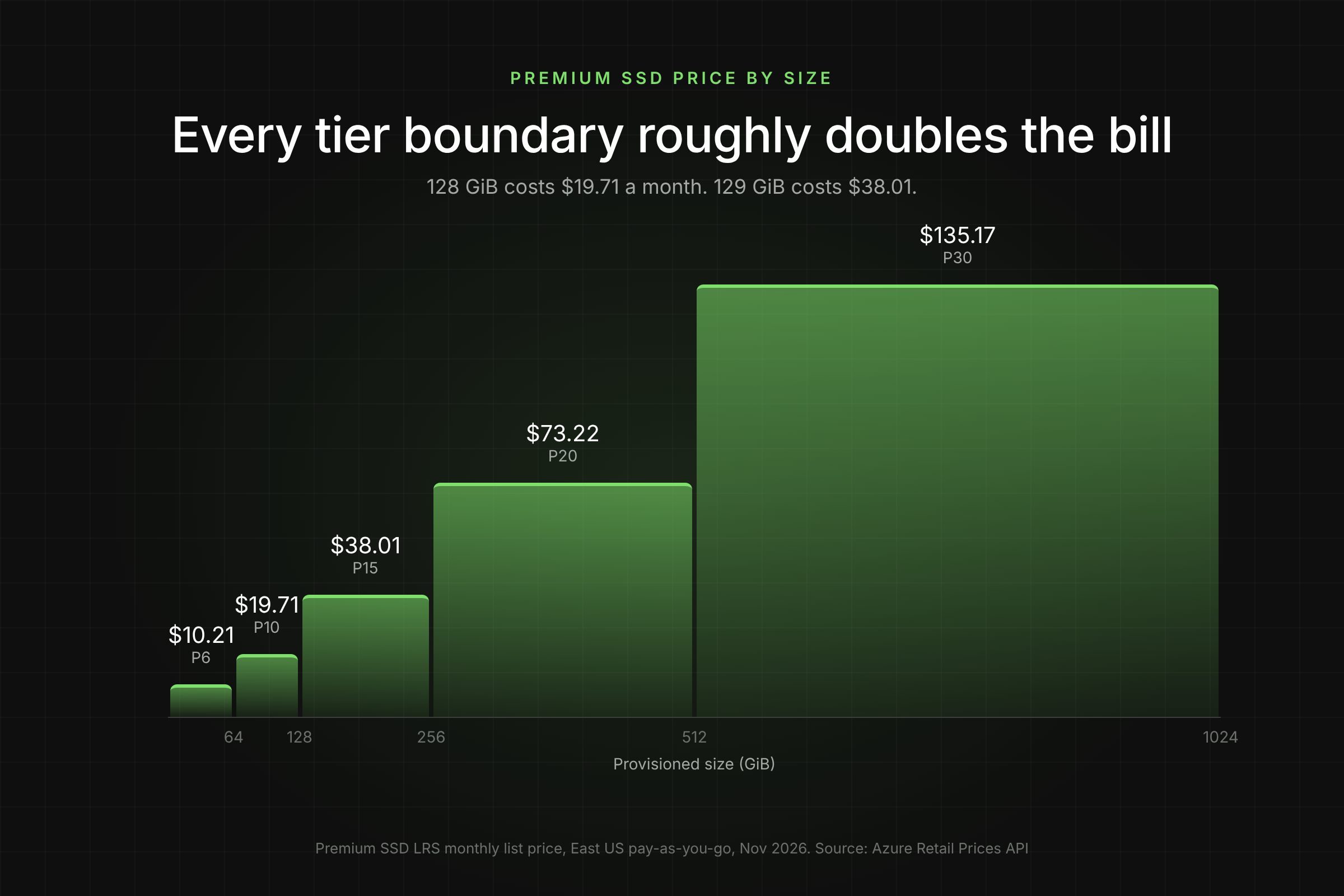
A tier boundary is the point where one extra GiB moves the disk to the next price. On Premium SSD each step roughly doubles the monthly cost, so a disk sized just above a boundary is the most expensive way to buy capacity.
The arithmetic: $38.01 / 129 GiB = $0.295 per GiB, almost double the 0.154perGiBofafull128GiBP10(19.71 / 128). The extra GiB costs $18.30 a month, or $219.60 a year, for one disk.
This pattern shows up in production for predictable reasons:
- Round numbers in templates. Teams type 200, 300 or 600 GiB in Terraform or Bicep. Each is billed as 256, 512 and 1,024 GiB.
- Emergency expansions. An on-call engineer adds 10 percent to a full 128 GiB disk at 3 a.m. It becomes 141 GiB and doubles in price.
- Lift-and-shift sizing. On-premises volumes with odd sizes are copied one to one.
[Visual 2: Step chart of monthly Premium SSD price against provisioned GiB from 0 to 1,024 GiB, with steps at each tier. Caption: "Premium SSD price steps up at every tier boundary." Alt text: Azure Premium SSD monthly price by provisioned size showing price steps at 64, 128, 256, 512 and 1,024 GiB.]
What else shows up on a managed disk bill?
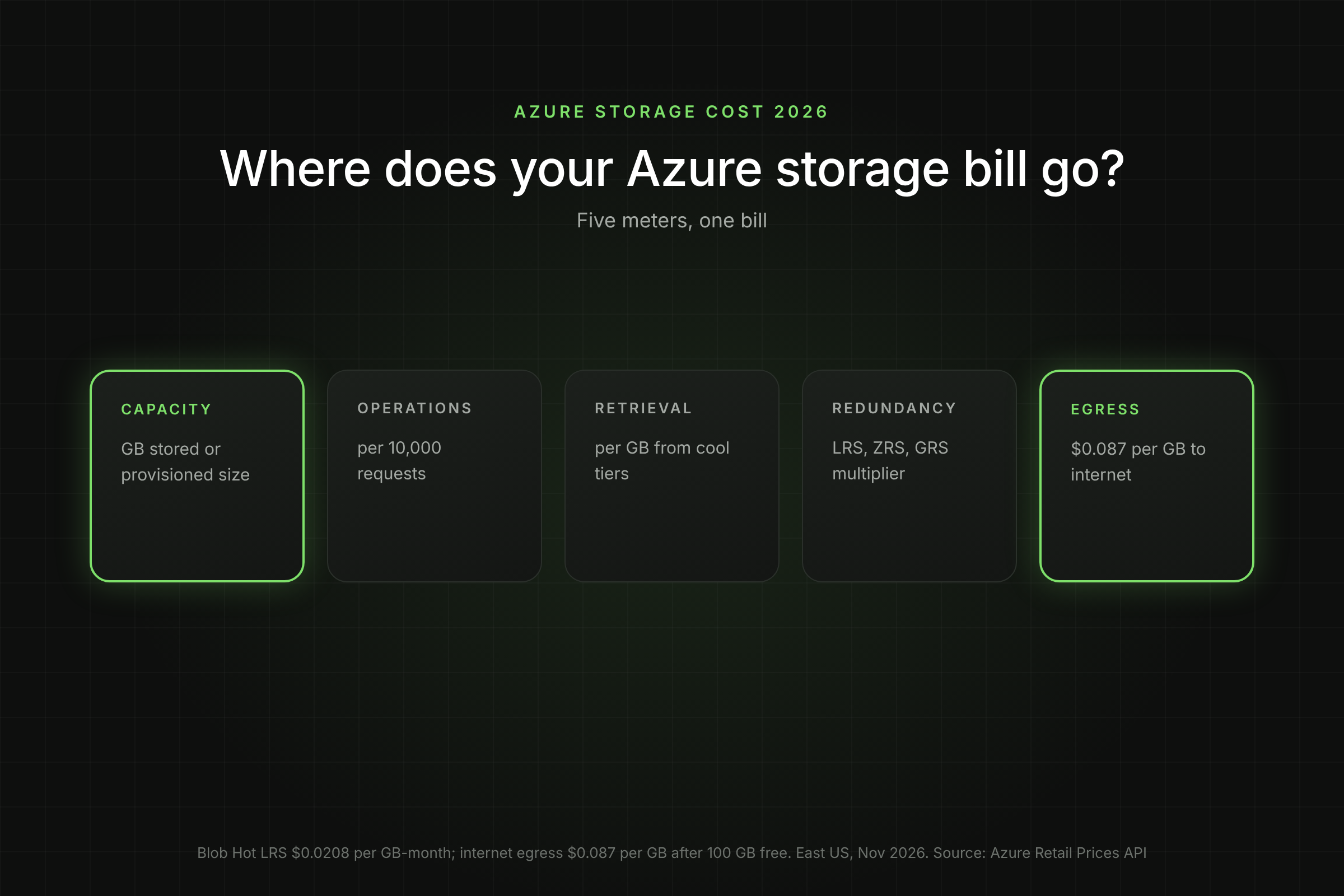
The disk tier is the biggest line, but three other meters can appear next to it, and unattached disks keep billing. Each has its own rule.
Transactions
Premium SSD has no transaction charge unless you enable on-demand bursting. Standard SSD bills every I/O at $0.002 per 10,000 operations in East US, and Standard HDD bills per 10,000 transactions too. On SSD, each I/O up to 256 KiB counts as one operation; larger I/Os count as several (Microsoft Learn). Microsoft caps billable Standard SSD transactions per disk per hour but does not publish the cap value on the billing page.
Snapshots
Snapshots bill on used size, not provisioned size. A full snapshot of a 500 GiB disk with 50 GiB of data bills for 50 GiB. Incremental snapshots are stored on Standard HDD, listed at $0.05 per GB-month in East US, and LRS and ZRS snapshots cost the same.
Bursting
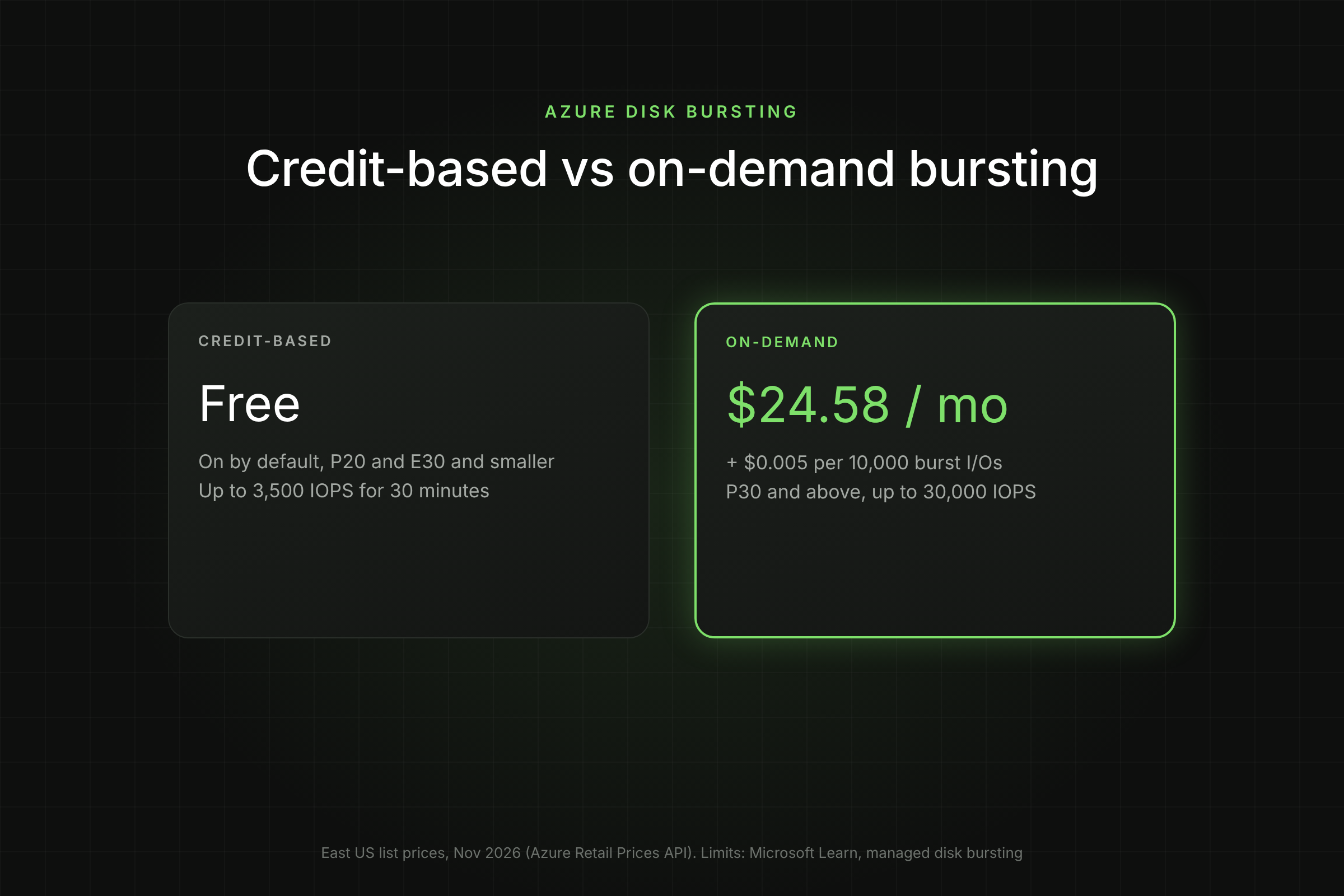
Credit-based bursting, which is on by default for Premium SSD P20 and smaller and Standard SSD E30 and smaller, is free. On-demand bursting for Premium SSD larger than 512 GiB adds a burst enablement fee, listed at $24.58 a month per disk in East US, plus $0.005 per 10,000 burst transactions (Azure Retail Prices API).
Unattached disks
A disk keeps billing at its tier after you delete or deallocate the VM it was attached to. Only a brand-new empty disk that was never attached or uploaded to is free. Unattached disks are often the fastest saving in an estate: they are pure cost with no workload to protect.
How is Premium SSD v2 billed differently?
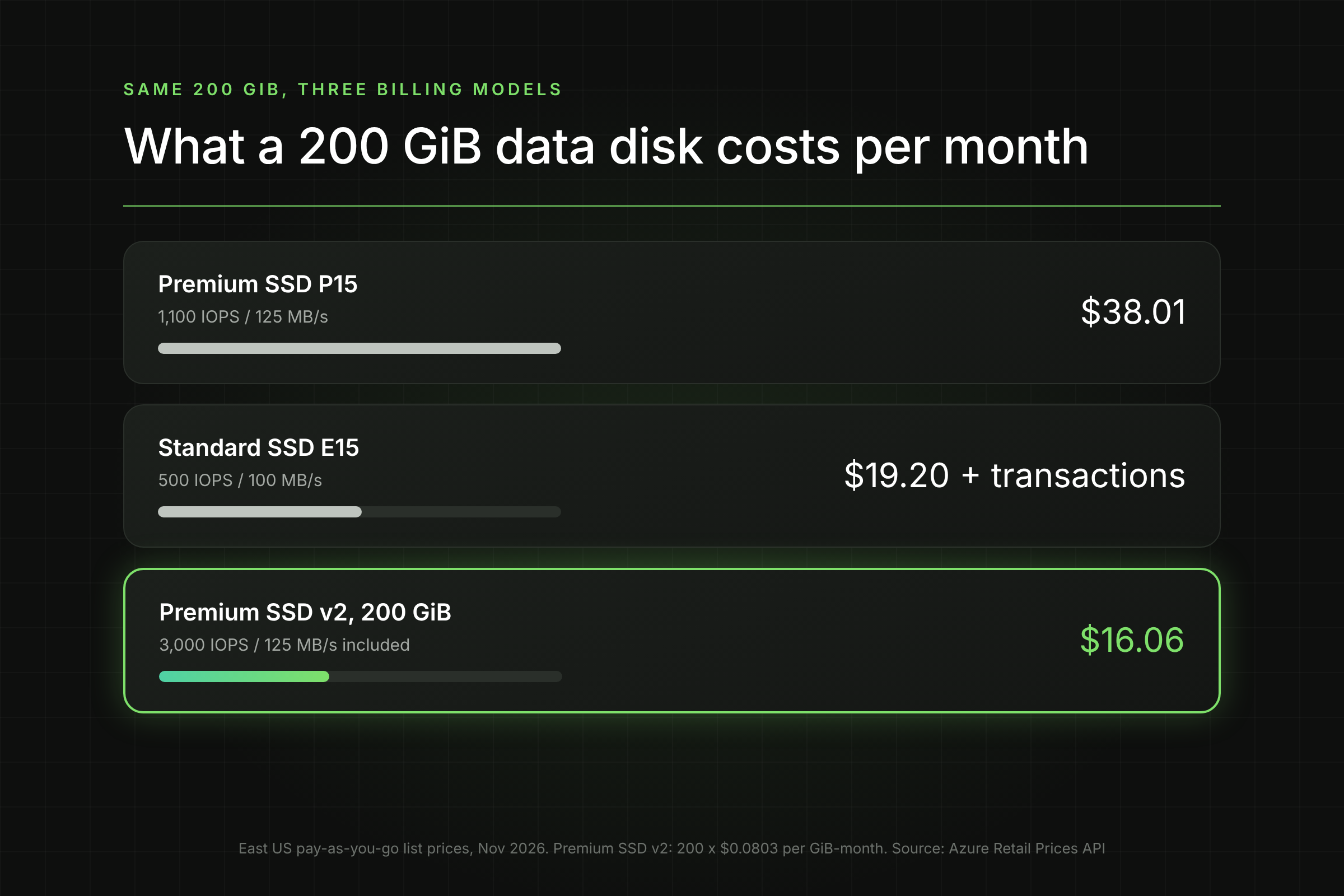
Premium SSD v2 is billed per GiB, per provisioned IOPS and per provisioned MB/s, with no size tiers. Every disk gets 3,000 IOPS and 125 MB/s free, and you pay only for capacity and anything above that baseline.
East US list prices (Nov 2026) are $0.0803 per GiB-month, $0.00511 per IOPS-month above 3,000 and $0.0402 per MB/s-month above 125. Compare the same 200 GiB data disk:
For data disks, Premium SSD v2 is often cheaper and faster than the tier you are on. The trade-offs are real, though. Premium SSD v2 cannot be an OS disk, does not support host caching, and in most regions with availability zones attaches only to zonal VMs (Microsoft Learn, disk types). You also cannot convert a Premium SSD v2 straight back to another type; you need a snapshot and a new disk.
[Visual 3: Grouped bar chart comparing monthly cost and IOPS for a 200 GiB disk on P15, E15 and Premium SSD v2. Caption: "Same capacity, three billing models." Alt text: Azure 200 GiB disk cost comparison between Premium SSD P15, Standard SSD E15 and Premium SSD v2.]
How do you find disks billed above their size?
Query every disk's provisioned size and compare it with the top of its tier. Disks a few GiB above a boundary, and disks with low used space, are your first targets.
This Azure Resource Graph query lists disks across all subscriptions you can read, with the tier Azure bills and the GiB of headroom you pay for:
az graph query -q "
Resources
| where type =~ 'microsoft.compute/disks'
| extend sizeGb = toint(properties.diskSizeGB), sku = tostring(sku.name),
tier = tostring(properties.tier), state = tostring(properties.diskState)
| extend tierTop = case(sizeGb <= 32, 32, sizeGb <= 64, 64, sizeGb <= 128, 128,
sizeGb <= 256, 256, sizeGb <= 512, 512, sizeGb <= 1024, 1024,
sizeGb <= 2048, 2048, 4096)
| extend paidHeadroomGb = tierTop - sizeGb
| project subscriptionId, resourceGroup, name, sku, tier, sizeGb, tierTop, paidHeadroomGb, state
| order by paidHeadroomGb desc" --first 1000 -o table
Read the output three ways:
- state = Unattached: the disk is billing with no VM. Confirm the owner, snapshot it and delete it.
- Large paidHeadroomGb: you already pay for that capacity. Expanding to the tier top costs nothing.
- sizeGb just above a boundary (129, 257, 513): the disk may belong in the tier below if used space allows.
The query tells you provisioned size, not used space. For used space, check the guest OS (df -h on Linux, Disk Management on Windows) or Azure Monitor guest metrics. To see this across every subscription without writing queries, switch on Lucidity Free Insights for a read-only report of disk utilization, tier waste and idle disks.
How do you fix tier waste safely?
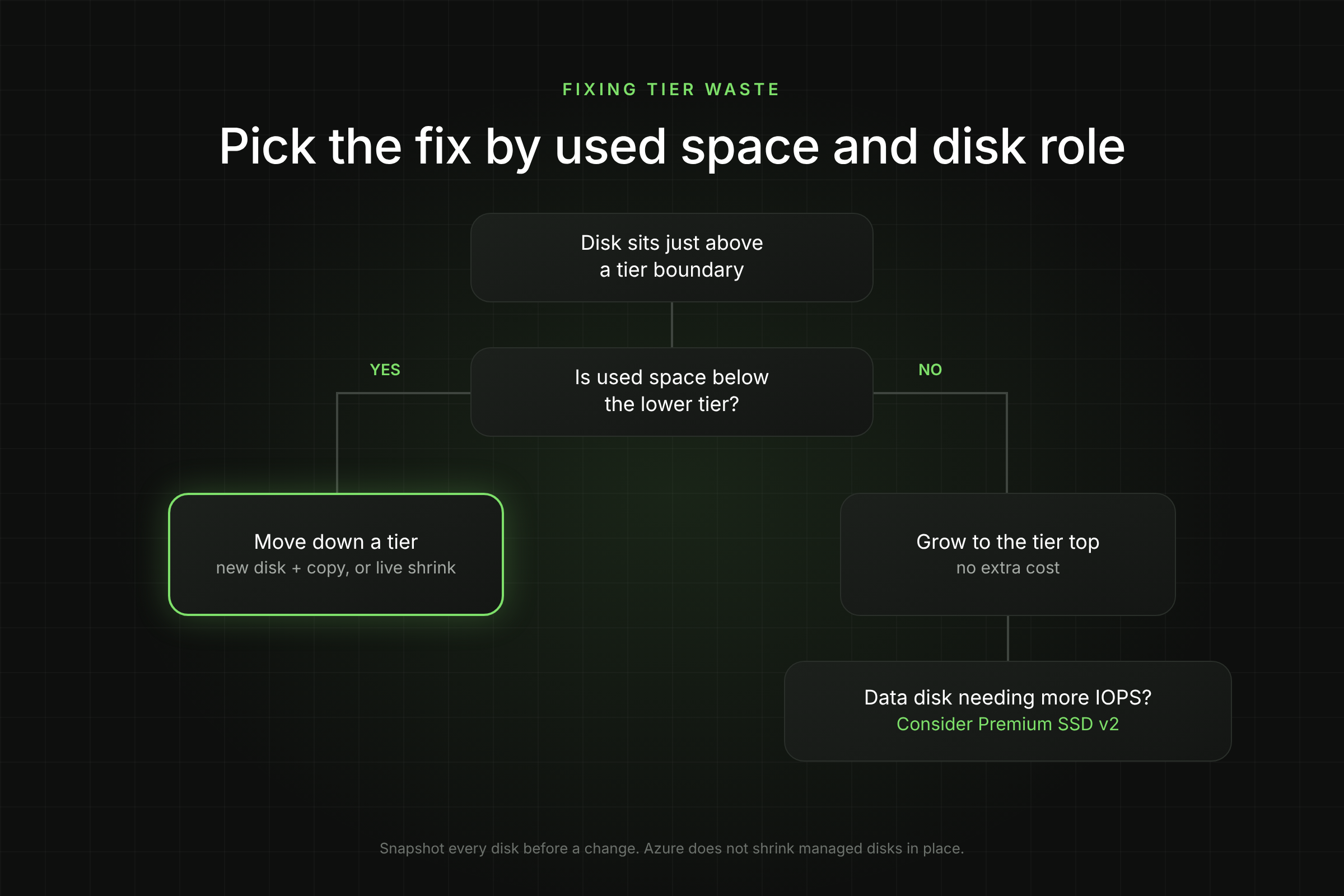
The fix depends on which side of the tier you are on: grow into capacity you already pay for, or move down a tier. Always take a snapshot first.
Option 1: Grow to the top of the tier (no extra cost)
If a 200 GiB disk is filling up, expand it to 256 GiB instead of 300 GiB. The bill stays at P15.
az snapshot create -g $rg -n ${diskName}-pre-resize --source $diskId --incremental true
az disk update -g $rg -n $diskName --size-gb 256
az disk show -g $rg -n $diskName --query "{size:diskSizeGb, tier:tier}" -o table
Then extend the partition and file system inside the guest (for example growpart and resize2fs or xfs_growfs on Linux). Check Microsoft's requirements for expanding without downtime before you resize an attached disk (Microsoft Learn, expand disks).
Option 2: Move down a tier (new disk and data copy)
Azure does not shrink managed disks: Microsoft states that shrinking an existing disk "isn't supported and might result in data loss" (Microsoft Learn). To get a 141 GiB disk back to P10, you create a 128 GiB disk, copy the data, swap the mount and keep the old disk until you verify.
- Snapshot the source disk as a rollback point.
- Create a new 128 GiB disk in the same zone and SKU, and attach it.
- Copy data with rsync -aHAX (Linux) or robocopy /MIR (Windows) while the application is stopped, or replicate at the database layer.
- Update /etc/fstab by UUID or the drive letter, restart the application and run checks.
- Keep the old disk detached for a few days, then delete it and the snapshot.
This is downtime plus engineer time for every disk, which is why most teams never do it. Lucidity AutoScaler expands and shrinks managed disks live, with no downtime, so disks follow used capacity instead of the size someone typed in a template.
Option 3: Change disk type
For data disks, converting to Premium SSD v2 removes tiers altogether. It needs a VM deallocation and has the constraints listed above; our break-even guide for changing an Azure disk type walks through the maths and commands.
[Visual 4: Decision flow: disk above tier boundary, then used space below lower tier? Yes: move down a tier or AutoScaler. No: grow to tier top. Data disk with IOPS above tier? Consider Premium SSD v2. Caption: "Pick the fix by used space and disk role." Alt text: Decision tree for fixing Azure managed disk tier waste.]
What does tier waste cost a fleet?
Tier waste is small per disk and large per estate. Here is a worked example a finance team can check line by line, using East US list prices from Nov 2026.
Scenario: 100 Premium SSD data disks provisioned at 129 to 160 GiB (all billed as P15), with under 100 GiB of data each.
Line
Calculation
Amount
Current monthly cost
100 x $38.01
$3,801
Cost if moved to P10 (128 GiB)
100 x $19.71
$1,971
Monthly saving
$3,801 - $1,971
$1,830
Annual saving
$1,830 x 12
$21,960
One-time cost, manual migration
100 disks x 2 hours x $100 per hour (assumed rate)
$20,000
Payback, manual
$20,000 / $1,830
10.9 months
Two things stand out. First, the saving is real and recurring: 48 percent of the line. Second, the manual migration eats almost a year of savings and needs 100 maintenance windows, which is why tier waste survives in most estates. Removing the engineering hours is what turns this into a same-month saving. Use your own engineering rate and disk counts; the structure of the calculation holds.
Frequently Asked Questions
Does Azure bill managed disks per GiB?
Only Premium SSD v2 and Ultra Disk. Premium SSD, Standard SSD and Standard HDD bill at the flat price of the size tier the disk falls into, so a 200 GiB Premium SSD bills as a 256 GiB P15.
Is a deallocated VM's disk still billed?
Yes. Deallocating a VM stops compute charges, not disk charges. The disk bills at its tier until you delete it.
Can I get more IOPS without paying for a bigger disk?
On Premium SSD, raise the performance tier without resizing; you pay the higher tier only while it is set, and can downgrade once every 12 hours. On data disks, Premium SSD v2 includes 3,000 IOPS at any size.
Does a snapshot cost the same as the disk?
No. Snapshots bill on used GiB, not the disk tier. Incremental snapshots are listed at $0.05 per GB-month in East US, so a snapshot of a P15 with 60 GiB of data costs about $3 a month.
Table of Contents
Sign Up