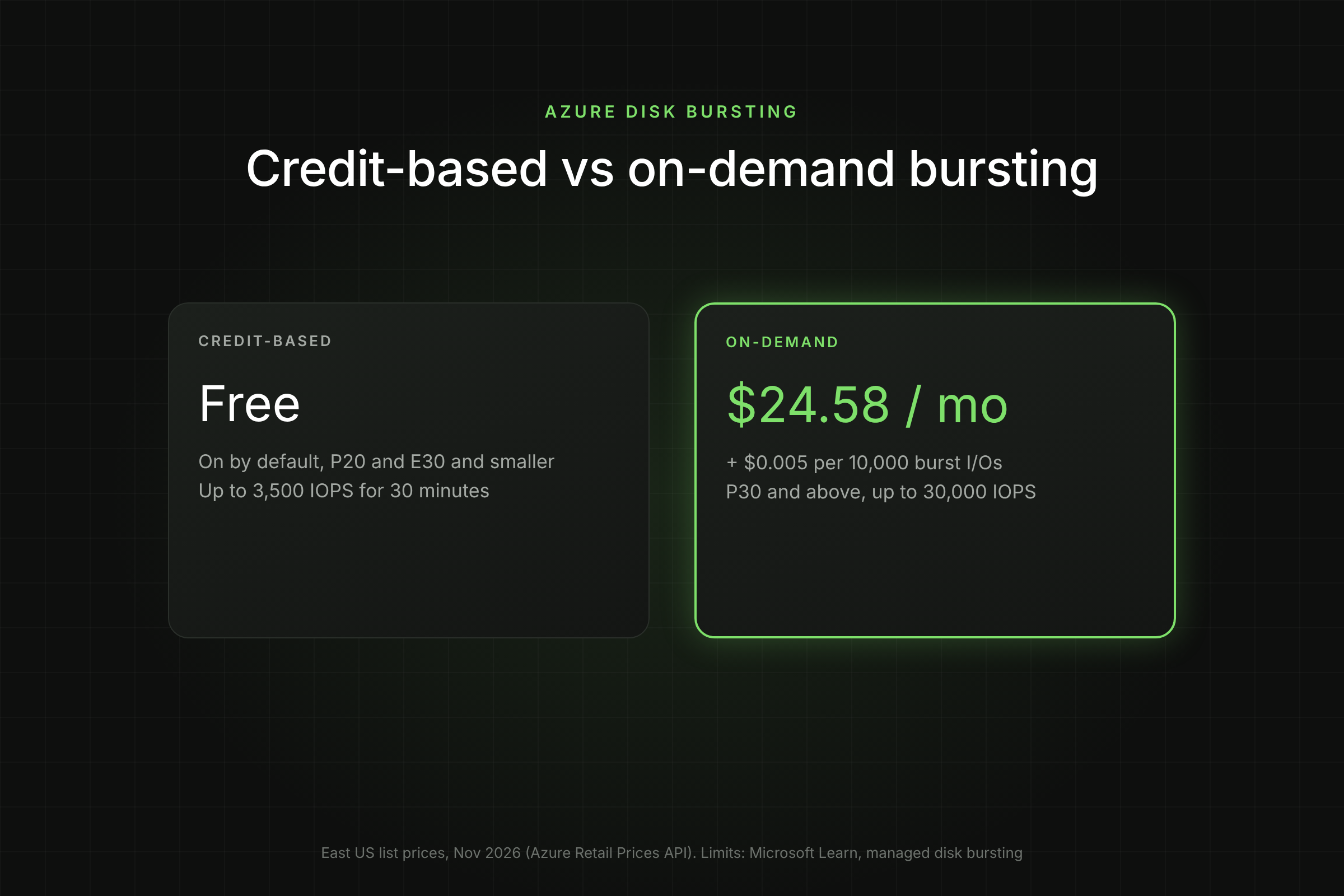
Azure gives managed disks two ways to run above their provisioned IOPS for a while. One is free and already on. The other is opt-in, billed by the hour and by the I/O, and easy to leave running long after the spike that justified it.
Key Takeaways
- Credit-based bursting is free and on by default for Premium SSD P20 and smaller (up to 3,500 IOPS and 170 MB/s) and Standard SSD E30 and smaller, for up to 30 minutes.
- On-demand bursting is for Premium SSD larger than 512 GiB. It lifts a P30 to 30,000 IOPS and 1,000 MB/s, at $24.58 a month plus $0.005 per 10,000 burst I/Os in East US.
- Bursting a P30 by 10,000 extra IOPS costs about $18 per hour. Sustained bursting gets expensive fast.
- For a data disk that needs 15,000 IOPS all month, Premium SSD v2 costs $146.57, less than a P30 with on-demand bursting enabled and no burst at all ($159.75).
What is Azure disk bursting?
Azure disk bursting is a feature that lets a managed disk exceed its provisioned IOPS and throughput for a limited time to absorb spikes such as VM boot, patching, batch jobs and backups. It exists so you can size disks for normal load instead of for the worst minute of the month.
Azure offers two disk bursting models (Microsoft Learn, managed disk bursting):
- Credit-based bursting spends credits the disk earned while running below target. It is free and enabled by default on eligible disks.
- On-demand bursting lets larger Premium SSD disks burst whenever needed, with no credits, for a flat enablement fee plus a charge per burst transaction.
Ultra Disk, Premium SSD v2 and Standard HDD do not support bursting. Ultra Disk and Premium SSD v2 let you set IOPS and throughput directly instead, which is often the better answer to a sustained spike.
Bursting also exists at the VM level, separately from the disk. The two are independent, and a disk burst only helps if the VM's own uncached limit leaves room for it. We cover that below.
How does Credit-Based Bursting Work?
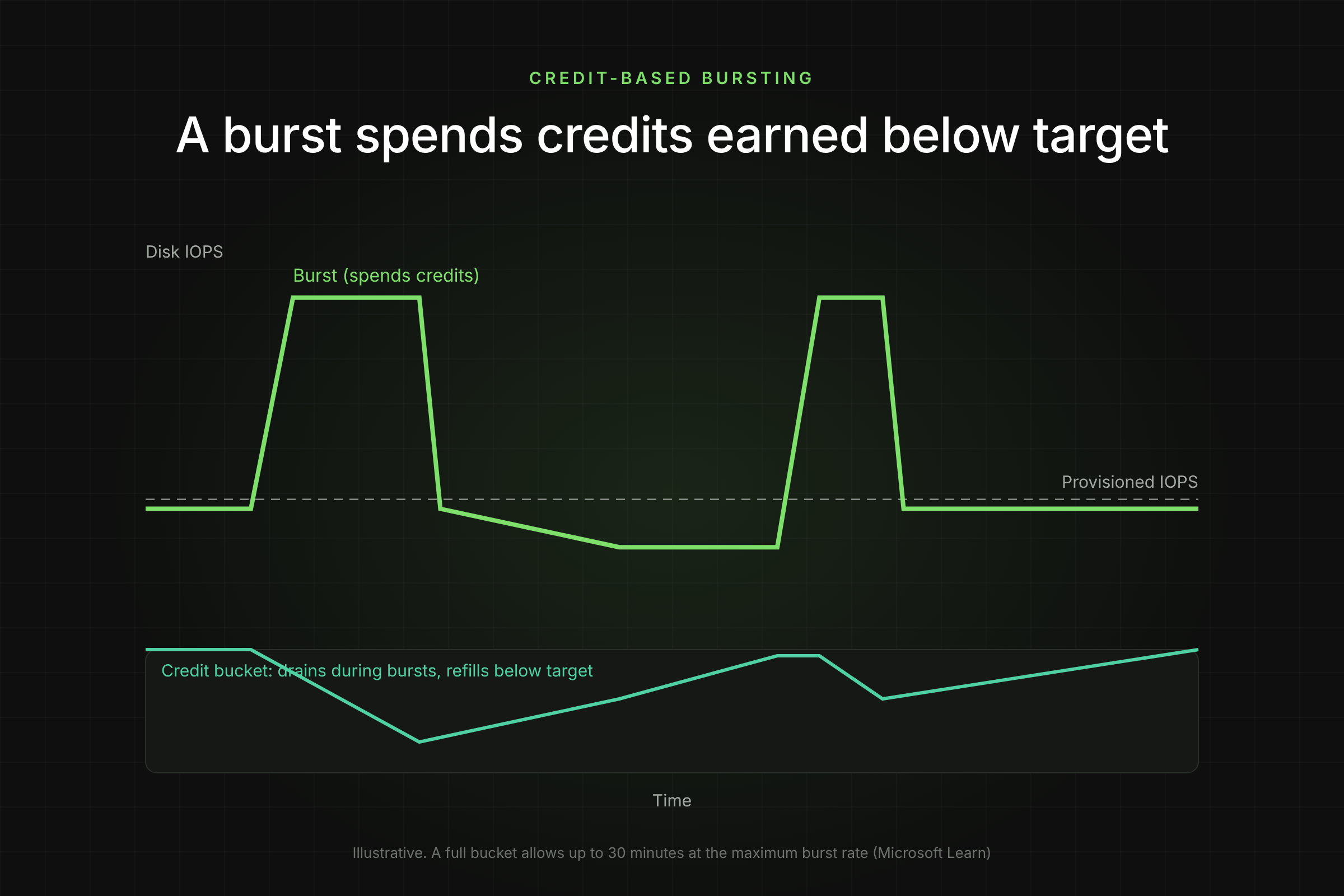
Credit-based bursting works like a bucket. Every second the disk runs below its provisioned IOPS or MB/s, the unused amount is added as credits; every second it runs above, credits are spent. Each disk starts with a full bucket.
Microsoft's key rules:
- A full bucket lets the disk run at the maximum burst rate for up to 30 minutes.
- IOPS credits and throughput credits are tracked separately.
- An idle disk earns credits at its provisioned rate: an idle P1 accrues 120 IOPS per second, an idle P20 accrues 2,300.
- A depleted bucket refills in less than a day, and the disk can burst before the bucket is full.
Eligible disks and limits (Microsoft Learn, scalability targets):
The practical effect is largest on small Premium disks. A P4 OS disk runs at 120 IOPS normally but can boot at 3,500, which is why small Premium OS disks rarely feel slow during startup. On a P20 the headroom is smaller, from 2,300 to 3,500 IOPS.
The failure mode is a workload that bursts every day for longer than the credits last. Once the bucket is empty the disk drops back to its provisioned IOPS mid-job, and the job slows down without any error. If your nightly batch gets slower at the same minute each night, check burst credits before anything else.
How does On-Demand Bursting Work?
On-demand bursting lets a Premium SSD larger than 512 GiB (P30 and above) burst whenever the workload needs it, with no credit bucket and no 30-minute limit. A 1 TiB P30 provisioned at 5,000 IOPS and 200 MB/s can burst to 30,000 IOPS and 1,000 MB/s.
It is opt-in and has restrictions worth knowing before you plan around it (Microsoft Learn, enable on-demand bursting):
- Premium SSD only, and only for disks larger than 512 GiB.
- You can enable it only when the disk is detached or the VM is stopped. Turning it on is a maintenance-window change, not a live fix during an incident.
- Once enabled, you must wait 12 hours before you can disable it.
- Changing the performance tier does not disable it. Changing the disk type to anything other than Premium SSD does.
Billing has two parts. A flat burst enablement fee applies for every hour bursting is enabled, whether or not the disk bursts. On top, each burst transaction above the provisioned target is charged. Azure counts transactions from IOPS and from throughput (at 256 KiB per I/O) and bills whichever is larger (Microsoft Learn).
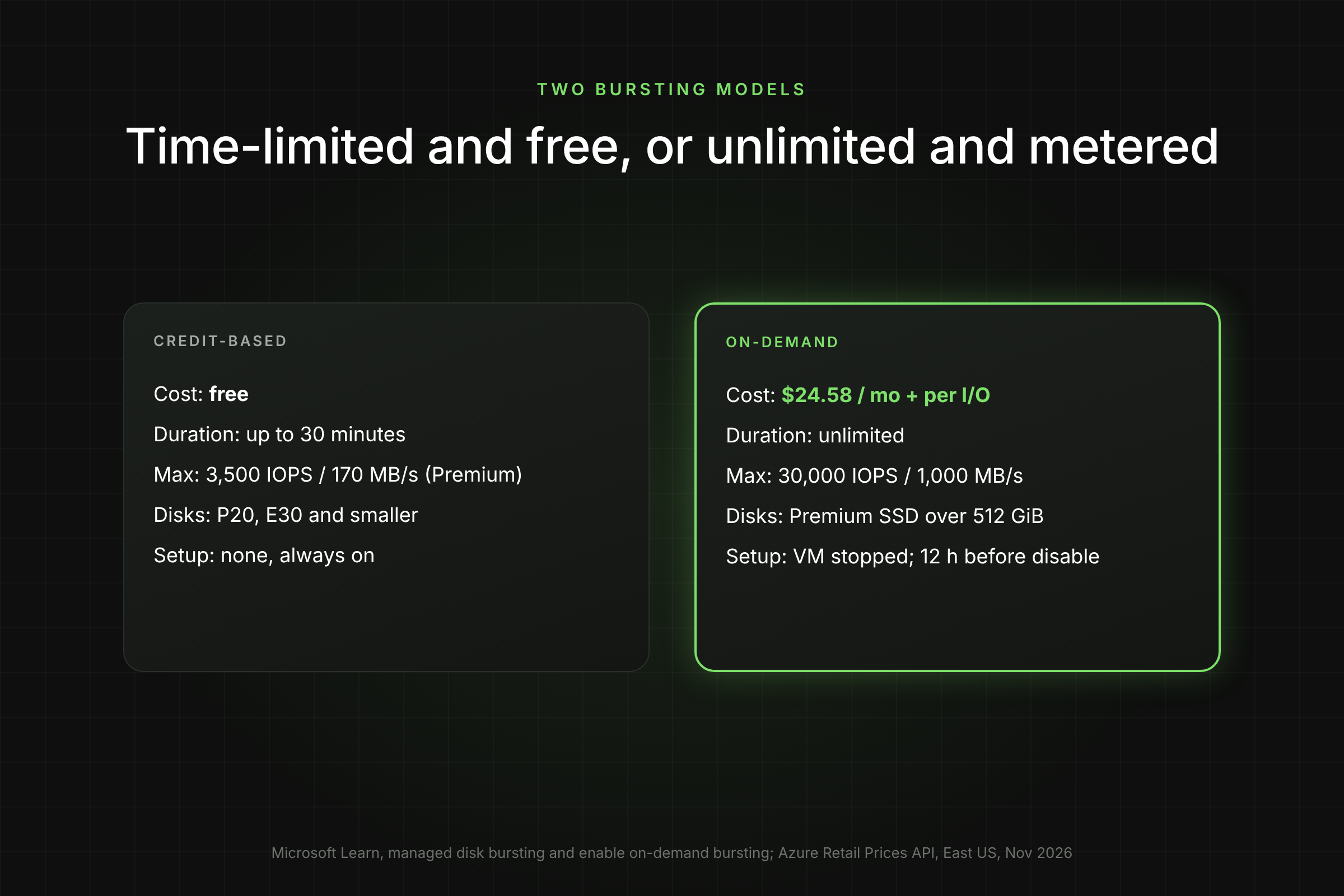
Credit-Based vs On-Demand: How do they compare?
Credit-based bursting is the default safety net for small disks; on-demand bursting is a paid capability for large Premium disks. The table puts them side by side.
Prices are from the Azure Retail Prices API, East US, Nov 2026; the enablement fee is listed as $24.576 per month and accrues hourly while bursting is on.
What does on-demand bursting really cost?
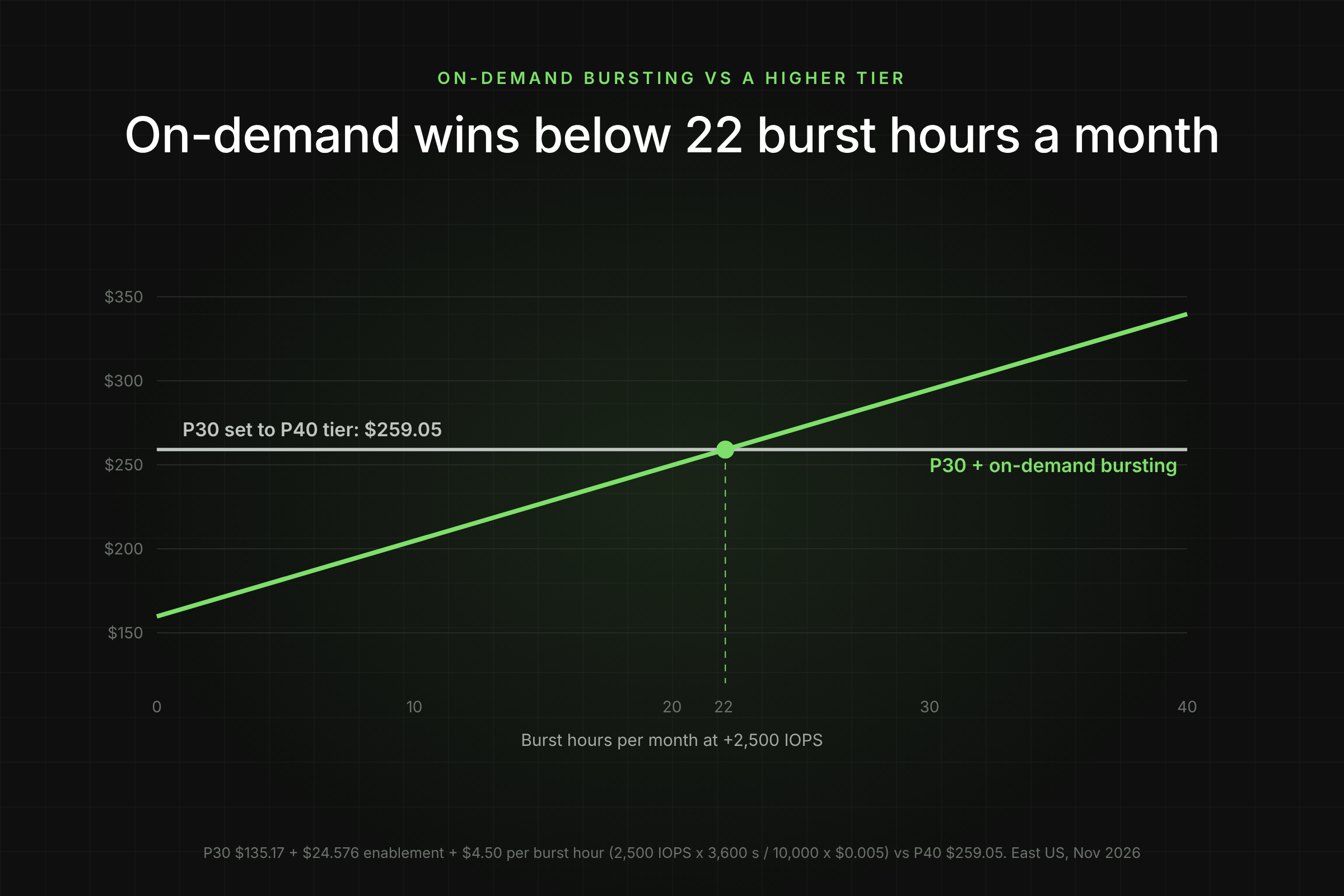
On-demand bursting costs a fixed $24.58 a month per disk plus $0.0018 per hour for every IOPS above the provisioned target. The per-hour figure is 3,600 I/Os divided by 10,000, times $0.005.
Two decision points come out of these numbers:
- On-demand burst vs a higher performance tier. Moving a P30 to P40 adds $123.88 a month for 2,500 extra IOPS. On-demand bursting for the same 2,500 IOPS costs $24.58 plus $4.50 per hour, so it is cheaper below about 22 hours of burst per month: ($123.88 - $24.58) / $4.50.
- On-demand burst vs Premium SSD v2. For a data disk, v2 at 15,000 IOPS costs less than a P30 with bursting merely enabled. If the extra IOPS are needed for more than a few hours a month, Premium SSD v2 is the cheaper and simpler design.
Premium SSD v2 has its own constraints: data disks only, no host caching, zonal VMs only in most zonal regions, and conversion needs a VM deallocation. Our break-even guide for changing an Azure disk type covers the migration maths.
Does VM-Level Bursting Change the Picture?
Yes. Every VM size has its own uncached disk IOPS and throughput limit, and a disk can never deliver more than the VM allows. Many Premium-capable VM sizes also have VM-level credit-based bursting, on by default, which is independent of disk bursting.
Microsoft's example: a Standard_L8s_v2 has 160 MB/s of uncached throughput and can burst to 1,280 MB/s at the VM level, while its P4 disks provide 25 MB/s and burst to 170 MB/s (Microsoft Learn). The VM and disk buckets fill and drain separately.
Before paying for on-demand disk bursting, check three things:
- The VM size's uncached IOPS and MB/s limit is above the burst target. A 30,000 IOPS disk on a VM capped at 12,800 uncached IOPS will stop at 12,800.
- Several data disks on the same VM share that VM limit. Bursting all of them at once does not add up.
- The bottleneck is really the disk. Azure Monitor's "VM Uncached IOPS Consumed Percentage" and "Data Disk IOPS Consumed Percentage" show which limit you hit first.
If the VM is the bottleneck, resizing the VM, not the disk, is the fix.
How do you Enable, Monitor and Disable Bursting?
Credit-based bursting needs no setup. On-demand bursting is enabled per disk with one CLI command while the disk is detached or the VM is stopped.
Enable on-demand bursting
az vm deallocate -g $rg -n $vmName
az disk update -g $rg -n $diskName --enable-bursting true
az vm start -g $rg -n $vmName
PowerShell equivalent (Az 5.5.0 or later):
New-AzDiskUpdateConfig -BurstingEnabled $true | Update-AzDisk -ResourceGroupName $rg -DiskName $diskName
Requires Azure CLI 2.19.0 or later. In the portal: open the disk, select Configuration, tick Enable on-demand bursting and select Save.
Verify and monitor
az disk show -g $rg -n $diskName --query "{tier:tier, size:diskSizeGb, bursting:burstingEnabled}" -o table
In Azure Monitor, watch "Data Disk Used Burst IO Credits Percentage" and "Data Disk Used Burst BPS Credits Percentage" on the VM for credit-based disks, and the "Burst Transactions" meter in Cost Management for on-demand disks. A credit metric that hits 100 percent at the same time every day means the workload has outgrown credit-based bursting.
Disable when the spike is over
az disk update -g $rg -n $diskName --enable-bursting false
You can disable only 12 hours or more after enabling. Put a calendar reminder or a scheduled pipeline on it; the enablement fee runs every hour the setting stays on.
[Visual 4: Screenshot of the disk Configuration blade with the "Enable on-demand bursting" checkbox highlighted. Caption: "On-demand bursting is a per-disk setting." Alt text: Azure portal disk configuration page showing the enable on-demand bursting option.]
Which option should you choose?
Pick by how long and how often the disk needs extra performance. The rule of thumb from the numbers above:
The hidden cost in all of these is the engineer watching the dashboard and flipping settings. Bursting, performance tiers and disk sizes are levers that need someone to pull them at the right time and put them back afterwards. Lucidity AutoScaler adjusts disk capacity live, with no downtime, based on observed usage, and Free Insights shows which disks are paying for performance they never use.
What does This Mean for Your Storage Budget?
Most teams overpay for disk performance in one of two ways: oversized Premium disks bought for IOPS, or on-demand bursting left enabled after the event it was meant for. Both are visible in a single month of data.
A worked example for 20 Premium SSD P30 data disks, East US, Nov 2026:
The Premium SSD v2 line uses the same P30 performance (5,000 IOPS, 200 MB/s) at 1,024 GiB. Check each disk's constraints (OS disk, caching, zones) before planning a conversion.
Frequently Asked Questions
Is credit-based bursting really free?
Yes. Microsoft states that only on-demand bursting affects billing. Credit-based bursting on eligible Premium SSD and Standard SSD disks has no fee and no transaction charge for the burst itself.
Can I enable on-demand bursting on a P20?
No. On-demand bursting needs a Premium SSD larger than 512 GiB. A P20 is exactly 512 GiB and uses credit-based bursting only. Growing it to P30 to unlock on-demand bursting nearly doubles the base price.
Can I turn on on-demand bursting during an incident?
Not without downtime. The disk must be detached or the VM stopped to enable it. During a live incident, raising the Premium performance tier is the faster lever, because it changes without downtime.
Why didn't my disk burst to 30,000 IOPS?
Usually the VM's uncached IOPS limit is lower than the disk burst limit, or several disks share the same VM cap. Check VM Uncached IOPS Consumed Percentage in Azure Monitor.
Does Premium SSD v2 support bursting?
No. Premium SSD v2 replaces bursting with provisioned performance: you set IOPS and MB/s per disk, pay only above the 3,000 IOPS and 125 MB/s baseline, and can change them without detaching the disk.
Table of Contents
Sign Up