Azure Blob vs Files vs Disk Storage: Which to Use in 2027
Pranshu Mishra
|
November 13, 2026
Azure has three main places to put data, and they are not interchangeable. Blob is object storage you reach over HTTP, Files is a shared file system over SMB or NFS, and managed disks are block devices attached to a VM. Picking the wrong one shows up as either a slow application or a bill that is two to five times higher than it needs to be.
Key Takeaways
Use Blob for unstructured data read by applications, Files for data shared by many machines, and managed disks for one VM's OS, databases and low-latency volumes.
1 TiB costs $21.30 a month in Blob Hot LRS, $29.39 in Azure Files Hot and $82.23 on a Premium SSD v2 disk (East US, Nov 2026).
Premium SSD v2 vs Azure Files: use a v2 disk when one VM needs low-latency storage, and an SSD file share when many machines need the same data.
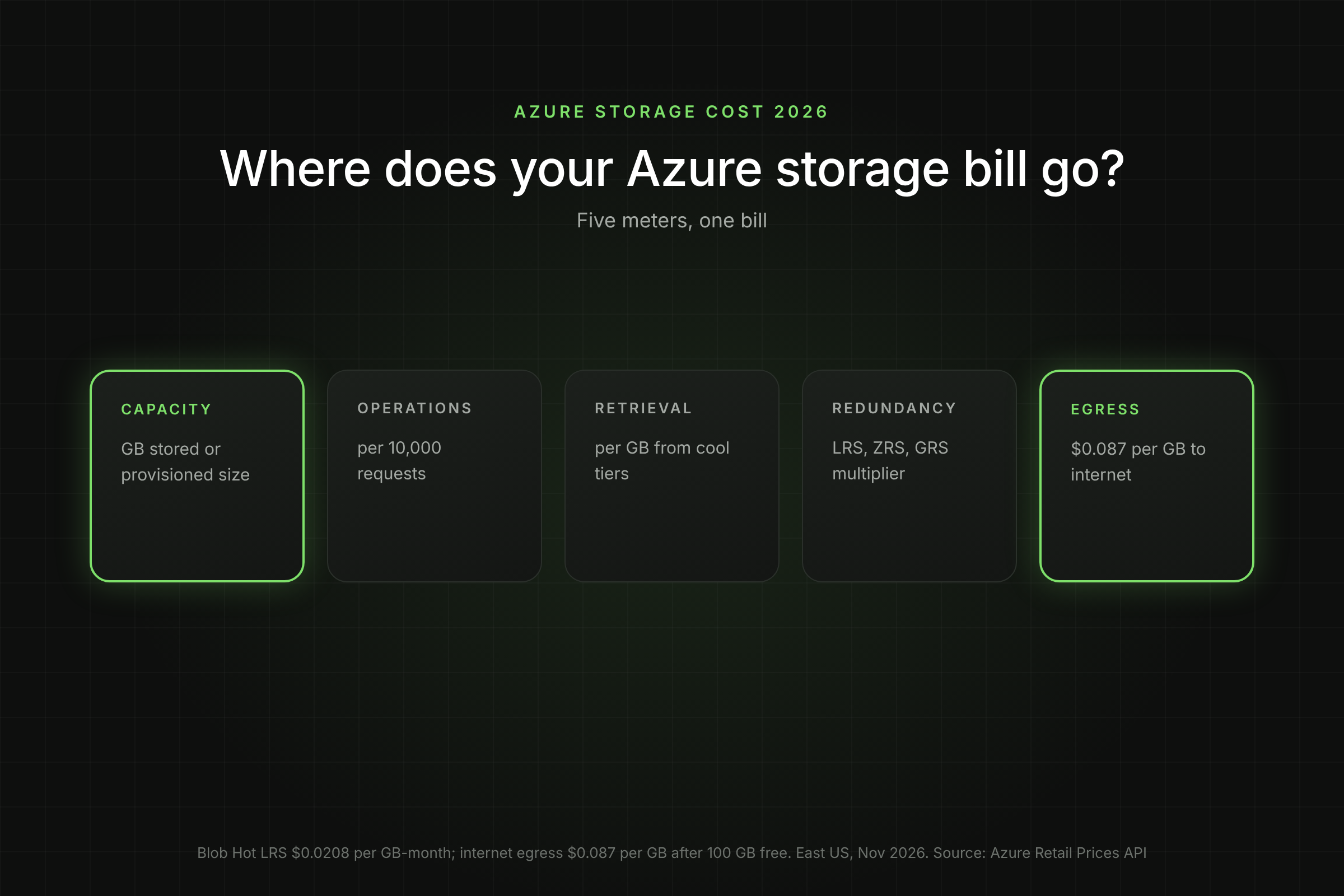
Managed disks bill on provisioned size, Blob and pay-as-you-go Files on data stored. That one difference drives most storage waste.
Azure Blob vs Files vs Disk: How do They Compare?
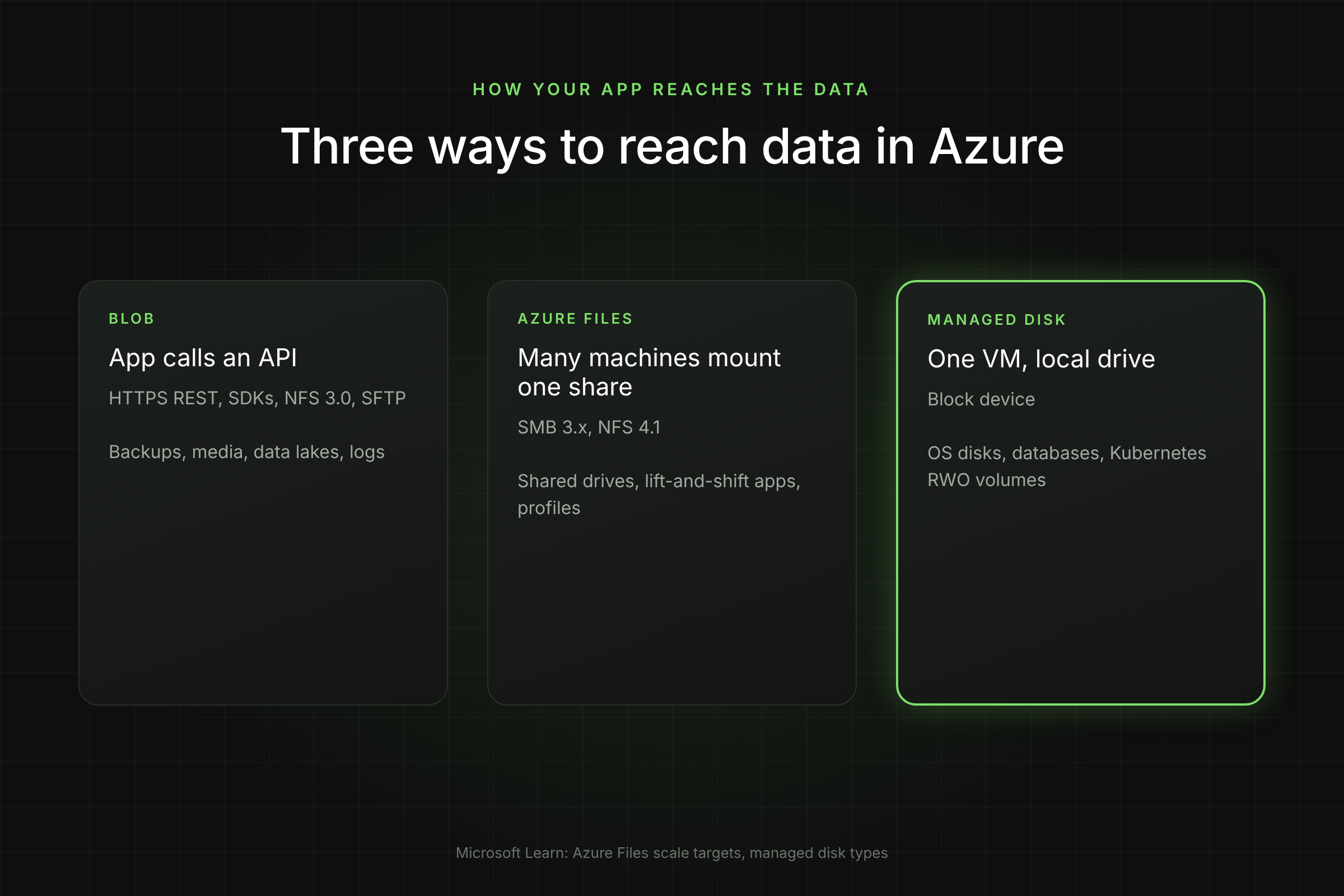
Azure Blob vs Files vs Disk comes down to how your application reaches the data: through an API (Blob), through a shared file path (Files) or as a local drive on one VM (Disk). The table summarises the differences.
Azure Blob storage, Azure Files and managed disks compared: type, access, performance, billing, redundancy and use
Attribute
Blob storage
Azure Files
Managed disks
Storage type
Object
File share
Block
Access
HTTPS REST API, SDKs; also NFS 3.0 and SFTP
SMB 3.x and NFS 4.1, mounted by many clients
Attached to a VM as a drive
Max performance
Scales with the storage account
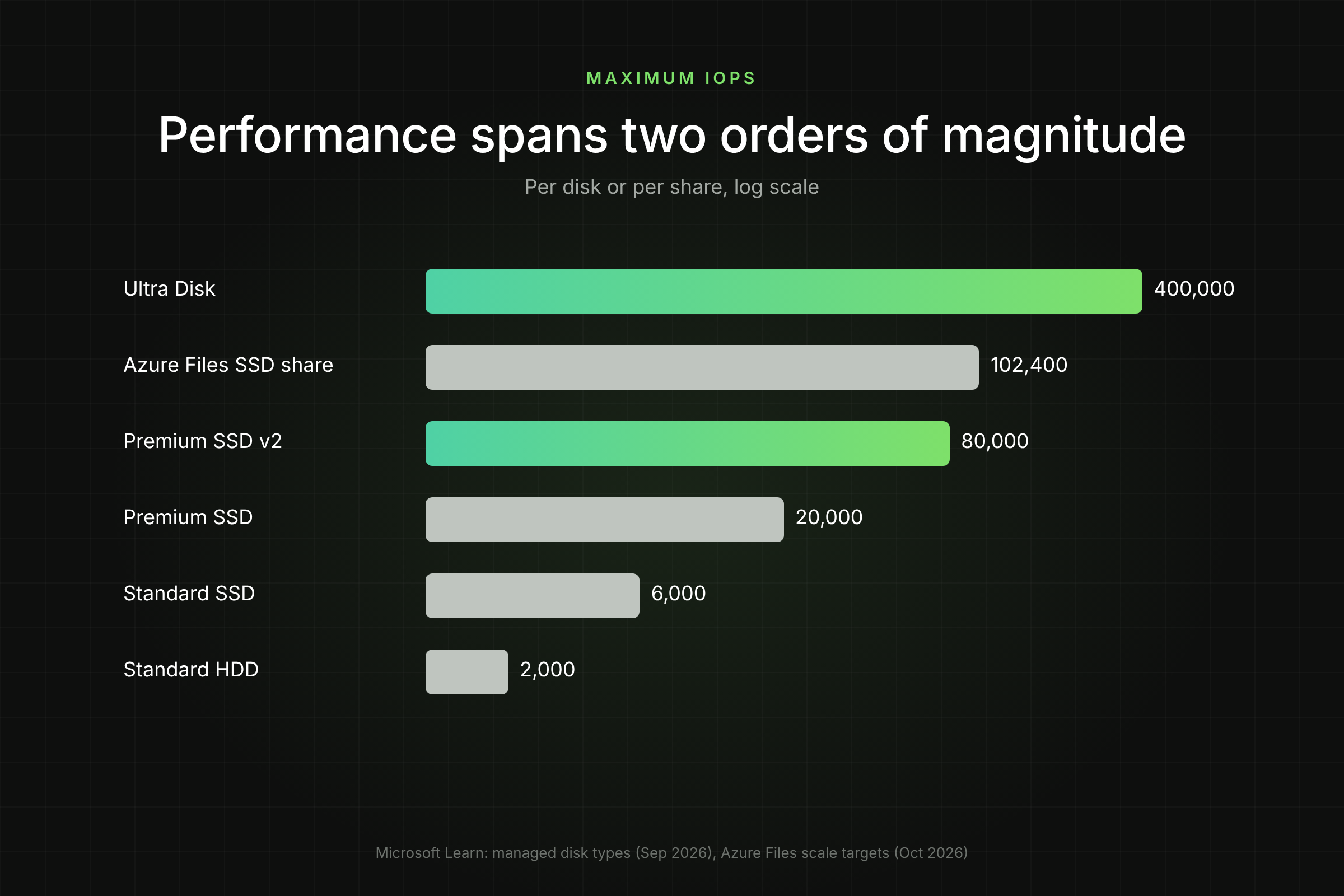
Up to 102,400 IOPS and 10,340 MiB/s per SSD share
Up to 400,000 IOPS and 10,000 MB/s (Ultra Disk), 80,000 IOPS and 2,000 MB/s (Premium SSD v2)
Billing basis
GB stored, operations, retrieval, egress
GB stored (pay-as-you-go) or provisioned GiB, IOPS and throughput
Provisioned size tier, or provisioned GiB, IOPS and MB/s (v2, Ultra)
Redundancy
LRS, ZRS, GRS, GZRS
SSD: LRS, ZRS. HDD: LRS, ZRS, GRS, GZRS
LRS; ZRS for Premium SSD and Standard SSD; Ultra Disk LRS only
Typical use
Backups, media, data lakes, logs, static content
Shared drives, lift-and-shift apps, user profiles, shared config
OS disks, databases, Kubernetes persistent volumes
[Visual 1: Three-column diagram showing an app calling Blob over HTTPS, several VMs mounting one Azure Files share over SMB/NFS, and one VM with attached managed disks. Caption: "Three ways to reach data in Azure." Alt text: Azure Blob vs Azure Files vs managed disk access patterns.]
What is Azure Blob Storage Best For?
Azure Blob storage is Microsoft's object store for unstructured data, read and written by applications through an API. It is the cheapest per GB and scales furthest, which makes it the default for anything that does not need a file system or a block device.
Blob offers four access tiers with very different economics (East US, LRS, Nov 2026):
The application already uses an SDK or REST API (most modern apps, analytics engines and backup tools do).
Data is written once and read many times, or rarely read at all.
You need lifecycle rules to move data to cheaper tiers automatically.
Volumes run to hundreds of TB or more. A standard account holds up to 5 PiB by default.
Avoid Blob for workloads that need POSIX file locking, random in-place writes or sub-millisecond latency; those belong on Files or disks. Data Lake Storage Gen2, used by Spark and Synapse, is Blob with a hierarchical namespace switched on.
What is Azure Files Best For?
Azure Files is a managed file share that many VMs, containers and on-premises machines can mount at the same time over SMB or NFS. It replaces a Windows file server or NAS without changing how applications open files.
Provisioned v2 (SSD or HDD): you set storage, IOPS and throughput separately. Microsoft recommends it for new deployments. SSD minimums are 32 GiB, 3,000 IOPS and 100 MiB/s.
Provisioned v1 (SSD only): you provision storage, and IOPS and throughput scale with it. Minimum 100 GiB; $0.16 per GiB-month LRS in East US.
Pay-as-you-go (HDD only): you pay for data stored plus operations. Hot LRS is $0.0287 per GB-month, Cool $0.0228.
Choose Azure Files when:
More than one machine needs the same files: shared application folders, CMS uploads, build artifacts, user profiles for virtual desktops.
You are lifting a legacy application that expects a UNC path or NFS mount.
You want to cache an on-premises file server in Azure with Azure File Sync.
Watch for per-file limits. A single file tops out at 12,000 IOPS on SSD shares and 1,000 on HDD shares, so one large hot file (a database file, for example) can bottleneck long before the share does.
What are Azure Managed Disks Best For?
Azure managed disks are block storage volumes attached to a single VM (or a small cluster with shared disks). They give the lowest latency and the most predictable IOPS, which is why databases and OS volumes live on them.
Azure managed disk types compared: maximum size, IOPS and throughput, and OS disk support
The catch with disks is billing. Premium SSD, Standard SSD and Standard HDD bill for the full size tier, and Premium SSD v2 and Ultra bill for provisioned GiB. None bill on data stored, so every unused GiB is paid for. Azure also cannot shrink a managed disk in place, so disks only grow. Lucidity AutoScaler expands and shrinks managed disks live, with no downtime, so provisioned capacity tracks what the workload uses.
Premium SSD v2 vs Azure Files: Which Sould You Choose?
Choose Premium SSD v2 when one VM needs fast, low-latency block storage, such as a database data disk. Choose Azure Files SSD when several machines need the same data over SMB or NFS. The question is less about speed than about who needs to read the data.
Azure Premium SSD v2 compared with Azure Files SSD: access, performance, limits, redundancy and 1 TiB price
Attribute
Premium SSD v2
Azure Files SSD
Access
Block device on one VM
SMB or NFS share, many clients
Baseline performance
3,000 IOPS and 125 MB/s included at any size
Provisioned v2 minimum 3,000 IOPS and 100 MiB/s
Maximum
80,000 IOPS, 2,000 MB/s per disk
102,400 IOPS, 10,340 MiB/s per share
Latency
Designed for submillisecond latency
Single-digit milliseconds for most I/O
Size range
1 GiB to 64 TiB
32 GiB (v2) or 100 GiB (v1) to 256 TiB (v2)
Redundancy
LRS (check regional ZRS support)
LRS or ZRS
1 TiB price, East US
$82.23 (1,024 x $0.0803)
$102.41 to $134.13 on provisioned v2 (minimum to Microsoft-recommended IOPS and throughput); $163.84 on provisioned v1
Limits
Data disks only, no host caching, zonal VMs in most zonal regions
Per-file limit 12,000 IOPS
Three practical rules:
Databases go on disks. SQL Server, PostgreSQL and MySQL data files want submillisecond block storage on the VM. Premium SSD v2 gives that and is cheaper than a 1 TiB file share.
Shared content goes on Files. If you would otherwise run a VM with a disk just to serve SMB or NFS to other machines, Azure Files removes the VM, the patching and the single point of failure.
Price both with IOPS. A v2 disk above 3,000 IOPS adds $0.00511 per IOPS-month. An SSD share on provisioned v2 bills storage at about $0.10 per GiB-month plus IOPS above 3,000 and throughput above 100 MiB/s, billed by the hour: $102.41 a month for a 1 TiB share at the minimum, or $134.13 at Microsoft's recommended 4,024 IOPS and 203 MiB/s. Price your real IOPS in the calculator before deciding on cost alone.
Microsoft's own formula for SSD shares on provisioned v2 recommends 3,000 + 1 IOPS per GiB and 100 + 0.1 MiB/s per GiB, so a 1 TiB share is sized at 4,024 IOPS and 203 MiB/s by default (Microsoft Learn).
What does The Same 1 TiB Cost on Each?
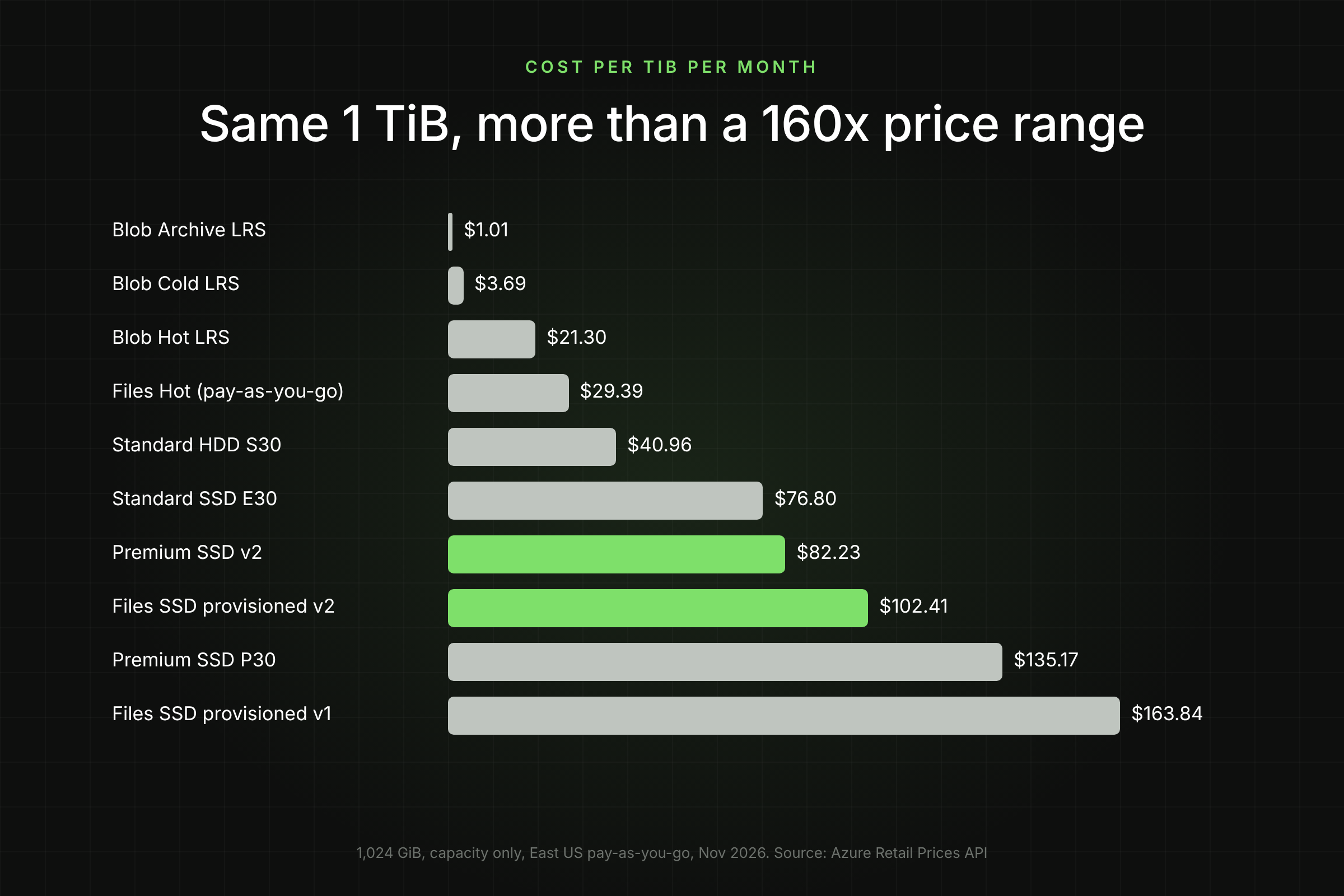
Here is 1 TiB (1,024 GiB) of data on each service at East US list prices, Nov 2026, from the Azure Retail Prices API. Capacity only; operations and egress are extra and depend on traffic.
Monthly cost of 1 TiB (1,024 GB) across Azure Blob, Azure Files and managed disk options, cheapest first
The spread is more than 160x from Archive to an SSD file share. Two things follow. First, data that sits on disks or SSD shares only because the application was first deployed that way, not because it needs their performance, is the biggest saving opportunity in most estates. Second, disk and SSD share prices are for provisioned capacity: a P30 that is 30 percent full still costs $135.17.
How do You Decide for a New Workload?
Ask four questions in order. The first one that gives a clear answer usually decides it.
Does more than one machine need the data at once? Yes: Azure Files (or Blob if the app can use an API). No: continue.
Does the app need a file system or block device? No, it can use an SDK: Blob. Yes: continue.
Is it an OS disk or a latency-sensitive database? OS disk: Premium SSD or Standard SSD. Database: Premium SSD v2, or Ultra Disk above 80,000 IOPS.
Is the data mostly cold? Move it out of disks and into Blob Cool, Cold or Archive with lifecycle rules.
Common overlaps and how teams resolve them:
Kubernetes: Azure Disk CSI for single-pod ReadWriteOnce volumes (databases), Azure Files CSI for ReadWriteMany volumes shared across pods, Blob CSI for large read-mostly datasets.
Backups: write to Blob, not to extra managed disks. A 1 TiB backup volume costs $40.96 on S30 and $3.69 in Blob Cold.
File servers on VMs: a VM plus disks serving SMB usually costs more than an Azure Files share once you count compute and patching.
How do You Move Data Between Them Safely?
Moving data is a migration, so treat it like one: copy, verify, switch, then delete. Never delete the source until the target has served production traffic.
Snapshot or back up the source. For disks, az snapshot create --incremental true. For Blob, enable soft delete and versioning before changes.
Copy with AzCopy. It moves data between disks (via a VM or SAS export), Files and Blob, and can resume:
azcopy copy "https://$src.file.core.windows.net/share?$sas" \ "https://$dst.blob.core.windows.net/container?$sas" --recursive azcopy jobs show $jobId --with-status=Failed
Verify counts and checksums before switching paths; AzCopy's job summary shows failed and skipped files.
Switch the application to the new path in a change window, and keep the old store read-only for a week.
Check the bill after one cycle in Cost Management, then delete the source and its snapshots.
To see which disks are oversized or idle before you plan moves, switch on Lucidity Free Insights for a read-only report across your Azure subscriptions.
Frequently Asked Questions
Is Azure Files faster than a managed disk?
Not for a single VM. Premium SSD v2 and Ultra Disk are designed for submillisecond latency, while Azure Files SSD gives single-digit milliseconds. Azure Files wins on shared access and on total throughput per share, up to 10,340 MiB/s.
Can I use Blob storage as a VM disk?
No. Managed disks are the block storage for VMs. You can mount Blob containers with BlobFuse or NFS 3.0 for read-heavy file access, but it is not a replacement for a disk under a database.
Which is cheapest for backups?
Blob. Cold LRS is $0.0036 per GB-month and Archive $0.00099 in East US, against $40.96 a month for a 1 TiB Standard HDD disk. Check minimum retention periods (90 and 180 days) against your backup rotation.
Can several VMs share one managed disk?
Yes, with shared disks on Premium SSD, Premium SSD v2, Ultra Disk and Standard SSD, but only for cluster-aware software such as Windows Server Failover Clustering. For general file sharing, Azure Files is simpler.
Does Azure Files charge for empty provisioned space?
On provisioned v1 and v2, yes: you pay for what you provision. On pay-as-you-go HDD shares, you pay only for data stored plus operations.
Table of Contents
Sign Up
Thank you! Your submission has been received!
Oops! Something went wrong while submitting the form.
Author
Pranshu Mishra
Experienced AWS Cloud Engineer with a demonstrated history of working in the information technology and services industry.
Share this post
Related Blogs
Azure Storage Cost: 2026 Pricing Guide with Worked Examples