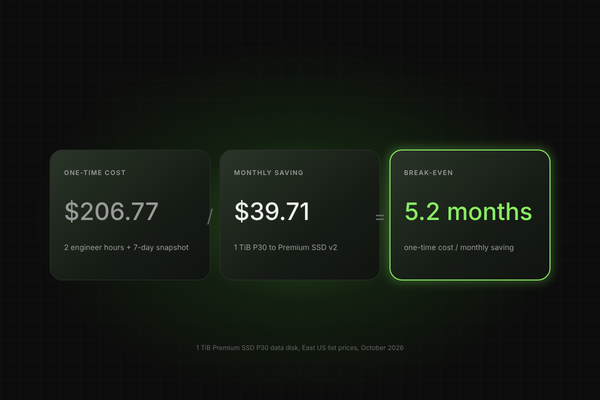
Azure storage cost optimization rarely fails for lack of data. It fails in the gap between a recommendation and an approved change on a production system. Observability and FinOps tools flag waste in volume, yet few findings ever reach execution.
In our webinar, The AI Action Engine, Harmon Sandhu, our Principal Solutions Engineer, walked through where that gap opens in block and blob storage, and how evidence, ownership, and automation close it. This post breaks down our framework, the audit steps behind it, the business case, and the hardest audience questions we took.
Key Takeaways
- Azure storage cost optimization starts with a utilization gap: managed disks in assessed environments typically run at 25-35% utilization, so most provisioned capacity is paid for but unused.
- The bottleneck is people and process, not detection: at one customer, Azure Advisor produced 290 idle-disk recommendations and only about 80 were actionable.
- Safe action needs three inputs: 60-90 days of IOPS and throughput evidence, a named owner, and a zero-downtime execution path.
- We see a conservative 25% reduction in the storage bill, up to 50-60% in some customers, and we target roughly 3:1 ROI (our figures, so validate them with a read-only assessment).
Why Does Azure Storage Cost Optimization Stall After Insight?
Azure storage cost optimization stalls because finding waste and removing it are different jobs, and only the first is well automated. Every finding still needs triage, an owner, a risk review, and a change window before a dollar is saved.
Azure storage cost optimization is the practice of reducing spend on managed disks and blob storage by right-sizing capacity, matching disk tiers to measured IOPS and throughput, removing idle resources, and applying lifecycle policies to object data.
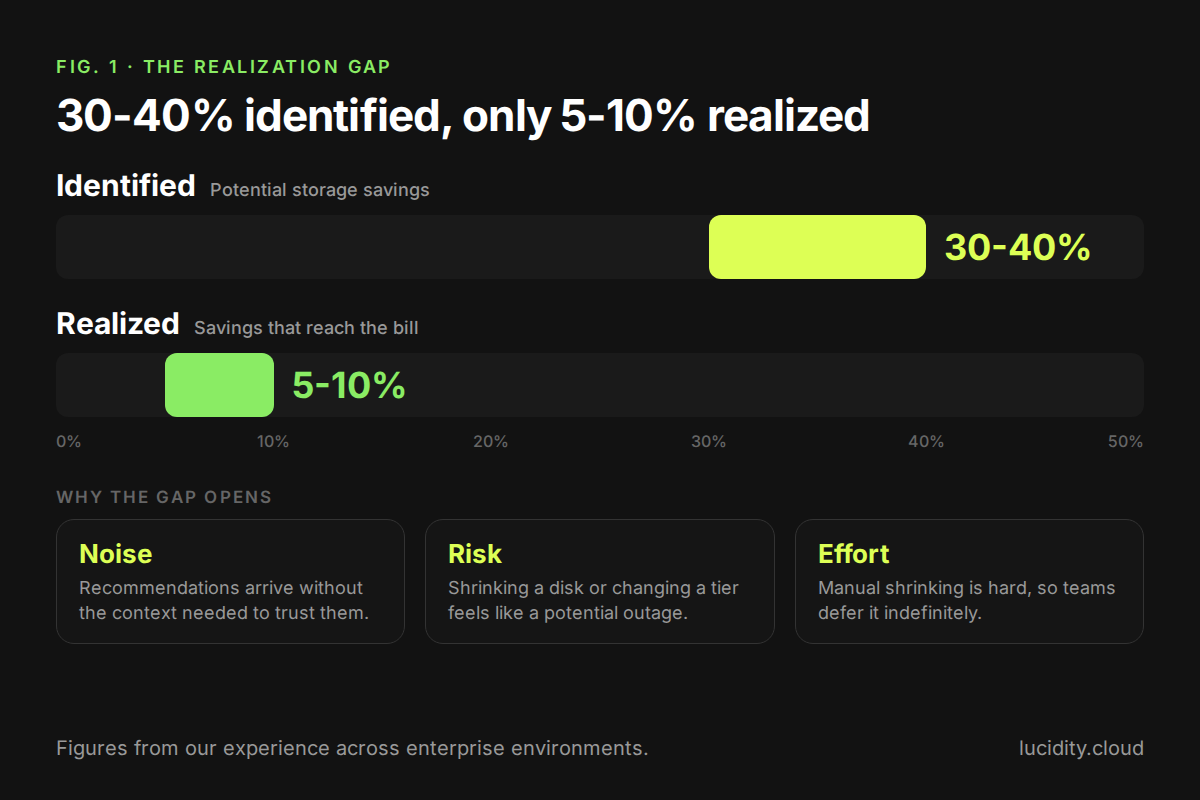
Across the enterprise environments we have worked in, the blocker is usually internal: risk aversion, or reluctance to adopt another technology on a production estate. Each step between identification and realization gets longer and more painful. We call this the realization gap: teams identify 30 to 40% in potential savings but realize only 5 to 10%.
Three failure modes recur:
- Noise: recommendations arrive without the context needed to trust them.
- Risk: shrinking a disk or changing a tier feels like a potential outage.
- Effort: manual shrinking is hard, so teams defer it indefinitely.
What Is the AI Action Engine and How Does It Close the Gap?
We built the Lucidity AI Action Engine to close the gap between finding savings and realizing them. It is an AI-driven platform that takes cloud cost optimization from insight to outcome. Instead of stopping at a dashboard of recommendations, it uses AI agents to work through the full cycle on its own: find where your cloud spend is going to waste, decide which changes are right for your environment, and act on them safely.
Most FinOps tools surface opportunities and leave the execution to your engineers. The AI Action Engine connects what is found to what is fixed, so savings show up on your bill rather than sitting in a backlog. The result is up to 40% in cloud savings, against the roughly 10% typical of other FinOps tools. The Azure examples in the rest of this post show Find, Decide, and Act on block and blob storage, and you can see the full workflow in our on-demand webinar.
How Does the AI Action Engine Find Deeper Than Billing Tools?
Generic FinOps tools work mostly from billing data and surface-level utilization, so they catch the obvious waste and miss the rest. The AI Action Engine looks at how your resources are actually being used, including block storage, where much of the hidden overspend lives.
- It analyzes real usage patterns at the resource level instead of relying on averages or billing line items.
- It uncovers opportunities that billing-based tools cannot see, finding 2x more than generic tools.
- It ranks everything into a prioritized list of top opportunities, ordered by savings impact, so teams know where to start.
How Does the AI Action Engine Help You Decide Confidently?
A finding is only useful if your team trusts it enough to act on it. The AI Action Engine does the analysis that engineers would otherwise do by hand before approving a change.
- Each recommendation comes with the evidence behind it and the expected savings.
- Changes are validated against how the workload actually behaves, so the risk of each action is understood up front.
- Teams stay in control with human-in-the-loop controls. You choose what needs your approval and what the engine can proceed with on its own.
How Does the AI Action Engine Act Safely?
This is where most tools stop and where the AI Action Engine delivers. Approved changes are carried out by AI agents, with no tickets, handoffs or waiting on a sprint.
- Changes are executed with zero downtime, so cost optimization never competes with reliability.
- For block storage, our AutoScaler adjusts capacity to match real demand, so you stop paying for provisioned space you do not use.
- Every action stays within the guardrails and approvals your team has set, and the savings are realized rather than just recommended.
What Does the AI Action Engine Mean for Your Team?
- Up to 40% cloud savings, compared with the roughly 10% typical of other FinOps tools.
- Less manual effort, because AI agents handle the execution engineers used to own.
- Zero downtime, so optimization never puts reliability at risk.
- Faster time to value, since savings are realized rather than just recommended.
Where Does Hidden Waste Sit in Azure Block and Blob Storage?
Azure storage cost optimization targets four places where hidden waste sits: unused disk capacity, over-specified disk tiers, idle disks that look healthy on the surface, and blob data parked on the wrong access tier. The VM is running and the disk is attached, so nothing looks wrong until you inspect what is underneath.
How Much Disk Capacity Do Azure VMs Actually Use?
In the environments we assess, Azure VM disks average 25-35% utilization. On a 1 TB disk, that leaves roughly 650-750 GB billed but unused. Across 700+ assessments and 200PB+ analyzed, we see about 30% average utilization.
The overhead persists for two reasons. Manual shrinking is hard, and the perceived risk is high. Azure managed disks cannot be shrunk in place, which is why one attendee asked us how downward resizing works at all. The answer, covered below, is OS-level online migration rather than a native Azure resize.
Any Azure storage cost optimization program should quantify this gap first. Multiply the unused gigabytes by your per-GB disk price and you have the ceiling for right-sizing savings, before tiering and idle disks are counted. We rarely see teams investigate this overhead actively, because the disks look healthy from the surface.
Does Every Azure Workload Need Premium SSD?
Most do not, but few teams verify it. Many organizations set a policy that every application runs on a defined disk tier, and the policy outlives the workload assumptions behind it. Our test is simple: if everything runs on Premium SSD, does everything need to?
The evidence standard matters. In our demo, tiering recommendations draw on up to 90 days of IOPS and throughput metrics, including peak I/O such as weekly or monthly reporting jobs. We can also simulate the workload on Standard SSD before anyone commits, and we move Premium v1 disks to v2 without downtime.
For Azure storage cost optimization, this is the most defensible tiering approach: measured demand against tier limits, not policy defaults. A Premium SSD that never approaches its performance ceiling is a candidate for Standard SSD, and the 90-day window keeps a quiet week from fooling the analysis.
Which Idle Disks Does Azure Advisor Miss?
Advisor does not reliably surface the disks that cost the most while doing the least. Our demo used a reserved disk that Advisor had flagged, yet none of its recommendations addressed cost; the rest covered areas such as security.
An idle disk is a provisioned disk that delivers no application value. We classify them into four types:
At one of our customers, Advisor generated 290 idle-disk recommendations. After checking how long each disk had gone unaccessed and when each recommendation was generated, only about 80 were actionable. That filtering step is what separates a useful Azure storage cost optimization backlog from a list nobody trusts.
How Do You Fix Azure Blob Storage Costs Without Guessing?
You fix blob costs by reading object-level behavior and applying lifecycle policies per storage account, not by flipping an account-wide tier. A storage account running entirely on the hot tier may hold mostly cold data, and nobody knows without looking.
Our questions for any storage account are direct. Are all objects being accessed continuously? Does the data belong on this tier? Is the right lifecycle policy applied? And can you answer those across the whole estate, not one account at a time?
Our demo showed a map of every object storage account, with drill-down into hot, cool, cold, and archive objects. Recommendation categories include:
- Migrating underused premium block blob accounts to standard.
- Disabling SFTP that has sat idle.
- Disabling idle secondary endpoints with one click.
- Tiering recommendations that generate a lifecycle management policy from observed access patterns, with current versus projected cost shown side by side.
Tiering recommendations are our favorites, because they come from how the objects behave rather than from account-level assumptions. Blob data is growing rapidly, driven by new application development and ever-larger data volumes, which makes it a growing share of Azure storage cost optimization work.
Why Do Optimization Recommendations Fail Without Owners and Evidence?
Recommendations fail because an engineer cannot act on a disk they do not own, and an owner will not approve a change they cannot verify. Both gaps are organizational, and both can be closed with data. Azure storage cost optimization succeeds when each finding arrives with an owner and proof attached.
Ownership comes first. We read resource tags, but also infer ownership from naming conventions and other signals using an AI engine. In our demo, a disk with no useful tag still carried a naming fragment that pointed to a likely team, which gave the engineer someone to contact.
Evidence comes second. Each recommendation we generate carries a "why it is safe" rationale built on 60+ days of utilization data.
"The why is the most important thing, because you want to have that context and that confidence." — Harmon Sandhu, Principal Solutions Engineer, Lucidity
That evidence changes the conversation with an app owner: this change is low risk, and your application usage is not what you assumed.
How Does Zero-Downtime Disk Shrinking Work on Azure?
Zero-downtime shrinking works by moving data between disks online at the operating system layer, so no volume is detached and no application restarts. We used Windows as the worked example, where the mechanism is Windows Storage Spaces.
Storage Spaces builds a storage pool from multiple disks and supports online migration of data from one disk to another. It is a native OS capability with checksums and the integrity checks expected of a data migration tool. We orchestrate it rather than reinvent it, which is how we deliver thin provisioning for the cloud using OS-native features.
AutoScaler applies this to expand and shrink disks as data grows or contracts, with no manual steps. For Azure storage cost optimization, this removes the main objection to right-sizing: the fear of an outage during the change. For reference, AutoScaler uses a lightweight agent and works across AWS, Azure, and Google Cloud, with support for Kubernetes/EKS volumes.
What Is the Azure Storage Cost Optimization Playbook for Engineering Teams?
The Azure storage cost optimization playbook has seven steps, moving from read-only measurement to scaled automation. It mirrors the sequence we demonstrate, so each step can run as a pilot before you widen scope. To see one recommendation move from finding to a verified saving, watch our AI Action Engine demo on demand.
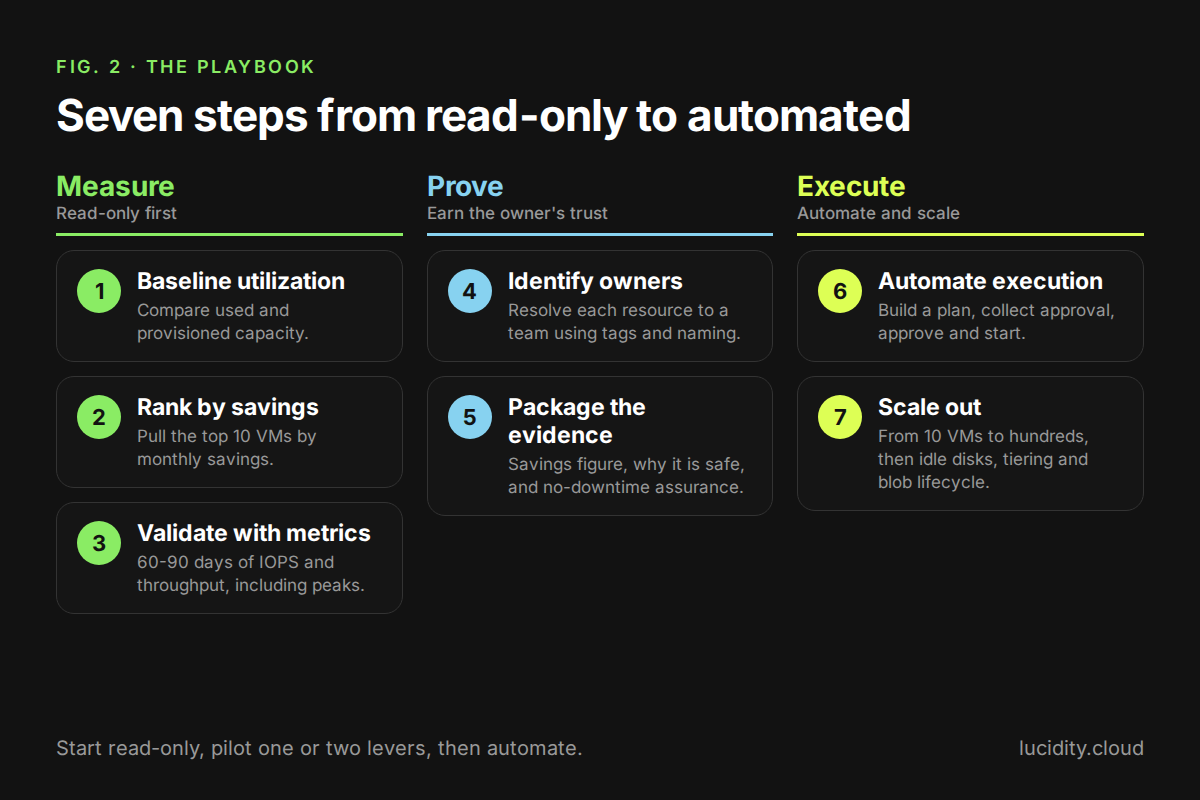
- Baseline utilization. Run a read-only assessment to compare used capacity with provisioned capacity and estimate savings.
- Rank by savings. Pull the top 10 VMs by monthly savings. Start where the money is.
- Validate with metrics. Check 60-90 days of IOPS and throughput, including peaks, before touching a tier or size.
- Identify owners. Resolve each resource to a team using tags and naming conventions.
- Package the evidence. Give owners the savings figure, the "why it is safe" rationale, and the no-downtime assurance.
- Automate execution. Build a plan, collect approval, and click approve and start, rather than working through manual runbooks.
- Scale out. Move from 10 VMs to hundreds, then repeat for idle disks, tiering, and blob lifecycle policies.
How Do Insight-Only Tools Compare With an Action Engine?
Insight-only tools show you a portion of the storage portfolio and leave execution to you, while an action engine pairs the same visibility with evidence and automated change. We complement existing FinOps and observability tooling; we do not replace it. The difference shows up in how far Azure storage cost optimization gets after the report is generated.
What Does the Business Case Look Like for a CFO?
The business case is capacity reclaimed plus tier savings plus idle-disk removal plus blob lifecycle savings, minus platform cost. Each lever has a formula you can paste into a board deck and fill with your own Azure billing data. Framing Azure storage cost optimization this way lets finance audit every line.
Illustrative math: a disk at 30% utilization with a 75% utilization target needs only 40% of its provisioned capacity (30 ÷ 75), a 60% capacity reduction before tier effects. That lines up with the 50-70% savings range we cite.
We aim for roughly 3:1 savings to spend, with payback in one to two months and a pay-for-what-you-use model. Treat these as our claims and verify them with a read-only pass first.
How Do You Start Azure Storage Cost Optimization Without Production Risk?
Start read-only, pilot one or two levers, then automate. Azure storage cost optimization de-risks itself when you sequence it this way, and our progression follows that logic: Assessment, then idle disk cleanup, then AutoScaler.
- Assessment: a free, read-only diagnostic of disk utilization and savings potential, typically running in 30 minutes to a couple of hours. Begin with your top 10 paying subscriptions.
- Disk Cleanup: idle disk cleanup and disk tiering, with recommendations you approve and execute.
- AutoScaler: continuous, automated right-sizing once the evidence has earned trust.
We deliver Lucidity as SaaS. Our pre-sales team runs insights first, then optional testing on a few of the levers above, and then our customer success team hands off to the operations team that will run it.
Run our free Assessment at lucidity.cloud to see your utilization gap in a read-only report, or watch the on-demand AI Action Engine webinar to see the workflow run on a live Azure workload. When you are ready, book a demo and we will run it on your own estate.
Frequently Asked Questions
How Does Shrinking an Azure Disk Avoid Data Loss?
It relies on native OS migration with built-in checksums, not on custom data-moving code. On Windows, Storage Spaces moves data between disks online. We orchestrate that capability, so the integrity guarantees come from a mechanism already trusted in production, which matters for any Azure storage cost optimization effort that touches live data. We offered a separate technical deep dive for headroom specifics, since an attendee asked whether disks keep spare capacity above the data. We cover approvals, autonomy per workload, and rollback in the guardrails segment of our on-demand webinar.
Where Do We Fit If You Already Have a FinOps Tool?
We complement the tool you have. Keep your observability and billing visibility, and use us to produce cleaner, higher-confidence storage recommendations and to execute them. The Azure Advisor comparison above shows the pattern: Advisor raises the finding, and the deeper analysis decides which ones are actionable. That layering is how Azure storage cost optimization works alongside the tools you already pay for.
How Does Microsoft Smart Tier Change Blob Optimization?
Smart Tier is a solid default, but it does not replace estate-wide policy analysis. We complement it by evaluating lifecycle policies at the prefix level across all accounts, and by catching other blob waste such as geo-redundancy replication, idle SFTP, and secondary reads.
Why Not Build This With Your Own LLM?
A model can analyze data, but savings come from safe execution. We combine data-driven cloud intelligence with proprietary cloud-native automation, so optimization becomes realized cost reduction with minimal operational impact. Building the execution layer yourself also pulls senior engineers off the roadmap to maintain tooling, which is a poor trade for Azure storage cost optimization when the goal is savings, not internal software.
Table of Contents
Sign Up