The redundancy dropdown in the storage account wizard is a cost and risk decision: Hot GRS costs 2.2x Hot LRS per GB in East US, and the wrong choice either leaves data exposed to a datacenter failure or pays for geo-replication nobody uses.
Azure offers six options: LRS, ZRS, GRS, RA-GRS, GZRS and RA-GZRS. They differ in durability, geographic scope, failover behavior and price. This post compares them side by side, works through a 100 TiB cost example, and covers the conversion and failover rules that catch teams out.
Key Takeaways
- Azure Blob redundancy is a cost decision: Hot GRS costs 2.2x Hot LRS per GB in East US, before geo-replication transfer.
- LRS and ZRS replicate synchronously. GRS and GZRS copy to the secondary region asynchronously, so recent writes can be lost in an unplanned failover.
- Moving between LRS and ZRS is a self-service conversion with no downtime. Adding or removing geo is a setting change.
- Unplanned failover leaves the account on LRS. Restoring geo means paying to re-replicate the whole account.
What does Azure Storage Redundancy Actually Mean?
Azure storage redundancy is the automatic replication of your data to multiple physical locations, so hardware failures, outages and disasters do not take it offline or destroy it. Azure always keeps at least 3 copies; the option you pick controls where they live.
Redundancy is set at the storage account level, so it applies to every service in the account: Blob, Files, Queues and Tables. It shapes four things:
- SLA eligibility: higher tiers unlock stronger availability guarantees.
- RPO: how much recent data is at risk if a failure hits before the next replication sync.
- RTO: how quickly read and write access returns after an outage.
- Cost: storage and transfer charges rise as replication scope widens.
What redundancy does not cover?
Redundancy protects against infrastructure failure. It does not protect against accidental deletion, data corruption or ransomware overwrites, because those changes replicate to every copy immediately. For those risks, use blob versioning, soft delete or point-in-time restore.
Primary Region Redundancy: LRS and ZRS
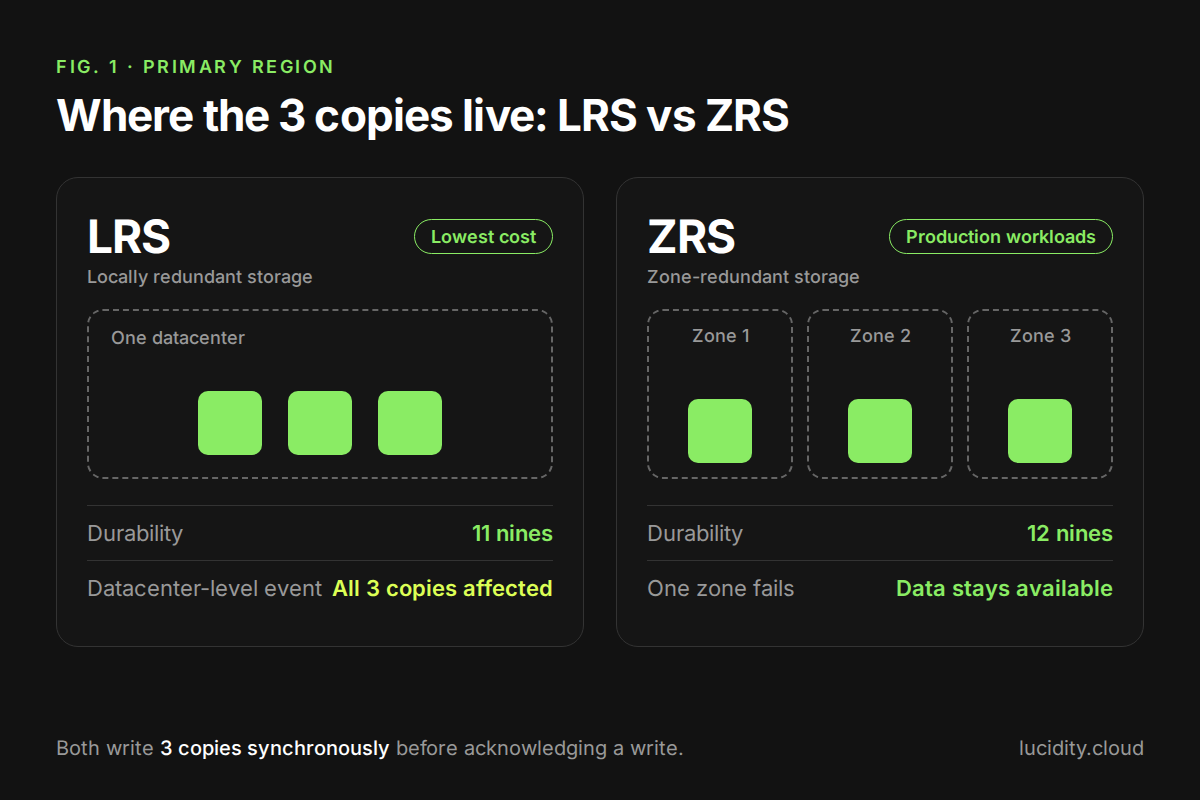
LRS and ZRS both write 3 copies synchronously within the primary region before acknowledging a write. The difference is where those copies sit.
Locally redundant storage (LRS)
LRS keeps all 3 copies in a single datacenter and offers 11 nines (99.999999999%) durability. It is the cheapest option, but a datacenter-level event such as fire, flooding or a facility-wide power failure can make all 3 copies unavailable at once.
LRS fits dev and test environments, data you can rebuild or re-ingest, and workloads whose residency rules rule out zone or regional replication.
Zone-redundant storage (ZRS)
ZRS spreads the 3 copies across 3 availability zones in the primary region. Each zone has independent power, cooling and networking, so a single datacenter failure no longer takes the data offline. Durability is 12 nines (99.9999999999%).
Azure repoints DNS automatically during a zone failure, but applications should still use retry logic with exponential backoff to ride out brief interruptions. Microsoft recommends ZRS for production workloads that need high availability inside one region, and for Azure Files, where it avoids remounting shares during a zone failure.
Secondary Region Redundancy: GRS, GZRS and Read-Access Variants
When a full regional outage is a credible risk, Azure replicates data asynchronously to a paired secondary region. Azure assigns the pair from your primary region and you cannot change it; Microsoft publishes the full list of region pairs.
Geo-redundant storage (GRS)
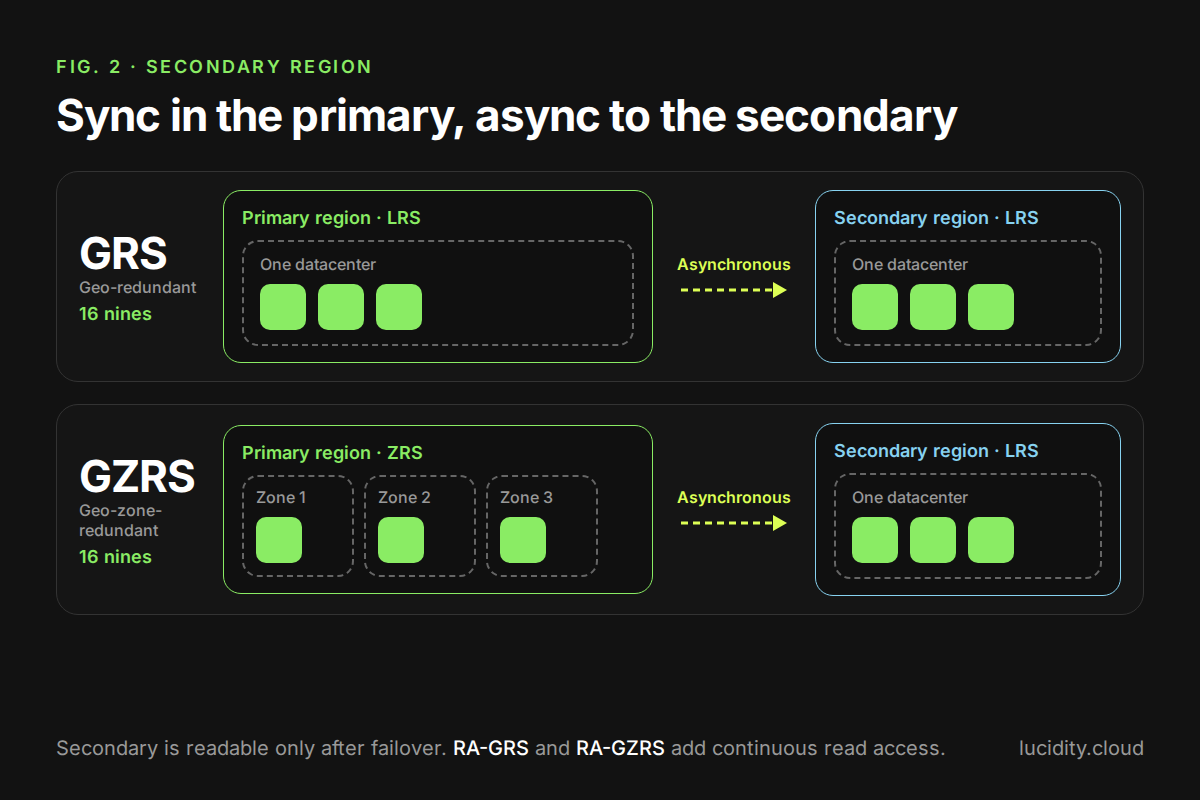
GRS writes to LRS synchronously in the primary region, then copies asynchronously to the secondary, where the data is also held as LRS. Durability is 16 nines. Under normal operation the secondary is a passive copy: you cannot read it unless a failover is initiated.
Geo-zone-redundant storage (GZRS)
GZRS writes synchronously across three availability zones in the primary region, then replicates asynchronously to the secondary region. It adds zone resilience in the primary; the secondary stays eventually consistent, as with GRS (Microsoft Learn, storage redundancy). Durability is 16 nines.
GZRS suits workloads that need both zone and regional resilience. The primary region must support availability zones and have a paired region.
Read-access variants: RA-GRS and RA-GZRS
RA-GRS and RA-GZRS add continuous read access to the secondary endpoint, even while the primary region is healthy. The secondary endpoint is the account name with a -secondary suffix, and applications must be written to read from it.
Because replication is asynchronous, the secondary can trail the primary. Check the account's Last Sync Time property to gauge the lag, and design readers to tolerate slightly stale data.
How to Choose the Right Redundancy Option
The choice comes down to three variables: how much durability and availability you need, any geographic or compliance limits, and what you can spend. Use the table to match the option to the workload.
Prices: first 50 TB, General Block Blob v2, Hot tier, from the Azure Retail Prices API, pulled 21 Oct 2026. Prices vary by region, so check your target region before deciding.
Failover: What Happens in a Regional Outage?
Before committing to geo-redundancy, know the three failover mechanisms:
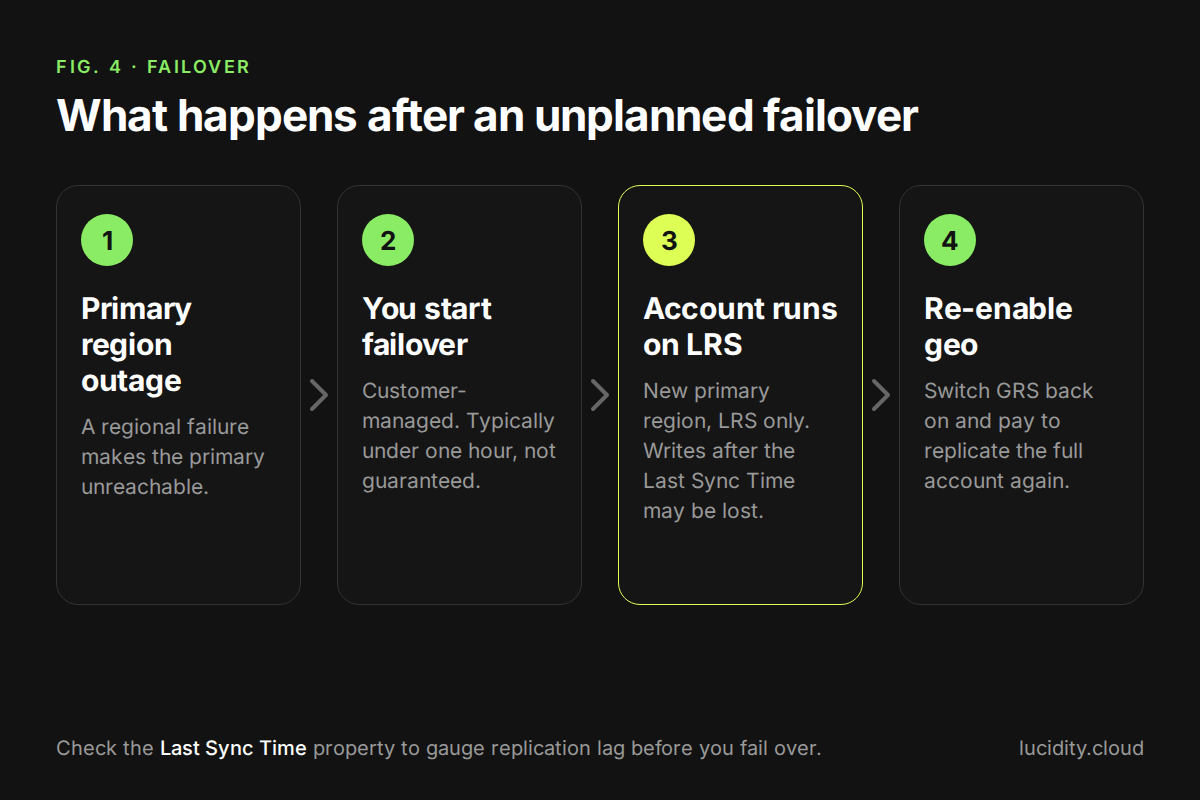
- Customer-managed unplanned failover: you start it during a primary region outage. It typically takes less than one hour, though Microsoft does not guarantee that.
- Customer-managed planned failover: used for DR drills and coordinated migrations. It finishes synchronizing data before switching.
- Microsoft-managed failover: a last resort for catastrophic regional failures. Microsoft warns against relying on it for DR planning.
Two consequences matter for cost and risk. Data written after the Last Sync Time may be lost in an unplanned failover. And after it, the account runs on LRS in the new primary region until you re-enable geo-replication (Microsoft Learn, disaster recovery guidance).
For a tighter recovery point, Microsoft offers optional, paid Geo priority replication, which targets an RPO of 15 minutes or less for block blobs. Check the Azure Storage SLA for its terms.
What Redundancy Costs: A 100 TiB Example
On 100 TiB of Hot block blobs, GRS costs about $31,300 a year more than LRS, and RA-GRS adds about $15,800 more on top of GRS. Per-GB prices are in the table above; this example adds the geo-replication charge those prices leave out.

Assumptions: 100 TiB (102,400 GB) of Hot block blobs, 5 TiB (5,120 GB) of new or changed data a month, East US list prices pulled 21 Oct 2026. Geo options also pay $0.02 per GB of geo-replicated data ($102.40 a month here). Transactions are excluded.
Formula: (51,200 GB x first-band rate) + (51,200 GB x second-band rate) + (geo-replicated GB x $0.02 for geo options).
Two ways this turns into waste:
- Keeping GRS on 100 TiB that never needs regional failover costs about $31,300 a year over LRS.
- Paying for RA-GRS when nothing reads the secondary endpoint costs about $15,800 a year over GRS.
A higher tier also does not change how much you provision. Redundancy decides where data is protected; right-sizing decides how much of it you pay to protect.
Changing Redundancy: Conversion Rules and Constraints
You can change redundancy after creation without downtime, but each type of change has its own rules (Microsoft Learn, change how a storage account is replicated).
- Add or remove geo or read access: change it in the portal, PowerShell or CLI with no downtime. Adding geo bills the initial sync of all existing data at the geo-replication rate.
- LRS to ZRS, or GRS to GZRS: run a customer-initiated conversion. It causes no downtime, typically starts within 72 hours, can take days, and has no completion SLA. Wait 24 hours after it completes before the next change.
- Remove read access: RA-GRS billing continues for 30 days after you switch to GRS or LRS.
- Archived blobs: ZRS, GZRS and RA-GZRS do not support the archive tier. Rehydrate archived blobs first, which can be costly.
- After an unplanned failover: the account becomes LRS and cannot convert to ZRS or GZRS. Use manual migration to a new account.
Common Misconceptions
Redundancy is not backup. It guards against infrastructure failure, not bad data. A deleted or overwritten blob replicates to every copy straight away.
More redundancy is not always better. GRS and GZRS need a paired region. If data governance rules keep your data inside one geography, geo-redundancy can break compliance even though it looks safer on paper.
Geo-redundancy does not mean instant failover. The secondary is asynchronous, so recent writes can be lost, and a customer-managed failover leaves the account on LRS until you pay to re-replicate it.
ZRS can replace any tier. Not if you use the archive tier: ZRS, GZRS and RA-GZRS do not support it, so archived blobs must be rehydrated before conversion.
Find Geo-Redundancy You Are Not Using
Paying for geo-redundancy nobody uses? Switch on Free Insights. Lucidity Object Drift uses agentless detection to flag geo-redundant accounts (GRS, RA-GRS, GZRS, RA-GZRS) with no recent activity and unused secondary read endpoints. It gives dollar-quantified recommendations and scheduled remediation, as part of the Object Storage Suite.
Frequently Asked Questions
What is redundancy in Azure storage?
It is the automatic replication of your data to multiple physical locations, within a region or across paired regions, so it stays available and durable through hardware failures, outages and disasters. It is set at the storage account level and applies to all data in the account.
How much does Azure storage redundancy cost?
Cost scales with replication scope. In East US, Hot tier, LRS is about $0.0208 per GB-month and RA-GZRS about $0.0585. Geo options also add a geo-replication transfer charge. See the cost example above and the Azure Blob Storage pricing page for current rates in your region.
Does GRS cost more than storage alone?
Yes. Geo-redundant accounts also pay $0.02 per GB of geo-replicated data in East US, including the initial sync of all existing data when you enable geo.
What is the difference between LRS and ZRS?
LRS keeps 3 copies in one datacenter (11 nines, lowest cost, exposed to datacenter-level failures). ZRS spreads 3 copies across availability zones in one region (12 nines, survives a zone failure, higher cost).
What is the difference between GRS and GZRS?
Both replicate asynchronously to a secondary region and offer 16 nines of durability. GRS uses LRS in the primary region; GZRS uses ZRS across availability zones, adding zone resilience in the primary on top of regional protection.
Can I change my Azure storage redundancy after creation?
Yes. Geo and read-access changes apply from the portal or CLI with no downtime. Zone changes (LRS to ZRS, GRS to GZRS) use a customer-initiated conversion with no downtime, though it has no completion SLA.
What happens to redundancy after a failover?
An unplanned customer-managed failover converts the account to LRS in the new primary region. To get geo back, you re-enable GRS and pay to replicate the full account again.
Does Azure storage redundancy protect against accidental deletion?
No. Deletions and overwrites replicate to all copies immediately. Use blob versioning, soft delete and point-in-time restore for that risk.
Table of Contents
Sign Up