An Azure Blob 403 with a managed identity is almost always one of three things: the identity lacks a data-plane role at the right scope, the request is blocked by network rules, or the code is using the wrong identity or credential type. The error code points to the most common cause: AuthorizationPermissionMismatch usually means RBAC, AuthorizationFailure usually means network access, and KeyBasedAuthenticationNotPermitted means Shared Key is disabled. Confirm the cause in the StorageBlobLogs table before changing anything.
Key Takeaways
- A managed identity 403 usually comes from missing RBAC, blocked network access, or the wrong identity or credential.
- Read the error code first:
AuthorizationPermissionMismatchmeans RBAC,AuthorizationFailuremeans network, andKeyBasedAuthenticationNotPermittedmeans Shared Key is disabled. - Confirm the cause in the
StorageBlobLogstable before changing anything. - Owner, Contributor and Reader don’t grant blob data access. Assign Storage Blob Data Reader or Contributor at the account or container scope.
- Role changes usually apply within minutes but can take about 30 minutes, and token caching can approach 24 hours.
- With several user-assigned identities, pass the client ID explicitly.
- Test with
az login --identityand--auth-mode login, or the CLI falls back to the account key. - Keep logging on only during the investigation. A 3-day window ingests about 4 GB, or about $9.20, versus about $92 a month if left on.
When does an Azure Blob 403 with managed identity apply?
This guide applies when an app running on an Azure VM, Functions app or AKS workload calls Blob Storage with a managed identity and gets HTTP 403 (Forbidden). Microsoft splits these failures into authentication and authorization errors, and the error code in the response body tells you which branch you are on.
Typical symptom: the app works locally but fails in Azure. For initial setup, see Azure Blob Storage access with managed identity.
Which error code maps to which cause?
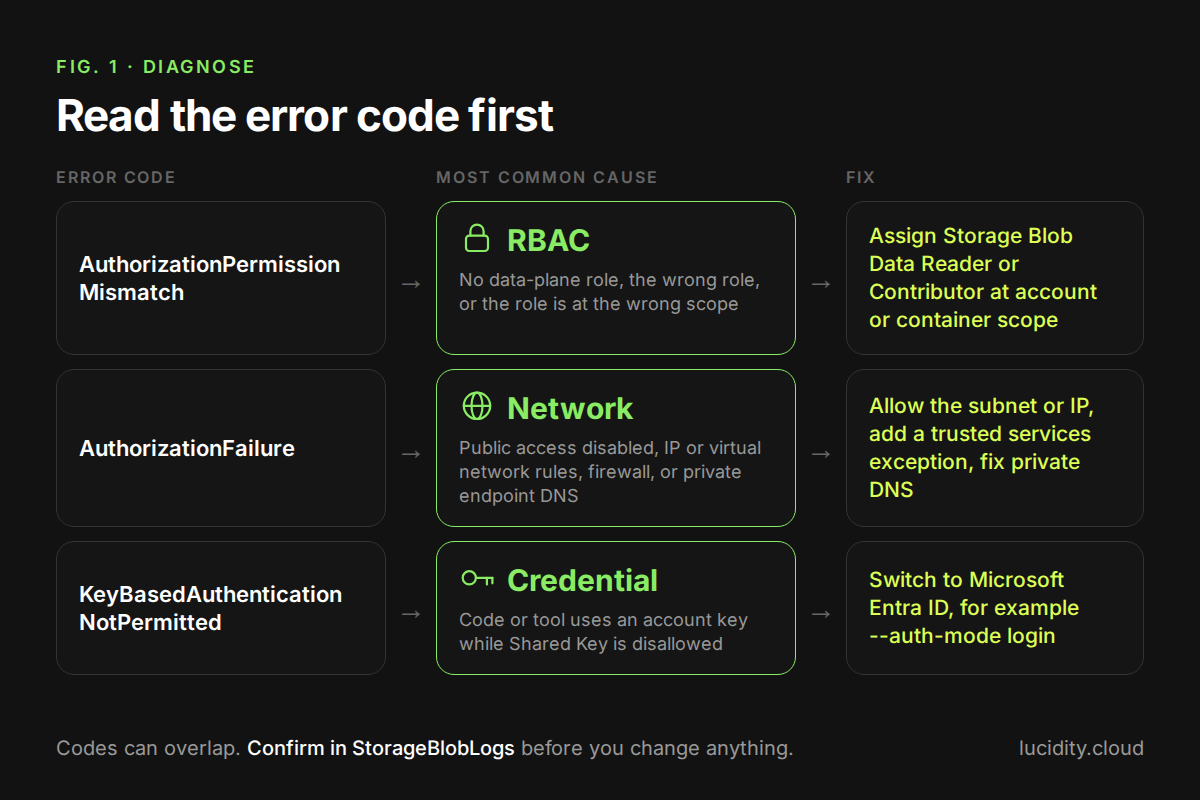
Each error code has a most common cause, but codes can overlap, so treat the table as a starting point and confirm with logs. The table below summarizes the Microsoft 403 troubleshooting guide.
How do you diagnose and fix the 403 step by step?
Find the failed request in logs, then check identity, role, scope and network in that order. Assigning roles needs Microsoft.Authorization/roleAssignments/write, for example Role Based Access Control Administrator or User Access Administrator (Microsoft Learn).
- Query the failed requests. Resource logs are not collected until you create a diagnostic setting (Monitor Blob Storage). Once logs flow to Log Analytics, group 403s by status text, auth type, caller and IP. All columns below are listed in the StorageBlobLogs reference; StatusCode is a string.
StorageBlobLogs
| where TimeGenerated > ago(1d) and StatusCode == "403"
| summarize count() by StatusText, OperationName, AuthenticationType,
RequesterObjectId, RequesterAppId, CallerIpAddress
| top 20 by count_ desc
- Confirm the identity. Compare RequesterObjectId with the identity you expect. Role assignments for managed identities use the object ID, which you can find with az ad sp list (Microsoft Learn).
az ad sp list --display-name "<identity-name>" \
--query "[].{name:displayName, objectId:id, clientId:appId}"
- Check and assign the data-plane role. Assign Storage Blob Data Contributor at the storage account or container scope. The scope formats below come from the Azure RBAC CLI guide.
az role assignment list --assignee "<object-id>" --all -o table
az role assignment create --assignee-object-id "<object-id>" \
--assignee-principal-type ServicePrincipal \
--role "Storage Blob Data Contributor" \
--scope "/subscriptions/<sub-id>/resourceGroups/<rg>/providers/Microsoft.Storage/storageAccounts/<account>/blobServices/default/containers/<container>"
Portal path: storage account, then Access control (IAM), Add, Add role assignment, pick the role, then on Members select Managed identity and Review + assign (Microsoft Learn).
- Test as the identity. On the host, sign in with the user-assigned identity's client ID (az login reference) and force Entra ID auth. Without --auth-mode, the CLI tries to retrieve the account key instead (Microsoft Learn).
az login --identity --client-id <client-id>
az storage blob list --account-name <account> \
--container-name <container> --auth-mode login -o table
- Check Shared Key and network settings. If the log shows key-based auth, check whether Shared Key is disallowed (Microsoft Learn). If the code is AuthorizationFailure, compare CallerIpAddress with the account's IP and virtual network rules.
az storage account show --name <account> --resource-group <rg> \
--query "allowSharedKeyAccess"
What does a 403 investigation cost in logs and time?
The main direct cost is Log Analytics ingestion of StorageBlobLogs, priced at $2.30 per GB for Analytics Logs as of 21 Oct 2026, East US, per the Azure Retail Prices API. As of 21 Oct 2026, the first 5 GB per month per billing account are free and 31 to 90 days of retention are included (Azure Monitor pricing).
Assumptions: one busy storage account produces 40 GB per month of blob resource logs, and the billing account's 5 GB free allowance is already used by other workspaces. Leaving logging on permanently costs 40 GB x $2.30 = $92.00 per month. Enabling it for a 3-day investigation ingests about 4 GB (40 GB / 30 days x 3 days), or $9.20.
Time matters too: a role fix usually applies within minutes but can take up to about 30 minutes, while managed identity group or token caching can approach 24 hours (Azure RBAC troubleshooting). Assigning roles directly to the identity avoids that wait.
What are the gotchas and limits?
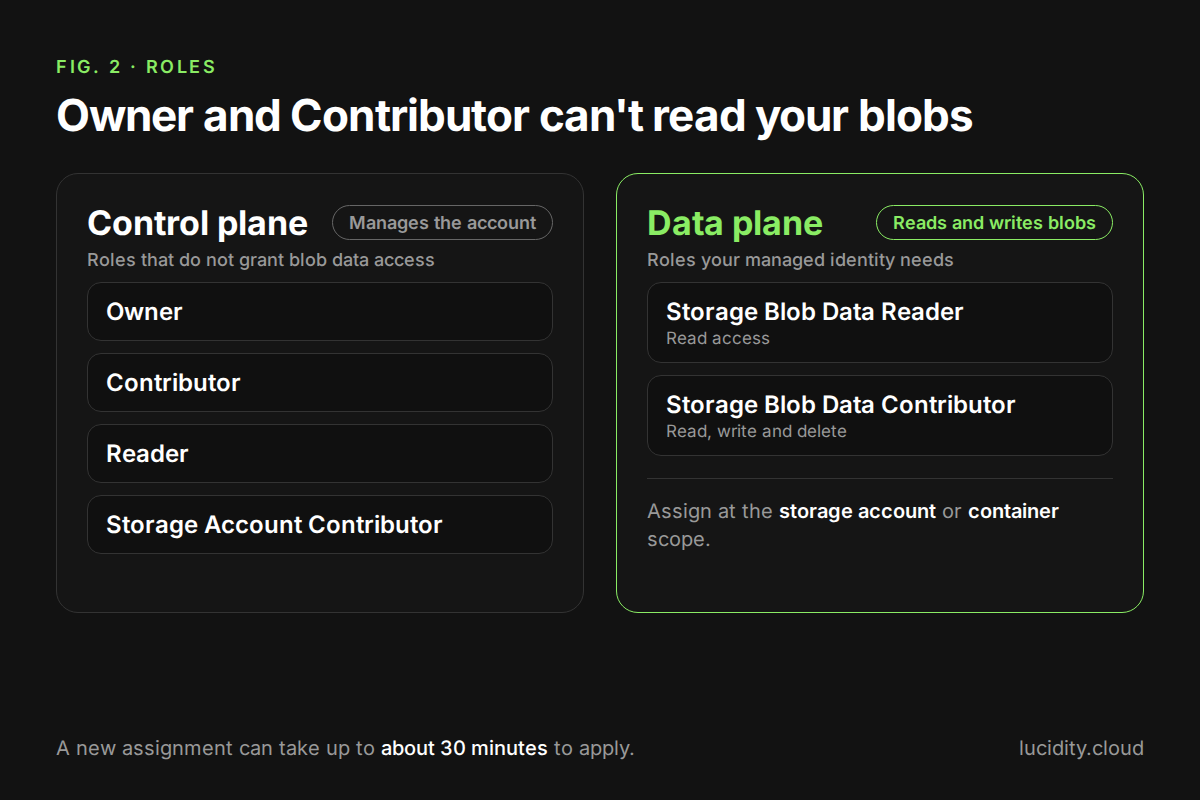
These are the cases that most often survive a first fix attempt.
- Control-plane roles do not read data. Owner, Contributor and Storage Account Contributor manage the account but give no blob data access via Entra ID (Microsoft Learn).
- Portal access needs two roles. Browsing blobs with Entra credentials needs the Azure Resource Manager Reader role plus a data role (Microsoft Learn).
- Management group scope is slow. Built-in roles with data actions at management group scope may not update on the data plane for several hours (Azure RBAC troubleshooting).
- Wrong token audience. Tokens for Azure Resource Manager (https://management.azure.com/) do not authorize blob calls; request https://storage.azure.com/ (Microsoft Learn).
- Multiple user-assigned identities. IMDS requires client_id, object_id or msi_res_id when a VM has several user-assigned identities (Microsoft Learn).
- Subnets are blocked by default once network rules apply, and service endpoint policy changes can take up to 15 minutes (Microsoft Learn).
- Read-only locks block role assignments scoped to the storage account or container (Microsoft Learn).
How do you verify the fix worked?
Rerun the az storage blob list --auth-mode login test as the identity, then rerun the KQL query and confirm no new 403 rows appear for that RequesterObjectId. Check that successful requests show the expected AuthenticationType rather than a key.
If you use an Azure ABAC condition, also test a request it should deny. AuthorizationDetails holds the policy information used to authorize each request (StorageBlobLogs reference).
How can you see which blob accounts and identities matter most?
Know which containers and prefixes hold live data. Lucidity's Object Storage Suite for Azure Blob includes Object Mapping, an agentless account to container to prefix heatmap built on Azure Blob Inventory and ARM metadata, plus Object Drift and Object Tiering. It covers connected, supported accounts (not GPv1); inventory data takes days to build. Switch on Free Insights.
Frequently Asked Questions
Why does my managed identity get 403 even though it has the Contributor role?
Contributor is a control-plane role and does not grant access to blob data through Microsoft Entra ID. Azure only allows data access through roles defined for it, such as Storage Blob Data Reader for reads and Storage Blob Data Contributor for read, write and delete. Assign one of these at the storage account or container scope, then allow up to about 30 minutes for the change to apply.
What is the difference between AuthorizationPermissionMismatch and AuthorizationFailure?
AuthorizationPermissionMismatch means the request reached the account but the identity or SAS lacks the needed permission. AuthorizationFailure means access was blocked by network controls, such as disabled public network access, IP or virtual network rules, or firewall settings. The first is fixed with RBAC role assignments; the second is fixed by allowing the caller's network path, for example a subnet rule or correct private endpoint DNS.
How long does an Azure role assignment take to work for blob access?
RBAC changes usually apply within minutes but can take up to about 30 minutes; Microsoft pages cite both 10 and 30 minutes. Management group scope can take much longer, and in rare cases data action permissions take up to 12 hours. Managed identity group or token caching can approach 24 hours, so direct assignment is faster.
Can I use az CLI to test blob access as a managed identity?
Yes, sign in with az login --identity, adding --client-id for a user-assigned identity, and run blob commands with --auth-mode login. This forces Microsoft Entra ID authorization. If you omit --auth-mode, the Azure CLI tries to retrieve the account access key, which hides RBAC problems and fails when Shared Key access is disallowed on the storage account.
Table of Contents
Sign Up