
Key takeaways (what you actually learn from the blog)
- Azure has eight native storage-monitoring surfaces, and they overlap in name more than in function. You leave able to tell apart confusingly similar tools — e.g. Storage Discovery (estate capacity trend) vs. Storage Insights (live operational metrics).
- Every monitoring question reduces to three: what do I have (inventory/capacity), what does it cost (spend), and should it be like this (utilization/action). Azure answers the first well, the second only at the account level, and barely the third.
- Only Azure Advisor recommends actions. The other seven surfaces hand you data and stop.
- No single tool shows capacity and cost together — capacity tools are storage-scoped, the cost tool (Cost Management) is cross-provider, so you join them by hand on resource ID.
- Cost attribution stops at the storage account — no per-container, per-prefix, or per-blob cost view exists anywhere in Azure.
- Nothing native tiers data on observed access — lifecycle management only applies static, pre-written rules.
- Scope explains every limitation: Storage Discovery, blob inventory, and Purview are Blob/ADLS-only; Storage Insights covers the full account; only Resource Graph, Cost Management, and Advisor see everything. Managed disks sit outside all of it (Microsoft.Compute, not Microsoft.Storage).
- Doing this manually costs 11–22 senior-engineer-hours per monthly cycle — the number to take to a budget owner.
- A workable native baseline is three tools joined by hand (Resource Graph + Cost Management + Storage Discovery), plus Advisor and blob inventory — but it still never answers "should it be like this."
Azure gives you at least eight separate places to do Azure storage monitoring: Azure Storage Discovery, Azure Advisor, Microsoft Purview, Azure Monitor Storage Insights, Azure Resource Graph, Microsoft Cost Management, blob inventory reports, and the retired Storage Analytics that a surprising number of subscriptions still have switched on. Between them they will tell you how much data you hold, how it is configured, what it costs, and what is inside it. Almost none of them will tell you what to do about any of it. This guide maps what each service answers, where each one stops, and which combination is worth standardizing on.
What Questions Does Azure Storage Monitoring Have to Answer?
Every Azure storage monitoring conversation reduces to three questions, and Azure answers them with wildly different levels of completeness. Most confusion about which service to use comes from asking one service a question it was never built to answer.
- What do I have? Inventory and capacity. How many storage accounts, how many disks, how much data, where, in what SKU, growing how fast.
- What does it cost? Spend, and spend attributable to a team, an application or an environment.
- Should it be like this? Utilization and action. Is this container cold, is this account over-redundant, and what specifically should change.
Azure answers the first question well. It answers the second partially - accurately at the account level, and not at all below it. It barely answers the third. Everything that follows in this guide is a consequence of that asymmetry.
The eight services also overlap in name far more than in function. Storage Discovery and Storage Insights sound interchangeable and answer different questions on different timescales. Cost Management and Advisor both mention savings, but only one of them recommends. Holding the three questions in mind while reading the rest of this guide is the fastest way to see which tool belongs to which question, and where the gaps between them fall.
What Are Azure Storage Monitoring Services Actually Scoped To?
Azure storage monitoring services are scoped to the storage account resource, and several are narrower than that. Nearly every limitation in this guide follows from scope, so it is worth stating before the comparison rather than discovering it service by service.
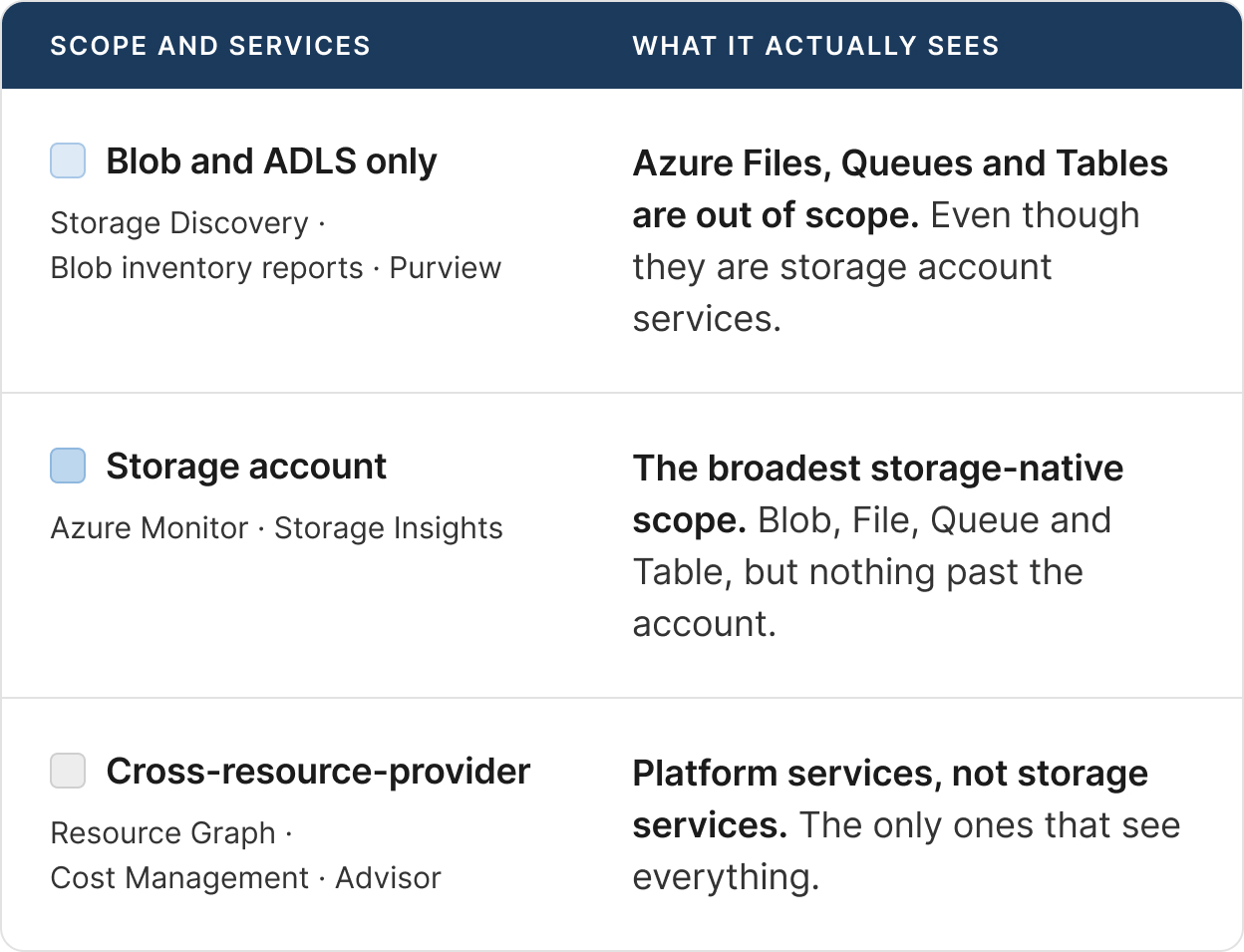
Two consequences are worth holding onto. Azure Storage Discovery does not cover Azure Files - so "storage service" and "storage account service" are not the same thing, and the newest service has the narrowest scope.
Managed disks sit outside all of this entirely. Azure Managed Disks are Microsoft.Compute resources, not Microsoft.Storage, so no service in this guide is built to see inside one. Resource Graph and Cost Management will inventory and price your disks because they are cross-provider, but that is the extent of it. Disk observability is a different question with a different set of tools, and it is out of scope for this series.
Which Azure Storage Monitoring Tools Report Capacity, Cost or Actions?
Only Azure Advisor tells you what to do; every other Azure storage monitoring tool reports either capacity or cost, and none reports both. This table is the short version of the entire series. Every claim in it is sourced in the sections below, and Parts 2 through 4 unpack each column.
Read the table by column rather than by row. The Capacity and Cost columns never both contain "Yes" on the same row - no single service knows both how much data you hold and what it costs. Every service that reports capacity is storage-scoped; every service that reports cost is cross-provider. And the final column, the one that matters most to anyone who has to act, contains a single unambiguous "Yes".
What Is Each Azure Storage Monitoring Service Actually For?
Each Azure storage monitoring service was built to answer one of the three questions, and the sections below state which one, what it reports, and the hard limit where it stops. The order runs from the newest service to the retired one.
What Does Azure Storage Discovery Tell You About a Blob Estate?
Azure Storage Discovery is a fully managed, agentless service that gives enterprise-wide visibility into a Blob and Azure Data Lake Storage estate from a single workspace. It reached general availability on 16 October 2025, and it is the newest addition to the Azure storage monitoring set.
Storage Discovery reports capacity (object size, object count, total data stored, growth by region), activity (transactions, ingress, egress, errors), security configuration (public access, shared key authentication, encryption) and resource configuration (redundancy, performance tier, whether lifecycle management is present). Analysis runs without touching the accounts it inspects - Microsoft documents no transactions and no performance impact on analyzed resources.
Two limits define it. Azure Storage Discovery covers Blob and ADLS only - Azure Files, Queues and Tables are out of scope, which makes it an Azure blob storage monitoring tool rather than a storage account one. And it reports no cost data and takes no action: it will flag that an account holds infrequently accessed data with no lifecycle policy, and leave the decision entirely to you.
What Does Azure Advisor Recommend for Storage Accounts?
Azure Advisor is the only native Azure storage monitoring surface that tells you what to do, and its storage-account recommendations are thin. Being cross-provider, it covers far more than storage - but for storage accounts there are two recommendations: revisit retention on classic log data, and a transactions-per-TB heuristic suggesting premium storage may be cheaper.
A third recommendation, a Blob storage reserved-capacity purchase, is scoped to the subscription rather than to any account, and lowers the rate you pay rather than the capacity you hold. Notably absent is any recommendation about access tiers or lifecycle management - the single largest blob cost lever generates nothing at all.
Azure Advisor's separate Cost Optimization workbook goes further, adding checks for non-v2 storage accounts, stale snapshots and idle backups, with a Quick Fix action on some items. Microsoft states plainly that the workbook "serves as guidance and doesn't guarantee cost reduction." Part 3 covers both surfaces in detail.
Is Microsoft Purview a Storage Cost or Capacity Tool?
Microsoft Purview is a data security, governance and compliance platform, and it is neither a cost tool nor a capacity tool. It answers "what is this data and who can see it." For a storage estate it scans Blob and ADLS to extract metadata, schema, classifications, sensitivity labels and lineage.
Microsoft Purview reports no spend and no storage size of any kind. It also has no managed disk coverage. This is worth stating bluntly because the confusion is widespread: teams frequently expect Purview to answer Azure storage monitoring questions about cost, and it will never do so.
Purview does have a role in a cost program, but an indirect one. Knowing that a container holds obsolete personal data is a reason to delete it; Purview will surface that fact, and stop there. Part 4 of this series covers Purview in detail, including the ongoing move from the classic Azure Purview stack to Unified Catalog.
What Does Storage Insights Cover for Azure Storage Account Monitoring?
Storage Insights is the Azure Monitor workbook for Azure storage account monitoring, reachable either estate-wide through Azure Monitor or per account. It reports availability, end-to-end and server latency, capacity used by blob, file, table and queue, failures and throttling, and transaction volumes. It is the broadest storage-native scope in this guide, and the only one that covers Azure Files.
The workbook itself is free; you pay only for Azure Monitor features you separately enable, such as Log Analytics ingestion. That makes it the default operational Azure storage monitoring view for most teams, and the one an on-call engineer opens first when a storage account starts throttling.
Two constraints define where Storage Insights stops. Azure Monitor platform metrics are retained for 93 days, and a single chart can only query 30 days at a time. And the multi-account view displays a maximum of 200 storage accounts, regardless of how many subscriptions you select - which rules it out as an enterprise estate view. It is an incident tool, not a trend tool.
What Can Azure Resource Graph Tell You About Storage?
Azure Resource Graph is the best inventory surface in Azure, and it is free. Using KQL, it queries Azure Resource Manager across subscriptions and tenants, returning resource properties with 14 days of change history. For Azure storage account monitoring at the inventory level, nothing else comes close.
Azure Resource Graph will enumerate every microsoft.compute/disks and microsoft.storage/storageaccounts resource in a tenant, filtered by SKU, region or tag, in seconds. A query like resources | where type == "microsoft.storage/storageaccounts" | summarize count() by sku.name, location is the fastest estate census available, and it costs nothing to run.
Its limitation is categorical rather than incidental: Azure Resource Graph exposes control-plane configuration only. It knows that a P30 disk exists in West Europe tagged env=prod. It has no idea how full that disk is, how many transactions the account served, or what any of it costs. Inventory is where its Azure storage monitoring role starts and ends.
How Far Down Does Microsoft Cost Management Attribute Storage Spend?
Microsoft Cost Management is the authoritative source for what Azure storage costs, and it stops at the storage account. It reports daily, at resource and meter level - per storage account, per meter such as Hot LRS Data Stored or Write Operations, and per individual managed disk.
Data lands 8 to 24 hours behind on EA and MCA agreements, and up to 72 hours on pay-as-you-go. The portal surfaces 13 months; the Exports API reaches further back. For Azure storage monitoring at the spend level, this is the system of record, and every FinOps allocation model is built on its exports.
Microsoft Cost Management cannot break storage cost down below the storage account - there is no per-container, per-prefix or per-blob cost view. Microsoft's own blob cost documentation acknowledges this implicitly by redirecting readers to blob inventory reports for container-level statistics. A shared account serving eight product teams is one line on the bill.
Why Are Blob Inventory Reports the Best Azure Blob Storage Monitoring Evidence?
Blob inventory reports are the only Azure blob storage monitoring surface that works per object rather than per aggregate, which makes them the only native way to build a real tiering business case. On a daily or weekly schedule, Azure writes a CSV or Parquet file listing every blob, version, snapshot and container with its properties - including Content-Length, AccessTier and LastAccessTime.
That combination is what a tiering decision actually needs: how big each object is, which tier it sits in, and when it was last read. Aggregate services tell you an account "holds infrequently accessed data"; inventory tells you which 40 TB, under which prefix, untouched since when.
Blob inventory reports are also raw material rather than insight. You get a file, and you build the analysis - there is no UI, no trend view and no cost data. Reports cannot be generated retrospectively, so the clock starts the day you enable them, and LastAccessTime is only populated if last-access-time tracking was already switched on for the account.
Is Storage Analytics (Classic) Still Worth Enabling?
No. Storage Analytics metrics were retired on 9 January 2024 and replaced by Azure Monitor metrics, which collect by default with no configuration.
The classic service stored its metrics in tables inside your own storage account, so you paid to store your own telemetry. If a subscription still has classic analytics enabled, that is a cleanup item rather than an Azure storage monitoring strategy. Classic logging (the $logs container) is on the same retirement path, and any pipeline still parsing it should move to Azure Monitor resource logs.
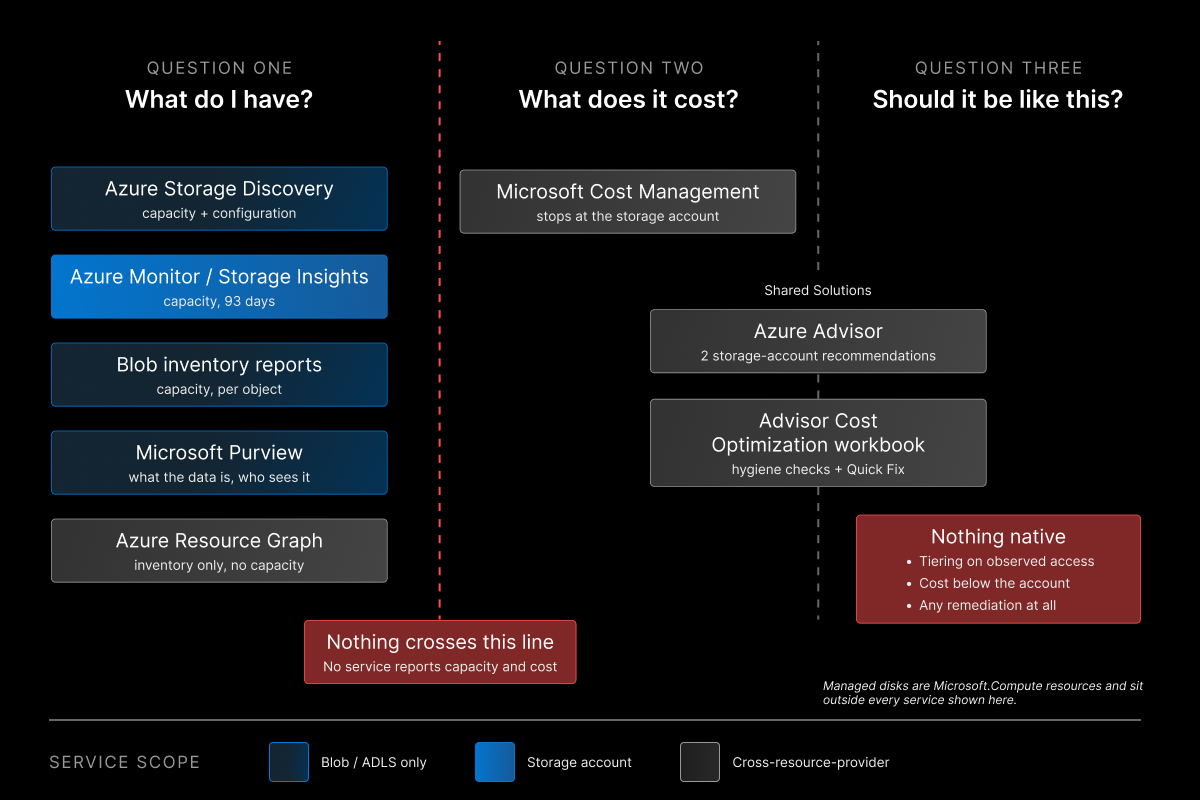
Why Do Capacity and Cost Never Meet in Azure Storage Monitoring?
Capacity and cost never meet in Azure storage monitoring because the services that measure capacity are storage-scoped and the service that measures cost is cross-provider. Reading the matrix carefully surfaces gaps that are not oversights in any individual product. They follow from how the services are scoped, which is why no amount of switching between native tools closes them.
Which Services Know Capacity and Which Know Cost?
The services that report how much data you hold - Azure Storage Discovery, Storage Insights, blob inventory reports - are storage-scoped and report no dollars. The service that reports dollars, Microsoft Cost Management, is cross-provider and reports no capacity.
So the most basic storage-economics question - we hold 400 TB in this account and it costs this much, is that ratio sane - requires exporting from two tools and joining them on resource ID yourself. Nothing in Azure puts capacity and cost on the same screen.
The join is not hard, but it is manual, and it goes stale. Capacity moves daily; Cost Management lands a day or three later; the two exports are on different schedules and different granularities. Any Azure storage monitoring dashboard that shows cost per TB is a spreadsheet someone maintains, not a service Azure provides.
Why Does Cost Attribution Stop at the Storage Account?
Microsoft Cost Management reports per storage account and per meter, and no lower, because Azure meters storage at the account boundary. There is no per-container, per-prefix or per-blob cost view anywhere in Azure.
This matters because a single shared storage account serving eight product teams is one line on the bill. Splitting it means exporting blob inventory, summing Content-Length by prefix, and applying published meter rates by hand. Microsoft's own blob cost documentation concedes the point implicitly: asked for container-level statistics, it redirects readers to blob inventory reports rather than to Cost Management.
The usual workaround - one storage account per team - trades a monitoring problem for an operational one. It multiplies accounts, keys, network rules and lifecycle policies, and it collides with the per-subscription storage account limit. Most enterprises end up with a mix: dedicated accounts for the teams that asked, shared accounts for everyone else, and no attribution for the shared ones.
Why Does Nothing Native Tier Blobs on Observed Access?
No native service observes access patterns across an estate and then acts on them. Azure Blob lifecycle management applies static rules - move to cool after N days since last modification or last access.
Azure Storage Discovery will flag that an account holds infrequently accessed data. Blob inventory reports will give you LastAccessTime per object. But the analysis and the action are always separate, and the action is always a policy written in advance rather than a response to what the data is actually doing.
The gap shows up in practice as a policy that is either too aggressive or too timid. Tier after 30 days and a monthly reporting job pulls 20 TB back out of cool at a retrieval charge. Tier after 180 days and the estate sits in hot for five months longer than it needed to. Neither outcome is visible in any Azure storage monitoring tool until the bill arrives.
Which Azure Storage Monitoring Tool Should You Use for Each Job?
No single Azure storage monitoring tool is sufficient, and the right one depends on which of the three questions you are trying to answer. The table below is the working answer to "which one should we standardize on."
A workable native baseline for most enterprises is three services: Azure Resource Graph for inventory, Microsoft Cost Management for spend, and Azure Storage Discovery for blob capacity trend - joined manually on resource ID. Azure Advisor sits alongside as the Azure storage monitoring recommendation feed, and blob inventory reports underneath as the per-object evidence layer.
That combination answers "what do I have" and "what does it cost" well. It still does not answer "should it be like this."
What Does No Native Azure Storage Monitoring Service Do?
Three capabilities are absent from the entire native Azure storage monitoring set, and it is worth naming them explicitly so that evaluations do not assume otherwise.
- Access-based tiering. Nothing compares what data is actually being read against what tier it sits in and moves it. Lifecycle management applies rules you wrote; it does not learn.
- Cost below the storage account. No per-container, per-prefix or per-blob cost attribution exists. Platform teams who want to charge blob spend back to the team that owns a container have to approximate it from inventory reports and meter rates.
- Remediation. With the narrow exception of Quick Fix in the Advisor Cost Optimization workbook, every service in this guide is read-only. They produce findings; a human or a script closes the loop.
None of these are roadmap gaps that a future release obviously fills. Access-based tiering needs a service that watches data-plane reads across accounts and holds write permission on tiers, which is not how any current Azure storage monitoring surface is built. Sub-account cost needs metering to move below the account boundary, which changes how Azure bills. Remediation needs a service willing to change your resources, which Advisor has so far declined to become beyond Quick Fix.
What Does Manual Azure Storage Monitoring Cost an Enterprise?
Closing the gaps by hand costs an enterprise a recurring engineering cycle plus the spend that stays unattributed while the cycle runs. The table below is the workflow most platform teams end up building, and it is the module to put in front of a CFO when the question is "why not just use the native tools.
That is 11 to 22 engineer-hours per cycle, and the cycle is monthly at best. A platform engineer at a fully loaded rate of your choosing turns that into an annual line item quickly - and the number to put next to it is the share of blob spend sitting in shared accounts, because that share is the portion of the bill nobody owns until the cycle runs.
The opportunity cost is the larger figure. The engineer building this join is a senior platform engineer, because the join needs KQL, Parquet, meter-rate literacy and access to billing exports. Every hour on the spreadsheet is an hour off the roadmap, and the spreadsheet is stale the day after it is finished. The board-deck version is one line: native Azure storage monitoring answers two of the three questions, and the third costs a senior engineer a week a month to approximate.
How Do You Close the Loop From Monitoring to Action?
Most of the gap between "Azure told me" and "the bill went down" is the third question - whether the estate should look the way it does, and acting on the answer. Native Azure storage monitoring services are good at inventory, spend and configuration, and were never designed to close that loop.
That is the gap the tooling category exists to fill, and it is what Lucidity's object storage work addresses: mapping a blob estate down to container and prefix level, classifying data by observed access rather than by a static policy, and flagging accounts whose redundancy or tier no longer matches how the data is used. If you already run Resource Graph, Cost Management and Storage Discovery well, you have a clear picture of your estate - and you still have to decide what to do about it.
If you want the container-level view the matrix above cannot produce, Lucidity's free storage assessment builds it for an Azure estate without an agent, and it costs nothing to see the result.
Frequently Asked Questions
What is the difference between Azure Storage Discovery and Storage Insights?
They solve different Azure storage monitoring problems despite the similar names. Azure Storage Insights is an Azure Monitor workbook for operational Azure storage account monitoring - latency, errors, throttling - with 93-day metric retention and a 200-storage-account display ceiling. Azure Storage Discovery is an estate-wide analytics service with up to 18 months of retention on its Standard plan and no practical account ceiling. Use Storage Insights to investigate an incident this week; use Storage Discovery to see how a whole estate has grown over a year. Part 2 of this series compares them in detail.
Why do Azure storage monitoring services not cover managed disks?
Because managed disks are not storage accounts. Azure Managed Disks are Microsoft.Compute resources, while Azure Storage Discovery, Storage Insights, blob inventory reports and Microsoft Purview are all scoped to Microsoft.Storage or narrower. It is a resource provider boundary, not an oversight. The three cross-provider services - Azure Resource Graph, Microsoft Cost Management and Azure Advisor - will inventory, price and make recommendations about disks, because they are platform services rather than storage services. Disk observability is a separate question with a separate tool set.
Can Microsoft Cost Management show storage cost per container?
No. Microsoft Cost Management reports at resource and meter level, which for blob means per storage account and per meter - not per container, prefix or blob. Microsoft's own guidance points readers to blob inventory reports and custom analysis for container-level statistics. Teams that need container-level chargeback have to approximate it by combining inventory report sizes with published meter rates, as in the workflow above.
Is Microsoft Purview useful for reducing storage costs?
Only indirectly. Microsoft Purview is not an Azure storage monitoring tool in the cost sense; it tells you what data you hold, how it is classified and who can access it. It reports no cost and no capacity. It can inform a retention or deletion decision - knowing that a container holds obsolete personal data is a reason to delete it - but Purview will not quantify the saving, identify the spend, or take the action. Part 4 covers this in full.
Does Azure Storage Discovery cover Azure Files?
No. Azure Storage Discovery covers Azure Blob Storage and Azure Data Lake Storage only; the deployment planning documentation explicitly lists Azure Files as unsupported, along with Queues and Tables. This surprises people, because Files is a storage account service. For Azure Files the native option is Azure Monitor Storage Insights, which covers blob, file, queue and table - the broadest storage-native scope available, at the cost of 93-day retention and a 200-account display ceiling.
Table of Contents
Sign Up