Most application logs are read hard for a week and almost never after 30 days, yet they sit in Hot storage for a year. Picking the right Azure Blob tier for application logs cuts that storage line by roughly two thirds without losing a single record.
Key Takeaways
- Hot for 0 to 30 days, Cool for 30 to 90, Cold to end of retention is the default Azure Blob tier for application logs. On East US list prices it costs about 66% less than keeping 120 TB in Hot.
- Access tiers apply only to block blobs. Azure Monitor diagnostic logs land as append blobs, so lifecycle rules can delete them but never tier them.
- Early deletion fees apply at 30 days (Cool), 90 days (Cold) and 180 days (Archive). Match tier transitions to your retention policy, not the other way round.
- Tier changes bill per blob. Millions of tiny log files can wipe out a month of savings in transition charges, so compact before you tier.
What Is the Right Azure Blob Tier for Application Logs?
The right Azure Blob tier for application logs depends on how often you read them after day 7. For most teams that means Hot for active debugging, Cool for incident lookbacks, and Cold for audit retention.
An access tier is a per-blob pricing class that trades storage cost against access cost. Azure offers four for block blobs: Hot, Cool, Cold and Archive. Hot, Cool and Cold are online and read in milliseconds. Archive is offline and must be rehydrated before any read (Microsoft Learn, access tiers overview).
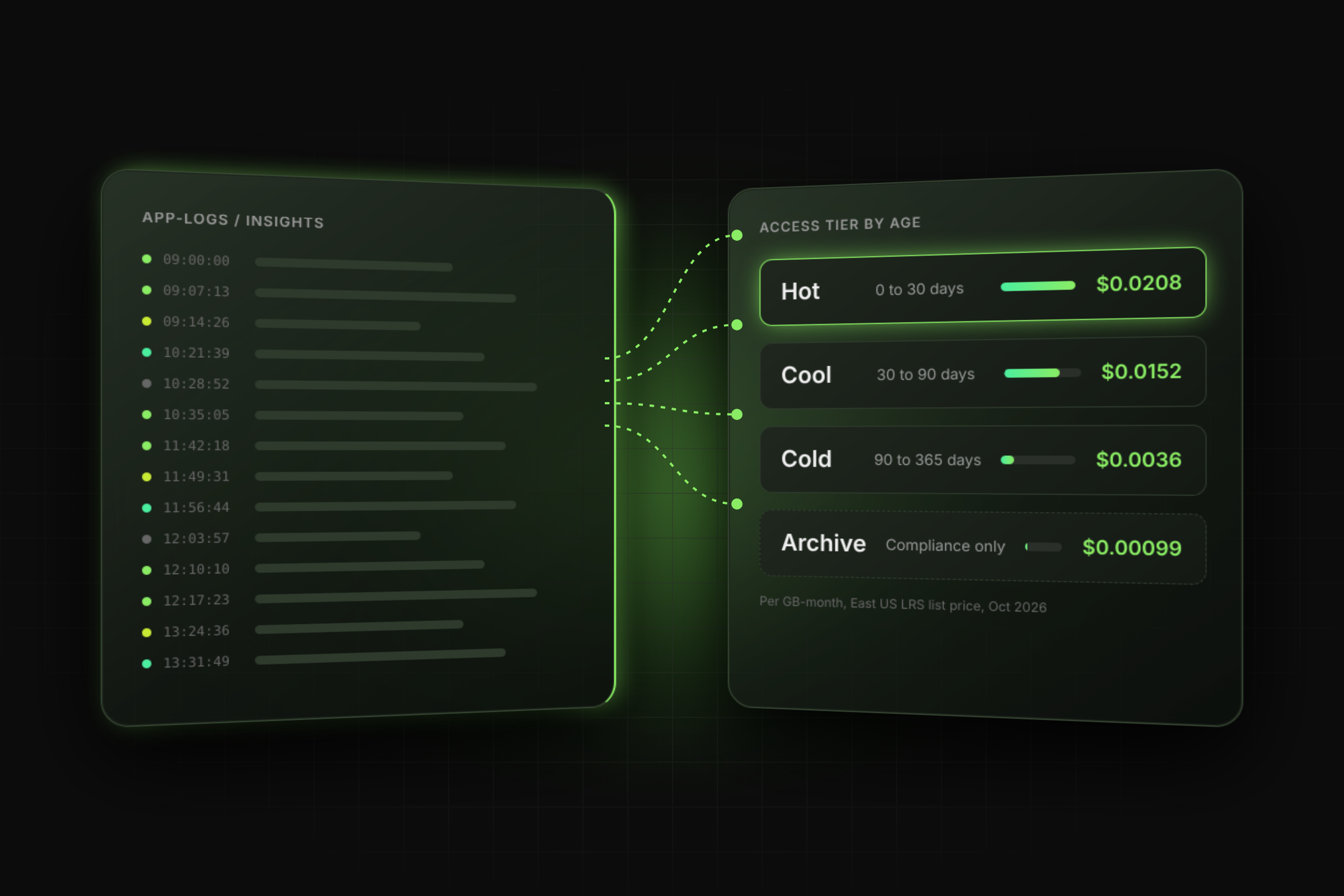
Logs follow a predictable decay curve. On-call engineers query the last 24 to 72 hours. Post-incident reviews reach back two to four weeks. Auditors and security teams ask for months-old records a few times a year. That curve maps cleanly onto the tiers:
- Days 0 to 30: Hot. Frequent reads, frequent writes, no minimum retention.
- Days 30 to 90: Cool. Occasional reads; the 30-day minimum is already met by the time blobs move.
- Day 90 to end of retention: Cold. Rare reads, still online, 90-day minimum.
- Compliance-only copies: Archive, if a 15-hour restore window is acceptable.
The mistake is picking one Azure Blob tier for application logs at the account level and never revisiting it. General-purpose v2 accounts default to Hot, so every log blob stays at the most expensive storage rate until a lifecycle rule moves it.
How Do Azure Blob Access Tiers Compare on Cost and Retention?
Cold storage costs about 83% less per GB than Hot, but writes cost 3.6x more and every GB read is billed. That trade-off is why tier choice follows read frequency, not data age alone.
Example prices: East US, LRS, General Block Blob v2, first 50 TB, from the Azure Retail Prices API on 9 October 2026. Check your region on the Azure Blob Storage pricing page before you model.
An early deletion fee is a prorated charge for removing, overwriting or re-tiering a blob before its minimum retention ends. A Cool blob deleted on day 21 is billed for the remaining 9 days (Microsoft Learn).
Past day 90, Cold is the best Azure Blob tier for application logs. It is online, so a SOC analyst runs the same query against a 200-day-old blob as a 2-day-old one. Archive saves another $0.0026 per GB-month but needs rehydration: standard priority can take up to 15 hours for objects under 10 GB, and high priority targets under one hour at $0.10 per GB retrieved (Microsoft Learn, rehydration overview).
Why Can't Lifecycle Rules Tier Your Azure Monitor Diagnostic Logs?
Because append blob tiering is not supported. Microsoft states that tiering is allowed only on block blobs, not on append or page blobs (Microsoft Learn, lifecycle management overview).
An append blob is a blob optimised for append-only writes, built for logging. That is exactly why Azure Monitor uses it. Microsoft's own sample lifecycle policy for the insights-activity-logs container filters on "blobTypes": ["appendBlob"] and only deletes (Microsoft Learn, migrate to lifecycle policy).
This catches teams in production. They write a tierToCool rule, wait 24 hours for the first run, and see no change on the bill. The rule ran; it simply had nothing it was allowed to move.
The retention gap widened on 30 September 2025, when Microsoft disabled diagnostic settings storage retention. Any retention value left on a diagnostic setting now does nothing, so logs grow until a lifecycle delete rule exists.
Your options for diagnostic logs:
- Set a lifecycle delete rule on appendBlob matching your compliance window. This is the only native control.
- Rewrite aged logs as block blobs in a separate container (for example, an AzCopy job with --blob-type BlockBlob), then tier that container. The rewrite adds write transactions and temporary double capacity until the source blobs are deleted.
- Send the category to a Log Analytics workspace instead and use its long-term retention, if your queries live there anyway.
Application logs your own code writes through the SDK with Put Blob or Put Block List are block blobs and tier normally. Check with az storage blob list --query "[].properties.blobType" before you design the policy.
What Azure Blob Lifecycle Management Policy Fits Log Containers?
A three-step policy keyed on last-modified time sets the Azure Blob tier for application logs automatically: Cool at 30 days, Cold at 90, delete at your retention limit. Log blobs are written once and never modified, so modification time is a reliable age signal.
An Azure Blob lifecycle management policy is a JSON rule set that tiers or deletes blobs on a schedule based on creation, modification or last-access time.
Three operational limits to plan around (Microsoft Learn):
- New or edited rules can take up to 24 hours before the first run.
- Filters cannot exclude blobs. Use a separate prefix or blob index tag for logs under legal hold.
- Each rule accepts up to 10 case-sensitive prefixes. Partition by service, not by date.
Leave at least 90 days between the Cold step and the delete step. Moving to Cold at day 45 and deleting at day 120 means every blob leaves Cold after 75 days and pays a 15-day early deletion fee.
Should You Use Azure Smart Tier Instead of Lifecycle Rules?
Use Azure smart tier when read patterns are unpredictable; use lifecycle rules when retention is fixed by policy. Most log estates have fixed retention, so lifecycle rules usually set the Azure Blob tier for application logs more predictably.
Azure smart tier is an account-level setting that moves block blobs between Hot, Cool and Cold based on access. New data starts in Hot, moves to Cool after 30 days without access, and to Cold after 90 days total. Any read returns it to Hot (Microsoft Learn, smart tier).
Two log-specific catches. First, many log writers emit small files, and anything under 128 KiB never leaves Hot under smart tier. Second, one ad hoc grep across a year of logs pulls every touched blob back to Hot and restarts its 30-day clock.
Smart tier fits shared buckets where some logs feed dashboards and others are never read. For a container with a written retention policy, a deterministic lifecycle rule is easier to audit.
When Is Archive the Right Tier for Compliance Logs?
Archive is the right Azure Blob tier for application logs only when they are kept to satisfy a regulator, not to answer engineers. If anyone might need the data during an incident, keep it in Cold.
The cold tier vs archive tier decision comes down to restore time. Archive saves $0.0026 per GB-month over Cold, or about $240 a month on 90 TB. In exchange, every read needs rehydration that can take up to 15 hours at standard priority (Microsoft Learn).
Archive also brings constraints that matter for log pipelines:
- 180-day minimum retention. Logs archived at day 90 and deleted at day 365 clear it; logs deleted at day 200 do not.
- No ZRS, GZRS or RA-GZRS. Archive works only on LRS, GRS and RA-GRS accounts.
- Lifecycle rules cannot rehydrate. Restores are a manual or scripted Set Blob Tier or Copy Blob call.
- Read operations cost $5.00 per 10K at standard priority and $50.00 per 10K at high priority.
Practitioner pattern: keep 90 days of logs online in Hot and Cool for incident response, then archive only the categories your auditors name, such as sign-in and access logs. Delete the rest at day 90.
What Does the Right Azure Blob Tier for Application Logs Save?
A tiered policy cuts steady-state log storage cost by about 66%: $856 a month instead of $2,496 for 120 TB. That is roughly $19,700 a year from one JSON policy.
Model: an estate writes 10 TB of block-blob application logs a month and keeps them 12 months, so 120 TB sits in storage at steady state. Prices are the East US LRS list rates in the comparison table above.
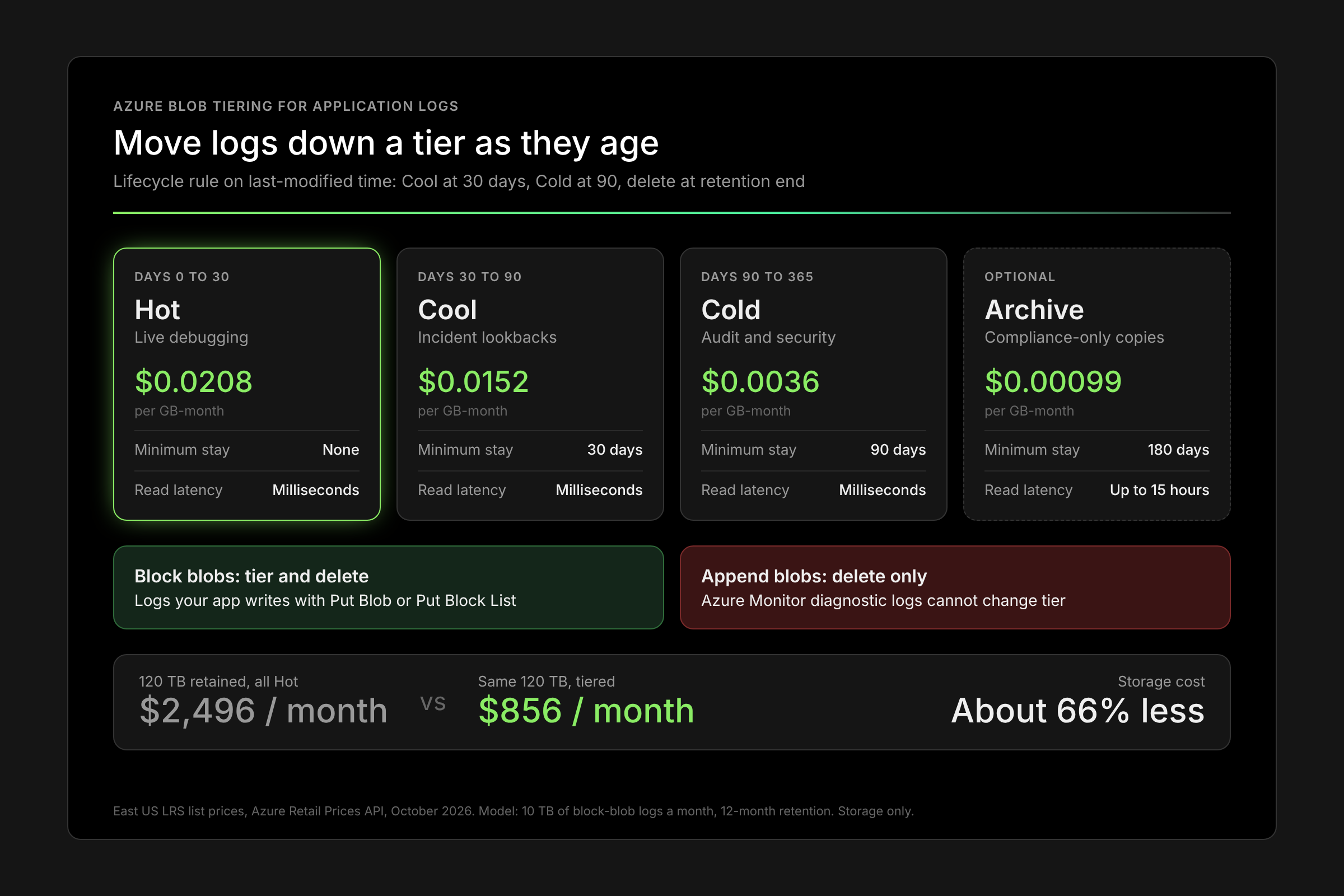
All Hot uses the tiered Hot rate: $0.0208 per GB for the first 50 TB and $0.019968 above it.
The hidden variable is blob count, because tier changes bill as write operations per blob:
- 10 TB a month in 100 MB blobs is about 105,000 blobs. Moving them to Cool and then Cold costs about $3 per monthly batch.
- 10 TB a month in 64 KB blobs is about 168 million blobs. The same two moves cost about $4,700 per monthly batch of 168M new blobs, more than the savings.
For the CFO slide: tiering is worth about $1,640 a month per 120 TB retained, provided log files are batched to at least a few MB before they age out of Hot.
Existing cloud tools miss 2x deeper optimisation. Lucidity's Object Storage Suite maps Azure Blob spend down to container and prefix and tiers it with lifecycle policies, alongside disk right-sizing. Switch on Free Insights to see where your Azure storage spend sits.
Frequently Asked Questions
Can I change the default tier of a storage account to Cool for logs?
Yes, but only if logs are rarely read in their first month. The account default can be Hot, Cool or Cold, never Archive. Cool writes cost twice Hot writes ($0.10 vs $0.05 per 10K), so write-heavy log ingestion is usually cheaper landing in Hot.
Does moving a log blob to a cooler tier rewrite the data?
No. A tier change is a metadata operation billed as a write to the destination tier. Rewriting the blob itself with Put Blob or Copy Blob inside the minimum period triggers an early deletion fee.
What happens to logs under soft delete or immutability?
Soft-deleted blobs avoid early deletion fees until their soft-delete window expires. Lifecycle delete actions do not apply to blobs in immutable containers or to soft-deleted blobs, so time-based retention locks outrank your lifecycle policy.
How do I find which log containers are worth tiering first?
Sort containers by capacity and blob count together before you set any Azure Blob tier for application logs. Large containers with large blobs give the fastest win. Large containers with millions of small blobs need compaction first, or transition charges erase the savings.
Does Azure bill me to track last-access time?
Yes. Each last-access update is billed as an other transaction, at most once per object every 24 hours. For write-once logs, modification time gives the same signal at no extra cost.
Table of Contents
Sign Up